On-page SEO is basically the part of SEO you control directly on your own website.
It covers the way your pages are written, structured, linked together, and presented so both Google and real people can understand them properly without having to work things out themselves.
Unlike off-page SEO, which relies on backlinks and external authority signals, on-page SEO happens entirely on your own site.
That includes things like headings, internal links, metadata, image optimisation, page layouts, and how easy the content actually is to read.
When those elements are handled well, pages become easier to scan, easier to trust, and much clearer for search engines to understand.
Summary: On-Page SEO For Beginners
Good on-page SEO usually comes down to a few practical fundamentals:
- Use a clear heading structure so readers and search engines can follow the page naturally
- Write short, readable paragraphs that are easy to scan on mobile and desktop
- Add internal links that genuinely help people find the next useful page
- Keep title tags and meta descriptions accurate and relevant to the search intent
- Use descriptive alt text and tidy URL slugs to improve clarity and accessibility
- Add schema markup that matches the page type where it genuinely makes sense
- Make sure the page delivers what the search snippet promises from the very first screen
- Focus on usability first, because better user experience often supports stronger SEO performance naturally
The pages that usually perform best are not necessarily the most advanced.
Most of the time, they are simply clear, organised properly, and genuinely easy to use.
What Is On-Page SEO?
The anatomy of a webpage. Source: lewismediagroup.net
On-page SEO covers all the elements you can optimise directly on your own website. These signals help search engines understand what a page is about, how it should be categorised, and how useful it may be for somebody searching.
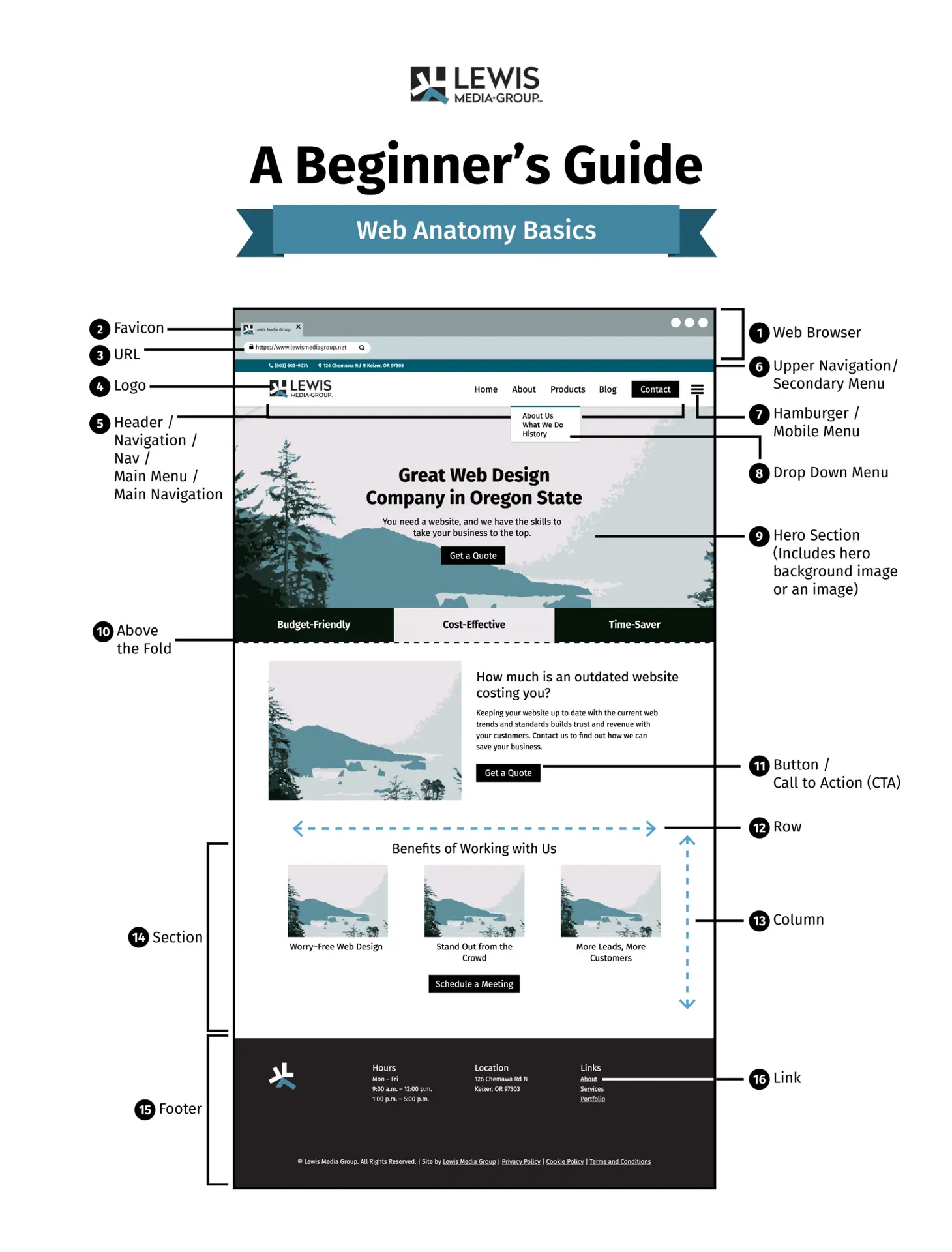
That includes the written content itself, but also the page structure, metadata, headings, images, links, and overall layout.
A lot of beginners think on-page SEO mostly means adding keywords into pages.
That matters to a point, but honestly, clarity is usually the bigger issue.
Most websites are not struggling because they forgot one keyword variation. They struggle because the pages feel messy, confusing, or difficult to navigate.
Can somebody land on the page and quickly understand:
- what the page is about
- where they are
- what to do next
- where to find supporting information
That is usually the point where things start falling apart.
Good on-page SEO makes the experience smoother.
People can scan the page properly, find the information faster, and move naturally through the site without feeling lost.
Top Tip
“The strongest pages are normally the clearest ones. If the core message is obvious and the page is easy to navigate, optimisation becomes much easier afterwards.”
Headings Matter More Than Most People Realise
Headings do much more than break up text visually. They help search engines understand the structure of your page and help visitors scan the content quickly.
Most people don’t read webpages line by line. They jump between headings looking for the part that answers their question. A messy heading structure makes that process harder.
A clean hierarchy keeps things organised.
- Use one H1 per page for the main topic
- Use H2s for major sections
- Use H3s and H4s to organise supporting points underneath
Try not to skip heading levels unnecessarily. Jumping from an H2 straight to an H4 can make the structure feel disjointed for both readers and search engines.
If you are doing SEO yourself, it is also worth learning how title tags and meta descriptions connect with heading structure because the two often work together.
Example
For a local SEO service page, the structure could look something like this:
H1: Local SEO Services for Small Businesses
H2: What Is Local SEO?
H2: How Local SEO Helps You Get Found
H3: Google Business Profile Setup
H3: Local Citations and Reviews
H2: Our Approach to Local SEO
And honestly, that structure works because it feels obvious.
People should not need to think too hard about where information sits on a page.
The clearer the structure becomes, the easier the page usually is to read.
Internal Linking Should Feel Helpful, Not Forced
Internal links connect related pages across your website. They help visitors continue exploring relevant topics while also helping search engines understand how your site is organised.
A good internal link normally answers one simple question:
“What would somebody naturally want to read next?”
If the link helps answer that question, it probably belongs there.
If the link only exists because somebody wanted to squeeze in another internal link for SEO reasons, it usually feels forced.
Example 1
Inside a beginner SEO guide, you could link naturally to pages covering:
- keyword research
- content writing
- technical SEO basics
- site structure
Example 2
On an e-commerce product page, you could link to:
- delivery information
- comparison guides
- setup tutorials
- returns policies
- supporting FAQs
Anchor text matters here too.
Avoid vague phrases like “click here” where possible. Descriptive wording gives more context and feels more useful.
For example:
- read our keyword research guide
- compare our pricing plans
- learn how local SEO works
Small details like this improve navigation quietly in the background.
Top Tip
“Topic clusters work well because they mirror how people naturally explore information. A broad pillar page introduces the subject, while supporting articles answer more specific questions in greater depth.”
Page Structure Has A Bigger Impact Than People Think
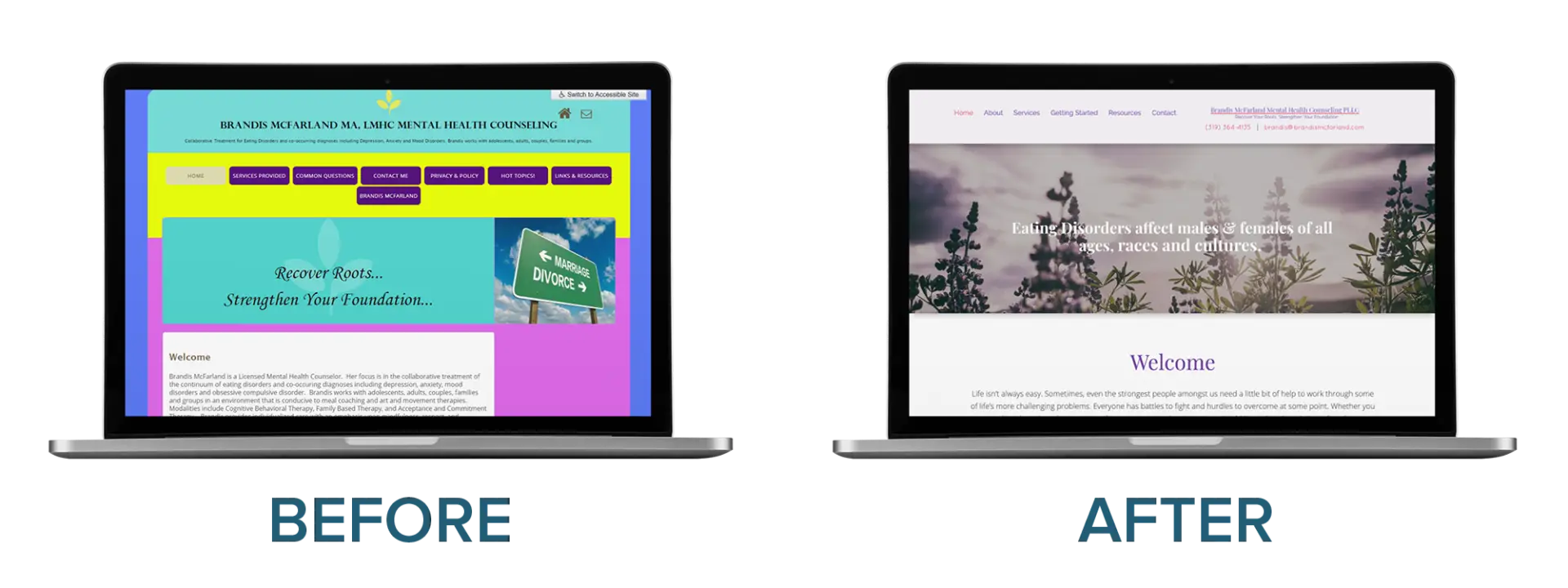
Even good information becomes difficult to use if the layout feels cluttered.
Most visitors scan webpages quickly. Especially on mobile.
Long blocks of text, inconsistent spacing, and poor visual hierarchy make people leave faster than most site owners realise.
That does not mean every paragraph needs to be tiny. Actually, overly fragmented writing can become exhausting too.
The goal is balance.
To keep pages readable:
- break long sections into manageable paragraphs
- use subheadings naturally throughout the page
- use bullet points where they genuinely improve clarity
- highlight key ideas sparingly
- avoid cramming too much information into one section
Too much bold text can become just as difficult to scan as no emphasis at all.
Example
If you are explaining how to set up Google Search Console, separate the instructions into clear stages.
One section could explain sitemap submission.
Another could explain URL inspection.
Another could explain indexing requests.
That structure makes the page easier to follow without forcing people to search through huge walls of text.
Cluttered vs. Non-Cluttered Web Page Redesign. Source: brightervision.com
A lot of on-page SEO improvements are really just usability improvements dressed up as SEO work.
Schema Markup Explained Simply
Schema markup gives search engines extra structured information about a page.
The easiest way to think about schema is as extra context for search engines.
It helps Google understand the type of content sitting on the page with more certainty.
When implemented correctly, schema can sometimes improve how your listing appears in search results. That may include review stars, FAQs, breadcrumbs, pricing information, or publication details.
It does not guarantee rich results though, and that part gets misunderstood all the time.
The easiest way to approach schema is to match it naturally to the page type.
- Blog posts often use Article schema
- Service pages may use LocalBusiness or Service schema
- E-commerce pages commonly use Product schema
- Question-based pages can use FAQPage schema
Most website owners do not need to manually build schema from scratch anymore. Plugins like Rank Math and Yoast handle much of the process on WordPress.
Still, it helps to understand what the markup is actually doing.
For more information I would recommend SEMRUSH’s Schema Markup Blog
Article Schema
Article schema is commonly used on blog posts, guides, and editorial content.
It can help search engines display information such as:
- author name
- publication date
- article type
For example, a guide about SEO tools may show the author and publish date directly inside the search result.
Small details like that quietly build trust.
Example
Imagine somebody searching for SEO advice.
If one result clearly shows the guide was updated recently while another looks outdated, most people will naturally lean toward the fresher result.
That’s part of why structured data matters.
Product Schema
Product schema is widely used across e-commerce websites.
It helps search engines understand:
- pricing
- stock status
- reviews
- product details
Example
A page selling hiking boots could show:
- current pricing
- availability
- review ratings
directly inside search results.
That makes comparison easier before somebody even clicks.
Local Business Schema
This schema type is particularly useful for local businesses.
It reinforces important business information like:
- address
- phone number
- opening hours
- business category
Example
A physiotherapy clinic could include its daily opening hours and full contact details inside the schema markup.
That helps search engines display more accurate local information.
FAQ Schema
FAQ schema works best when the page genuinely contains useful questions and answers.
When Google chooses to display it, users may see expandable questions directly in search results.
Example
A legal services page answering common pricing or turnaround questions may appear with those previews visible in search.
That can help users find answers faster.
Only mark up content that already exists visibly on the page.
Trying to force FAQ schema onto thin or low-value content rarely works well long term.
Breadcrumb Schema
Breadcrumb schema helps search engines understand where the page sits within your website structure.
It also makes listings look cleaner.
Example
A pet store might display:
Home > Products > Dog > Dog Collars
inside the search result.
It looks tidier and gives people extra context before clicking.
If you run a local business, LocalBusiness schema is usually one of the most useful starting points because it strengthens location signals naturally.
The Small SEO Elements People Forget About
Some on-page SEO elements sit quietly in the background.
People rarely notice them directly, but they still influence how your pages perform.
Most of them only take a few minutes to review.
Title Tags
A title tag should clearly describe the page while staying concise.
Including the main keyword naturally helps establish relevance.
Adding your brand name can also improve consistency across search listings.
Meta Descriptions
Meta descriptions give people a short summary of the page before they click.
Good descriptions are usually:
- clear
- specific
- relevant to the search intent
- naturally written
Overwritten, sales-heavy descriptions tend to feel spammy quickly.
Image Alt Text
Alt text mainly exists for accessibility.
It also helps search engines understand image context.
A simple description normally works best.
There is no need to stuff keywords awkwardly into every image.
Canonical Tags
Canonical tags help search engines understand which version of a page should be indexed.
This becomes useful on websites with:
- category filters
- duplicate product pages
- similar service pages
- tracking URLs
Without canonical tags, duplicate pages can become messy faster than most people expect.
URL Slugs
Clean URLs are easier for users to understand and easier for search engines to process.
Short, descriptive slugs usually work best.
For example:
example.com/on-page-seo-for-beginners
is much clearer than:
example.com/page?id=7492&seo=article
Small details matter more than people expect.
Search Intent Changes Everything
One of the biggest on-page SEO mistakes is building pages that do not actually match what the searcher expected to find.
Search intent matters constantly.
If somebody searches:
“how to set up Google Search Console”
They expect:
- steps
- screenshots
- instructions
- clarity
If somebody searches:
“SEO consultant in Leeds”
They probably expect:
- services
- experience
- proof
- pricing signals
- contact information
Those are completely different expectations.
This is why your title tag, meta description, and opening section need to align properly.
A simple way to check alignment is to compare:
- what the search query suggests
- what your search snippet promises
- what the first screen of the page delivers
When those three things line up clearly, engagement usually improves naturally.
Honestly, this part gets overlooked constantly.
A lot of site owners spend hours tweaking keywords while barely looking at the actual page experience.
How This All Ties Together
Clear headings, focused paragraphs, and logical internal links make websites easier to use and easier to trust.
Good structure helps both readers and search engines understand the purpose of the page without unnecessary confusion.
When people can quickly find what they need, they tend to stay longer, explore more pages, and interact more naturally with the site.
That behaviour often supports stronger SEO performance over time because it signals usefulness and clarity.
Most of the meaningful improvements are not especially complicated.
Usually, they come from simple changes:
- clearer headings
- stronger internal links
- more accurate snippets
- cleaner layouts
- pages that answer questions directly without forcing people to hunt for information
That is really what good on-page SEO comes back to.
Not tricks.
Just making pages easier for real people to use.