Choosing an SEO tool can feel far more complicated than you expect. There are dashboards that promise full automation, suites built around endless charts, and software that takes so long to understand that you forget what you were trying to fix in the first place. Most business owners do not want another layer of noise. They want something simple, accurate, and grounded in how websites actually work.
For me, that tool has always been Screaming Frog. I open it before every technical SEO audit because it gives me a clear view of what search engines see. The spider behaves like a crawler, records what it finds without distortion, and reveals small details that often shape the bigger picture. Many tools smooth over those details with scores or traffic charts. Screaming Frog shows the truth, which is exactly what you need when you want to improve performance rather than just measure it.
Summary
Screaming Frog is the tool I use when I want a clear view of what search engines can actually crawl and understand. One crawl can surface the issues that quietly hold sites back, like broken links, redirect chains, duplicate titles and descriptions, pages blocked from indexing, thin content, and weak internal linking. It turns a messy site into a short list of fixes you can work through in a sensible order.
In this post, the focus is on keeping the crawl useful, not overwhelming. You’ll learn which tabs to check first, which settings help you avoid noise, and how to spot the structural and technical problems that tend to cause the biggest drag. The aim is steady improvement, better crawling, clearer signals, and a site that is easier for people and search engines to move through.
Why Screaming Frog Helps You Understand Your Website
One of the main strengths of Screaming Frog SEO is the perspective it gives you. It removes the guesswork by showing your website through the eyes of a crawler. When you run a Screaming Frog analysis, you see the paths search engines follow, the pages they struggle to reach, and the issues they encounter along the way. This view is far more valuable than any traffic chart because it reveals how indexing and structure influence everything else.
Because the tool runs on your computer, it captures your site as it actually is, without smoothing things over with scores or sampling. If you’re crawling a larger website, you can switch to database storage and adjust memory settings so the crawl stays stable.
Checkout the full guide of how to crawl large websites. You are not limited by sampling, scoring systems, or dashboards that hide technical detail behind shapes and colours. Instead, you see your link structure, your meta data, your headings, and your responses in plain form. This honesty makes every improvement clearer and easier to justify.
Another advantage is how well the tool adapts to different skill levels. You can run a simple scan for a small business site or explore advanced filters during a full technical review. You do not need to learn the entire tool to start using it. Screaming Frog meets you where you are and grows with you as your confidence develops.
Top Tip
“For many small websites, the free version is enough to begin improving structure, content, and technical clarity.”
What the Screaming Frog Spider Actually Does
Although many people see Screaming Frog as a website crawl tool, the spider works across several layers of your site. It collects information, highlights problems, and helps you understand what needs attention.
Screaming Frog acts as both an SEO spider tool and a content optimisation tool. It collects information about each page and presents it in a way that reveals patterns and opportunities.
Once installed, the Screaming Frog spider crawls your site and flags common issues such as:
- broken internal links and 404s
- missing, duplicated, or overlong page titles
- meta description gaps and duplicates
- redirect chains and loops
- pages that aren’t indexable (and the exact reason why)
- thin pages and near-duplicate URLs
- missing image alt text
- orphan pages that have no internal links pointing to them
- slow or unresponsive URLs
This is the core of a technical audit: you stop guessing and start fixing what’s actually in the way.
These insights form the foundation of a strong technical SEO audit. They help you understand what your site looks like behind the scenes, which is often very different from what visitors see.
Top Tip
“Always run a crawl before making changes. It gives you a clear starting point for every improvement.”
Before You Crawl: 3 Settings That Save You Time
A clean crawl depends on a clean setup. Before you hit Start, check three things:
1) Decide what you’re crawling
Use “Spider” mode for a full website crawl. Use “List” mode if you’re auditing a set of URLs from a spreadsheet.
2) Crawl the version you actually want indexed
Pick either the www or non-www version and stick with it. Same for trailing slashes. Mixing versions can make duplicates look worse than they are.
3) Make sure you’re not crawling noise
If your site generates endless parameters (filters, search URLs, tracking tags), set limits or exclusions so the crawl stays focused on real pages you care about.
This keeps the output useful instead of overwhelming.
What You Learn Once the Spider Starts Crawling
The fastest way to get value from Screaming Frog is to focus on a few reports first. Start with your URL structure (what’s being crawled), then errors (what’s broken), then metadata (what’s unclear), then indexability (what Google may ignore). That sequence turns a crawl into a fix list instead of a data dump.
During the crawl, the tool also works as a broken link checker. If a link leads to a dead page, Screaming Frog flags it and shows the exact pages where the link appears. These issues often seem small, but they disrupt user flow and can affect how search engines interpret your site. Fixing them early keeps the foundation strong.
As the crawl continues, Screaming Frog begins its meta data review. Missing titles, weak descriptions, and duplicated tags become easy to spot. These elements help search engines understand your content and shape the way your pages appear in search results. Tidying them improves both clarity and click through rates.
The spider also detects repeated text across your site. If several pages share similar content, the duplicate content checker will highlight these patterns. Cleaning them up gives each page a distinct identity and improves relevance signals.
Content refinement is another area where the tool helps. Screaming Frog identifies images without alt text, headings that need adjustment, and structural issues that affect readability. These improvements benefit both users and search engines by creating a clearer experience.
Once your structure looks healthy, you can use the XML sitemap generator to create a clean sitemap. It won’t force pages to rank, but it does help crawlers discover your important URLs faster, especially after a rebuild or a large content change. This helps search engines index your content more effectively and supports better long term visibility.
How a Screaming Frog SEO Audit Can Strengthen Your Website
What makes Screaming Frog SEO so helpful is how easily it adapts to real sites. You can complete a detailed Screaming Frog website crawl on a small business site and still gain enough insight to fix structure, update meta data, refine content, and improve indexing. Even the free version suits many small websites because the 500 URL limit covers a surprising amount.
Understanding How Your Structure Works
Most websites grow naturally over time. A blog is added, a service page expands, and older content gets pushed aside. This often leads to a structure that no longer matches your goals. A Screaming Frog SEO audit gives you a clear picture of this structure so you can decide what needs attention.
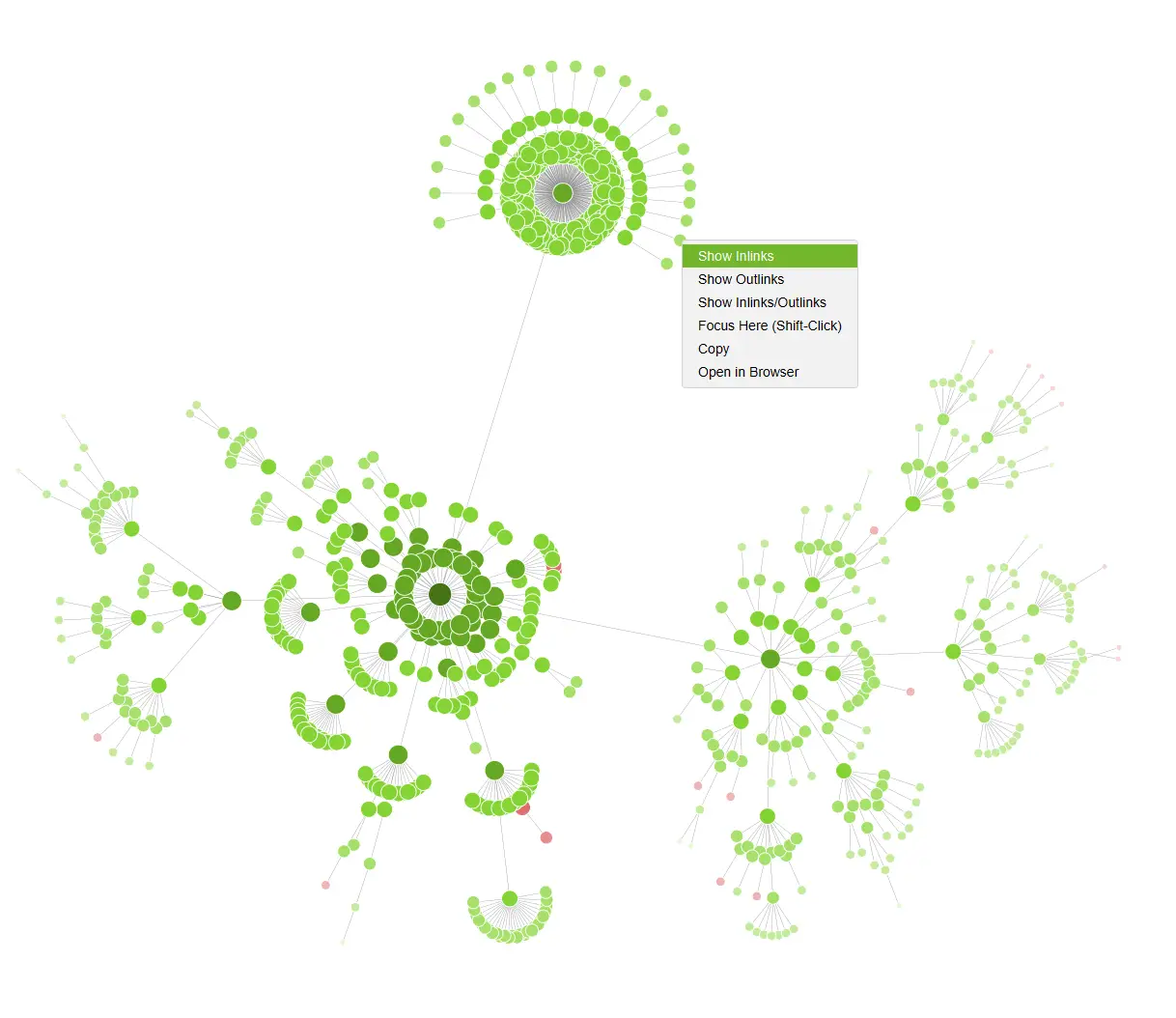
The crawl shows which pages lack internal support, which sit too far from your homepage, and which have become isolated. Understanding these patterns helps you plan an internal linking audit that improves both user flow and crawler access.
When your structure is clean, search engines have a much easier time indexing your content.
Spotting Technical Issues Before They Grow
Technical problems rarely appear on the surface. They sit in redirects, blocked pages, slow responses, and broken links. Screaming Frog helps you find them quickly.
A single scan can highlight:
- pages returning errors
- links leading nowhere
- confusing URL patterns
- repeated content
- inconsistent meta data
These may seem small on their own, but together they shape how search engines understand your site. Fixing them early keeps your foundations strong and prevents deeper issues from forming.
Improving the Quality and Clarity of Your Content
Good content depends on more than writing. It depends on structure, accessibility, and consistency. Screaming Frog supports this by revealing missing alt text, unclear headings, and duplicated sections that make pages harder to understand.
Once you know where these issues sit, improving them becomes a simple part of your workflow. Each fix helps your content read more clearly and ensures that search engines can interpret your pages with confidence.
Learning From Competitors Without Guessing
Competitor website analysis is one of the most useful but overlooked features of Screaming Frog. When you crawl a competitor site, you see the patterns that support their performance. You can understand how they group topics, how often their key pages are linked, and where they invest more depth.
This gives you ideas you can adapt rather than copy. You may notice a topic you have not covered, or realise a section of your site lacks supporting pages. A single crawl often sparks practical improvements you can act on straight away.
Supporting Sustainable Link Building
Although Screaming Frog is not a full outreach tool, it helps you understand which competitor pages attract attention. When you know what earns links for others, you can create your own helpful resources and prepare outreach based on real interest rather than guesswork.
A Personal Note
If you choose only one technical SEO tool to learn this year, make it this one. Screaming Frog has helped me across site launches, audits, rewrites, and rescue projects. It has saved hours of manual checking and brought clarity to websites that looked overwhelming at first glance. It is simple software that does its job well, and that is why it has stayed in my toolkit.
You do not need to understand every feature to begin. Even a basic crawl gives you enough insight to improve your site, and you’ll naturally pick up advanced uses as you run it regularly.
Top Tip
“Pair Screaming Frog with Search Console. One shows structure, the other shows performance, and together they help shape better decisions.”
Your First Screaming Frog Crawl: What To Check In 20 Minutes
If you do nothing else, check these in order:
- Response codes: fix 404s and broken internal links
- Indexability: find pages blocked by noindex, canonicals, or robots rules
- Page titles: remove duplicates and tighten vague titles
- Meta descriptions: fill gaps on key pages and avoid repeats
- H1s: check for missing or duplicated headings on important pages
- Internal links: identify pages that have very few links pointing to them
- Orphan pages: make sure valuable pages aren’t isolated
This single pass is enough to improve most small business sites.
Frequently Asked Questions About Screaming Frog
How long does a Screaming Frog website crawl take?
The time depends on your server and the size of your site. Smaller sites often finish within minutes, while larger sites take longer. The tool manages both without difficulty.
Why is Screaming Frog useful for technical audits?
It gives a clear picture of issues that influence indexing and performance. This includes broken links, duplicated content, blocked pages, and inconsistent metadata. Once you see these clearly, fixing them becomes easier.
Does Screaming Frog replace manual review?
It highlights technical problems and structural gaps, but human judgement is still needed for tone, layout, and design decisions. The tool guides you rather than replacing you.
How often should I run a crawl?
A monthly crawl suits most businesses. Websites with frequent updates may run weekly checks for a cleaner structure.
Is Screaming Frog difficult for beginners?
The tool is straightforward. I started with a simple crawl myself and found the rest of the features naturally as I went.
The Bottom Line
Screaming Frog is one of the most practical tools you can bring into your SEO routine. It shows your site as a crawler sees it and gives you the insight needed to improve structure, content, and technical clarity. Used regularly, it supports stronger visibility and a smoother experience for your visitors. If you want, run a crawl and pull out your top five issues. Fixing just those tends to create a noticeable lift in crawlability, clarity, and overall site hygiene.
If you are ready to improve your visibility and attract more local customers, get in touch to build a tailored SEO strategy for your business.