
Technical SEO Explained Without the Jargon
Technical SEO is the part of SEO that keeps your website accessible, understandable, and stable for search engines. It is the groundwork. Not the flashy part people like talking about, and definitely not the bit that gets immediate praise, but it quietly affects almost everything else.
A simple way to think about it is this. You can have a brilliant shop window, great products, and friendly staff, but if the front door sticks or the lights keep cutting out, people start leaving before they even get inside. Websites work in a similar way.
Search engines need to crawl your pages, understand how they connect together, and store them properly in their index. If they keep running into broken links, slow pages, confusing redirects, or blocked content, they waste time. Sometimes they stop before they even reach the pages you actually care about.
The good news is you do not need to become a developer to manage technical SEO properly. Most business owners just need a solid understanding of what healthy websites look like, what tends to go wrong, and how to spot issues before they become bigger problems.
Once you understand the basics, technical SEO stops feeling intimidating. It becomes regular maintenance rather than a stressful clean-up job every six months.
Summary
- Technical SEO helps search engines crawl, understand, and index your website properly.
- Small technical problems can quietly damage rankings, visibility, and conversions over time.
- Common issues include broken links, redirect chains, duplicate URLs, slow loading pages, and weak mobile usability.
- Search Console and crawl tools help you spot problems before they spread.
- Site structure, internal linking, and page speed all play a bigger role than most businesses realise.
- Mobile usability now matters just as much as desktop, sometimes more.
- Technical SEO is less about chasing perfect scores and more about keeping your website reliable, clear, and easy to use.
- A simple monthly routine usually prevents most long-term technical issues.
What Is Technical SEO?
Technical SEO focuses on how your website works behind the scenes. It covers things like crawlability, indexing, page speed, mobile usability, security, redirects, internal linking, and site structure.
It sits separately from things like keyword research or content writing, but it supports both of them.
There is no point publishing excellent content if search engines struggle to access it properly. The same goes for backlinks. If your website is slow, unstable, or confusing technically, those efforts become far less effective.
This is also where a lot of frustrating ranking issues come from.
A page can be genuinely useful, well written, and perfectly relevant to the search term, yet still struggle because Google cannot crawl it reliably, or because another duplicate version exists somewhere else on the site. Sometimes pages simply sit too deep in the structure and barely receive any internal authority.
That is why technical SEO matters more than people think.
It is not about obsessing over tiny developer details. It is about removing friction.
Why Technical SEO Matters
Technical SEO matters because search engines need clear access to your pages.
That sounds obvious, but plenty of sites quietly get this wrong.
If Google cannot crawl pages properly, they will struggle to compete in search regardless of how good the content is. At the same time, visitors expect websites to feel quick, stable, and trustworthy. If a page loads slowly, jumps around while reading, or breaks on mobile, people leave.
And honestly, most people do not give websites much patience anymore.
That trust gap becomes even more important for local businesses. Somebody looking for a plumber, solicitor, accountant, or cleaning company usually decides quickly if a site feels reliable.
Small technical issues also have a habit of growing quietly.
A messy redirect setup turns into duplicate pages. A plugin-heavy website becomes painfully slow. An accidental noindex tag removes important pages from search.
Most of the time, nobody notices until rankings or enquiries start dropping.
The aim of technical SEO is not perfection. It is consistency.
You want a website that loads properly, feels easy to use, and gives search engines a clear picture of your content.
Technical SEO Essentials: Crawlability, Indexing, and the Foundations
Before you start worrying about schema markup or performance scores, get the basics right first.
A sensible order for technical SEO usually looks like this:
- Make sure important pages can be crawled.
- Make sure they can be indexed.
- Fix duplicates and redirects.
- Improve structure and internal linking.
- Then work on speed and enhancements.
People often jump straight into speed tools while major indexing problems still exist. That usually wastes time.
Crawling vs indexing, without the jargon
Crawling is when search engines discover and visit your pages.
Indexing is when they decide to store those pages in their database and potentially show them in search results.
Those are two separate things.
A page can be crawled but never indexed. A page can also be indexed but perform badly because Google thinks another page is stronger or more relevant.
That is why visibility tools matter.
You need a way to see what search engines are actually doing with your site instead of guessing.
Google Search Console is still the best starting point
Google Search Console is one of the most useful free SEO tools available.
It shows:
- indexing issues
- excluded pages
- performance data
- Core Web Vitals
- security problems
- manual actions
- crawl issues
More importantly, it gives you direct feedback from Google about how your website is being processed.
If you only use one technical SEO tool consistently, make it Search Console.
Top Tip
“Fix crawl and index problems before chasing rankings.”
A clean sitemap, tidy redirects, and sensible canonical setup often solve bigger problems faster than people expect.
In reality, Search Console works best when you check it regularly rather than only opening it after traffic drops.
A quick weekly glance helps spot sudden problems early. A deeper monthly review helps you understand which pages are gaining traction and which ones Google keeps ignoring.
You do not need to obsess over it daily. Most businesses do not.
But ignoring it completely usually comes back to bite later.
In practice, Search Console works best as a routine tool. A quick weekly check helps you catch sudden drops or indexing problems early, while a deeper monthly review shows which pages are gaining visibility and which ones are being ignored. You do not need to live in it, but you do need to visit it regularly.
Robots.txt and XML sitemaps still matter
Robots.txt tells search engines which areas of the website should not be crawled.
Most smaller websites keep this fairly simple.
The biggest problems normally happen during redesigns or migrations when somebody accidentally blocks important folders without realising. It happens more often than people think.
A single line in robots.txt can quietly stop Google crawling key parts of your website.
That is why it is one of the first things worth checking after any rebuild.
XML sitemaps work differently.
They provide search engines with a list of URLs you want discovered and crawled. They do not force indexing, but they help guide search engines towards important pages.
Especially newer ones.
A clean sitemap is usually far better than an enormous messy one.
Keep low-value pages out where possible. Thin tag archives, duplicate filters, and internal search pages rarely belong there.
Status codes and redirects
Whenever somebody visits a page, the server returns a status code.
A 200 status means the page loaded correctly. A 301 means the page permanently moved. A 404 means the page no longer exists.
Redirects are completely normal. Problems start when they become messy.
Long redirect chains slow things down and waste crawl time. Redirect loops can block users and search engines entirely.
A surprisingly useful habit is simply clicking through your own main pages regularly.
If pages seem to “jump” multiple times before loading properly, or feel oddly sluggish, there is often a redirect or script problem sitting underneath.
Ideally, important pages should load directly on a clean 200 status.
One simple redirect is usually fine. Five layered redirects absolutely are not.
Site Structure Quietly Affects Everything
Site architecture is one of the most overlooked parts of technical SEO.
When the structure is simple and logical, everything else becomes easier. Internal linking works better. Search engines understand priorities more clearly. Visitors find pages faster.
When the structure becomes messy, websites slowly become harder to manage.
And honestly, this is where many business sites drift over time.
Keep the hierarchy simple
Most service businesses do not need complicated structures.
Usually something like this works perfectly well:
Homepage Service category pages Specific service pages Supporting content like FAQs or blogs Contact page
That is enough for most small and medium websites.
Pages buried six clicks deep tend to weaken over time. They receive fewer internal links. People struggle to find them. Google often treats them as less important.
Simple structures age far better.
Use clean URLs
URLs should make sense at a glance.
People should roughly understand the page before clicking it.
For example:
/boiler-repair-manchester/ /end-of-tenancy-cleaning-leeds/
That is clean and readable.
Long parameter-heavy URLs create confusion and often generate accidental duplicates, particularly on older CMS setups.
For service sites, simpler is usually better.
Internal linking still gets overlooked
Internal linking is one of those things people know they should do, but rarely approach properly.
A handful of deliberate internal links often helps more than dozens of random ones.
It helps search engines understand relationships between pages. It also passes relevance and authority naturally through the site.
A practical setup is linking blog content back to relevant services, then linking service pages back towards useful supporting guides or FAQs.
That creates context.
And context matters.
Breadcrumbs and navigation
Breadcrumbs help visitors understand where they are on the site.
They also help search engines understand page relationships more clearly.
For most smaller websites, a straightforward navigation menu and a clean breadcrumb trail are more than enough.
You do not need complicated mega menus unless the site genuinely requires them.
Mobile Usability Is No Longer Optional
Mobile traffic is now the default for many businesses.
Google also uses the mobile version of your site for indexing and ranking. That is known as mobile-first indexing.
So if your mobile experience is weak, rankings and conversions usually suffer together.
Responsive design tends to work best
Responsive websites adapt to different screen sizes using the same URL.
That is usually cleaner and easier to maintain than running separate mobile websites.
More importantly, it reduces the chance of inconsistencies.
When reviewing mobile usability, check for:
- text that feels too small
- buttons that are awkward to tap
- menus hiding important pages
- pop-ups blocking content
- layouts shifting around while loading
Small frustrations cause bigger problems than businesses realise.
A page can still rank well while quietly losing conversions because the enquiry form is awkward on mobile.
That happens constantly.
Content parity matters more than people realise
If your mobile version hides content, FAQs, reviews, or internal links, Google may not process them properly either.
Collapsible sections are completely fine. The important part is that the information still exists on the page.
A simple habit is opening your key service pages on your own phone and asking yourself:
“If I landed here from Google, would I actually trust this enough to contact the business?”
That question usually reveals problems surprisingly quickly.
Page Speed and Core Web Vitals
Speed affects rankings, user experience, and conversions all at once.
People simply do not wait around for slow pages anymore.
Especially on mobile.
Core Web Vitals are Google’s way of measuring real user experience. They focus on loading speed, responsiveness, and visual stability.
The metrics themselves are useful, but people sometimes obsess over the scores rather than the experience.
A technically “perfect” page that still feels clunky is not really solving anything.
The three metrics without the technical language
Loading speed How quickly the main content appears.
Interaction How quickly the page reacts when somebody clicks or taps.
Visual stability How much the layout jumps around while loading.
You can monitor these through Search Console and investigate deeper using PageSpeed Insights or Lighthouse.
Common speed improvements that actually help
Most small business websites run into the same speed problems repeatedly.
Images
Oversized images remain one of the biggest causes of slow websites.
Resize them before uploading. Compress them properly. Use modern formats like WebP where possible.
Even if your CMS creates multiple image sizes automatically, massive original uploads still create unnecessary weight.
Plugins and third-party scripts
Every extra widget adds load.
Live chat tools, sliders, review feeds, pop-ups, tracking scripts, social embeds. They all compete for resources.
Most websites carry far more than they genuinely need.
Hosting and caching
Cheap hosting often becomes a bottleneck.
If the site still feels slow after basic fixes, hosting quality is usually worth reviewing next.
Caching also helps reduce repeat loading time for returning visitors.
Fonts and bloated themes
Some themes load huge amounts of unused CSS and scripts. Custom fonts can slow pages more than people expect too.
Sometimes a simpler setup genuinely performs better.
That does not mean ugly. Just lighter.
At the end of it all, speed scores are only guides.
The real question is simple:
Does the website feel quick and stable enough that people stay on the page and take action?
That matters more than chasing perfect audit grades.
HTTPS and Website Security
HTTPS is no longer a bonus feature. It is the baseline.
Users expect websites to feel secure immediately. Browsers expect it. Payment providers expect it. Google expects it.
HTTPS encrypts data between the browser and the server, helping protect user information and improving trust.
If a website still lacks HTTPS, people notice.
Usually instantly.
What to check
- The entire site loads on HTTPS
- HTTP versions redirect properly
- Canonical tags use HTTPS URLs
- Sitemaps use HTTPS URLs
- No mixed content warnings exist
Mixed content issues are surprisingly common.
Sometimes a page technically loads securely while still pulling images or scripts through old HTTP links. That can still trigger browser warnings.
And browser warnings destroy trust quickly.
Duplicate Content Is Usually a Technical Problem
When people hear “duplicate content” they often imagine copied text.
In reality, technical duplication is usually the bigger issue.
The same page becomes accessible through multiple URLs.
Common causes include:
- www and non-www versions
- trailing slash variations
- URL parameters
- print versions
- category archives
- tag pages
- filtered URLs
Many websites accidentally create hundreds of duplicate URLs without anybody noticing.
How to reduce duplicate problems
Duplicate content issues usually build up slowly.
Most businesses do not notice them happening because the pages still technically work. The problem is that search engines start receiving mixed signals about which version matters most.
That confusion weakens indexing, splits authority between URLs, and sometimes causes the wrong version of a page to appear in search.
Honestly, this is one of the more common technical issues on DIY websites and older CMS setups.
The good thing is most duplicate problems are fixable once you identify the source.
Pick one preferred version
Canonical tags help search engines understand which version of a page should be treated as primary.
They are guidance rather than strict instructions, but they help reduce confusion.
Use redirects where possible
If duplicate versions do not need to exist, redirect them cleanly.
Simple setups are easier for both users and search engines.
Use noindex for low-value pages
Some pages help users but add very little value in search.
Internal search pages and thin archives are good examples.
Noindex helps stop those pages cluttering the index unnecessarily.
If you are unsure how serious duplication is on your site, run a crawl.
Most businesses are surprised by how many near-identical URLs exist once they actually look.
Structured Data and Rich Results
Structured data, sometimes called schema markup, helps search engines interpret content more clearly.
It can also support enhanced search results like:
- FAQ dropdowns
- breadcrumb trails
- review snippets
- local business information
For most service businesses, the useful schema types tend to be:
- LocalBusiness
- Service
- FAQPage
- BreadcrumbList
- Article
Keep schema simple and accurate
This part matters.
Schema should reflect information genuinely visible on the page.
If you mark up fake reviews or hidden FAQs, you create risk.
Structured data works best when it clarifies existing content rather than exaggerating it.
Tools like Google’s Rich Results Test or schema generators can save time formatting JSON-LD properly.
But accuracy matters more than quantity.
You do not need every schema type possible.
Broken Links and 404 Pages Still Matter
Broken links are normal.
Websites change. Services disappear. Old campaigns end.
The issue is leaving those problems unresolved for years.
Why 404 pages matter
If an old page has a clear replacement, redirect it.
If no sensible replacement exists, a proper 404 page is often the better option.
Forcing irrelevant redirects usually frustrates users more than helping them.
The goal is guidance. Not trapping people.
If external links point towards deleted pages with no redirect, you also lose authority and traffic that page once carried.
A good custom 404 page helps retain visitors
A useful 404 page should:
- explain the page no longer exists
- link towards important services
- provide navigation options
- include a contact route
- offer search functionality on larger sites
It sounds minor, but it genuinely helps reduce lost enquiries.
Top Tip
“Run a small technical check after every major website change. Theme updates, plugin installs, and page builder tweaks regularly introduce problems quietly. Catching them early saves months of hidden damage later.”
Crawl Budget, Hreflang, and the Bigger Technical Topics
Some technical SEO topics sound intimidating.
The reality is most small business websites do not need to obsess over them.
Still, it helps to understand the basics.
Crawl budget
Crawl budget refers to how much time search engines spend crawling your site.
Smaller sites rarely hit serious crawl limits.
Larger messy websites do.
If thousands of low-value URLs exist, bots waste time crawling junk instead of useful pages.
That is why clean sitemaps, sensible noindex rules, and avoiding endless parameter pages still matter.
Hreflang
Hreflang tags help search engines serve the correct language or regional version of a page.
If your website only targets one country and language, you probably do not need them.
If you run multiple international versions, they become important very quickly.
Pagination and filters
E-commerce sites often generate duplicates through filters and sorting URLs.
That setup usually needs tighter canonical rules, better internal linking, and careful noindex decisions.
It becomes more technical fairly quickly.
Tools That Make Technical SEO Easier
Technical SEO becomes far more manageable when you stop relying on guesswork.
The trick is not using dozens of tools. It is using a small number consistently.
Google Search Console
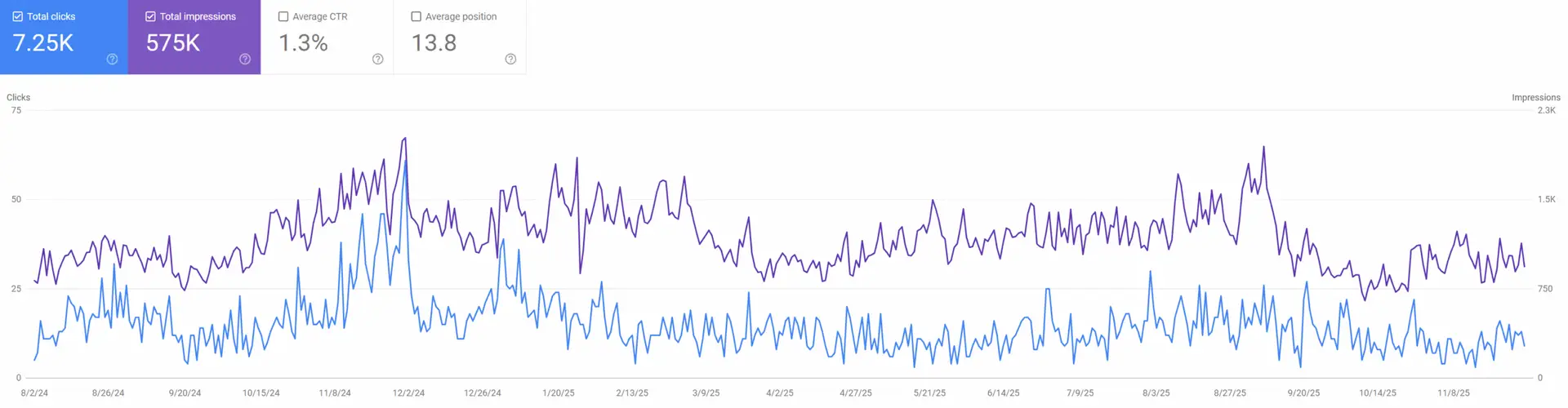
Use it for:
- indexing issues
- excluded pages
- Core Web Vitals
- mobile usability
- security warnings
- search query performance
A quick weekly check is usually enough for smaller sites.
Screaming Frog
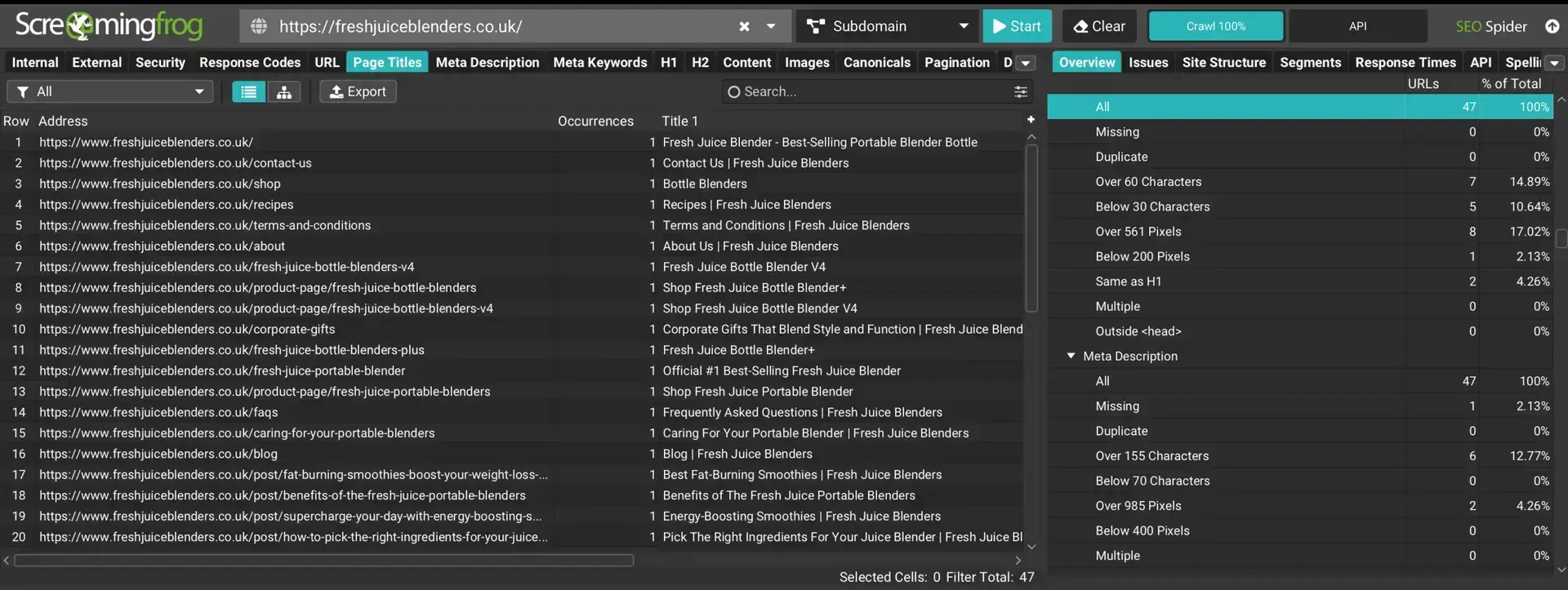
Screaming Frog crawls websites in a similar way to search engine bots.
It helps identify:
- broken links
- redirect chains
- duplicate titles
- missing metadata
- canonical issues
- pages buried too deep
It is especially useful after redesigns or migrations.
SEMrush and Ahrefs
These tools help surface broader technical issues and track trends over time.
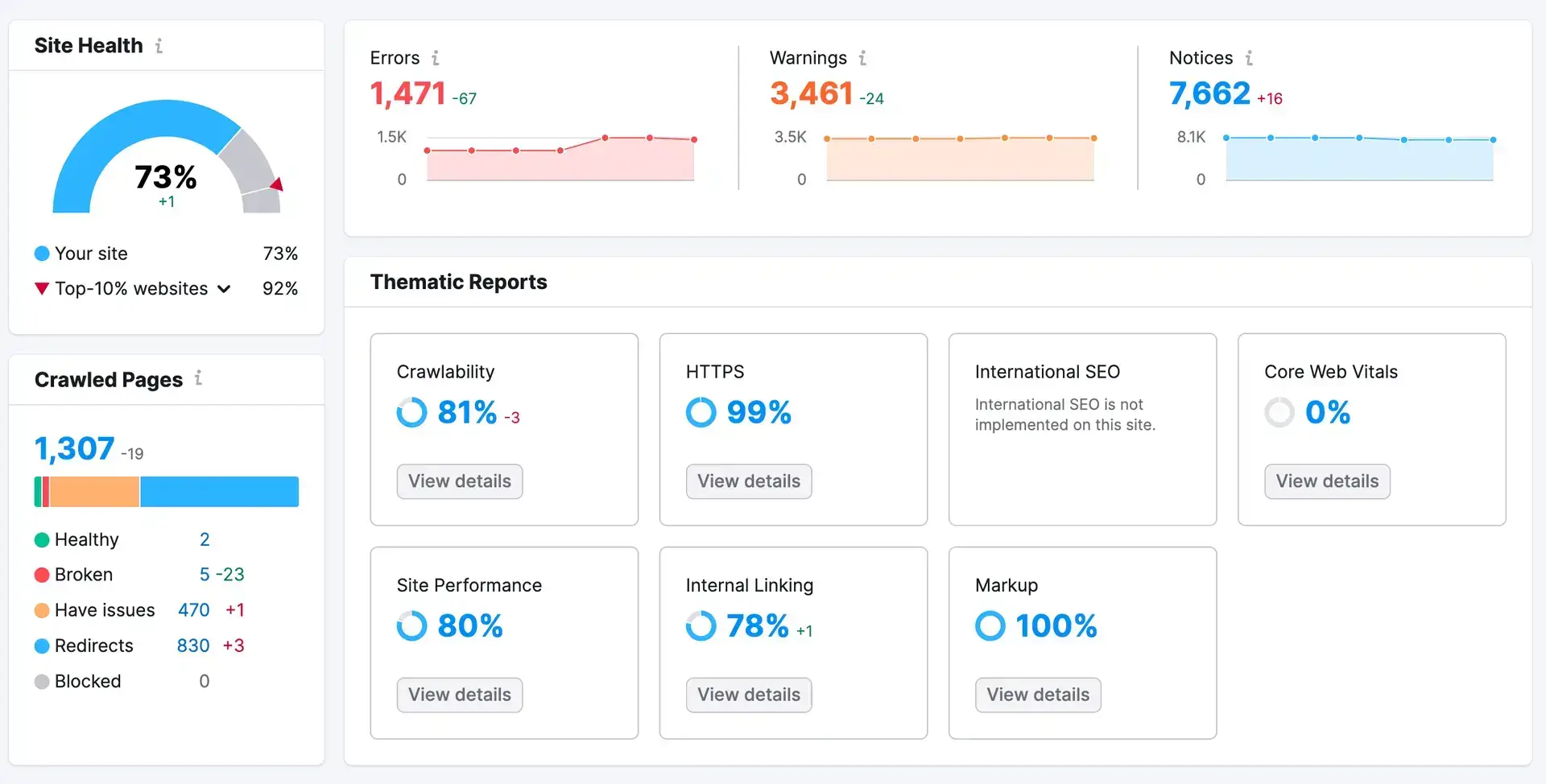
They are useful.
But people sometimes panic over every warning.
Not every alert needs fixing immediately.
Learning which issues genuinely matter is part of the process.
GTmetrix and Lighthouse
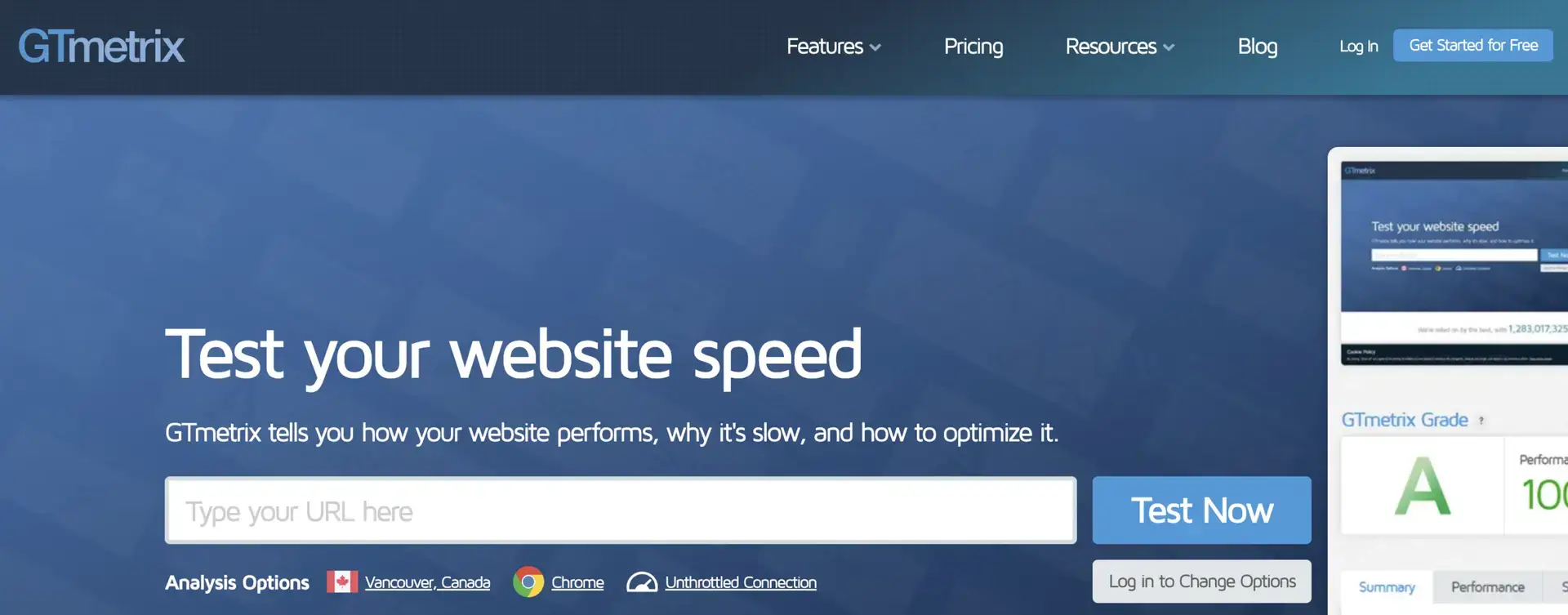
These tools help diagnose speed problems more clearly.
GTmetrix in particular makes it easier to see which scripts or resources slow pages down first.
The waterfall reports are especially useful once you get familiar with them.
Top Tip
“The waterfall feature in GTmetrix is still one of the most useful diagnostics for spotting slow-loading resources. You can often identify the problem scripts visually within minutes.”
Cloudflare
Cloudflare can improve both security and performance.
For some sites it noticeably reduces loading times by caching assets closer to users geographically.
Still, keep changes cautious if you are unfamiliar with the settings.
Technical SEO tools are helpful. Poor configuration is not.
If You Want a Professional Audit
Sometimes the fastest route is simply getting an experienced technical audit done properly.
Technical issues often stack together quietly.
One problem rarely exists on its own.
A structured audit helps prioritise fixes logically instead of jumping between random warnings from different tools.
That alone saves businesses a lot of wasted time.
FAQs
1) How do I know if Google is indexing my pages?
Google Search Console is the easiest place to check.
The indexing reports show which pages are indexed, excluded, redirected, or blocked. If an important page is missing, the report usually explains why.
Common reasons include noindex tags, redirects, duplicate canonicals, or crawl issues.
2) What is the quickest technical SEO improvement for a small business site?
Improving mobile usability and page speed usually creates the fastest overall impact.
Compressed images, lighter layouts, and removing unnecessary scripts often help immediately.
At the same time, make sure key pages load on clean 200 status codes without redirect chains.
Those basics matter more than people expect.
3) Do service business websites need schema markup?
Not necessarily, but it can help search engines understand your pages more clearly.
LocalBusiness, Service, FAQPage, and BreadcrumbList are usually sensible starting points.
Just keep the markup accurate and aligned with visible content.
4) Why does my site have duplicate pages if I only created one?
Technical duplication often comes from URL variations rather than copied content.
Tracking parameters, archives, filters, trailing slashes, and CMS quirks commonly create multiple versions of the same page.
A crawl tool usually reveals the issue quickly.
5) How often should I run a technical SEO audit?
For most smaller websites, a light monthly review is enough.
A deeper crawl every quarter usually works well too.
If you update plugins regularly, publish lots of content, or make structural changes often, check more frequently.
Technical problems are always easier to fix early.
How This All Ties Together
Technical SEO is the quiet maintenance work that keeps your website accessible, reliable, and easy for search engines to process.
When your site structure is clean, your pages load properly, and mobile usability feels smooth, your content has a much better chance of performing well.
You do not need endless rebuilding. You do not need to obsess over every tiny score.
What matters is consistency.
Use Search Console regularly. Run occasional crawls. Fix broken links. Keep redirects tidy. Improve speed where it genuinely affects users.
Those small habits prevent larger problems later.
And honestly, that is what good technical SEO usually looks like.
Quiet maintenance. Steady improvements. Fewer hidden problems.
If you want help improving your website’s technical foundations properly, get in touch and we can build a practical SEO strategy around the areas holding the site back most.