Choosing an SEO tool sounds simple until you actually start looking.
One platform promises full automation. Another gives you six dashboards before you’ve even crawled a page. Then there are the tools that bury basic problems under layers of graphs and scoring systems that look impressive but don’t really help you fix anything.
Most business owners are not looking for more noise. They just want a clearer view of what’s happening on their website and a sensible way to improve it.
That’s why I keep coming back to Screaming Frog.
It’s the first tool I open before a technical SEO audit because it shows me what search engines actually see. No smoothing over problems. No vague scoring systems. Just the structure of the site, the pages being crawled, and the issues sitting underneath everything.
A lot of SEO software tries to simplify technical problems so heavily that you lose the detail that matters. Screaming Frog does the opposite. It gives you the raw picture. That’s usually where the useful work starts.
Summary
Before getting into the crawl itself, it helps to understand what Screaming Frog is actually useful for in day-to-day SEO work.
Instead of turning a website into a collection of performance charts, it shows the structure underneath the site. You can see how pages connect, where search engines get stuck, and which technical problems quietly weaken visibility over time.
Here’s what a single crawl will usually uncover:
- Broken internal links and 404 pages
- Redirect chains and redirect loops
- Duplicate page titles and meta descriptions
- Pages blocked from indexing
- Weak internal linking structures
- Thin or duplicated content
- Missing image alt text
- Orphan pages with no internal links
- Slow or unresponsive URLs
The goal is not to overwhelm yourself with data.
The useful part is learning which reports matter first, which settings remove unnecessary clutter, and which fixes will genuinely improve crawling and indexing. Most websites do not need hundreds of changes. They usually need a handful of structural problems cleaned up properly.
Why Screaming Frog Gives You a Better Understanding of Your Website
One of the biggest strengths of Screaming Frog is perspective.
When you run a crawl, you stop looking at your site as a collection of designed pages and start seeing it the way a crawler does. You see the paths search engines follow, the pages they struggle to reach, and the technical issues sitting quietly in the background.
That’s often far more useful than staring at traffic graphs.
Traffic drops can happen for dozens of reasons. Crawling issues are usually much more concrete. A blocked page, a broken internal link, a redirect chain, duplicated metadata. Once you can see those things clearly, fixing them becomes much easier.
Because the tool runs locally on your computer, the crawl reflects the actual site structure rather than sampled data or abstract scoring systems. You’re seeing the links, headings, metadata, status codes, canonicals, and indexability exactly as they exist.
If you’re working on a larger website, you can switch to database storage and adjust the memory allocation so the crawl stays stable. That matters more than people realise. Large crawls become messy very quickly if the setup is wrong.
There’s also something refreshing about how direct the tool feels.
You are not locked into automated recommendations or simplified health scores. You can investigate issues yourself and understand why they exist. That tends to lead to better decisions long term.
Another reason people stick with Screaming Frog is that it scales naturally with experience.
A beginner can run a straightforward crawl and improve basic site structure within an hour. Someone handling larger technical audits can dig through advanced filters, custom extraction, crawl settings, JavaScript rendering, log file analysis, and much deeper technical reviews.
The tool grows with you instead of forcing you into complexity immediately.
Check out their full guide on how to crawl large websites.
Top Tip
“For many small websites, the free version is enough to start improving structure, content clarity, and crawlability.”
What the Screaming Frog Spider Actually Does
A lot of people describe Screaming Frog as a website crawler, which is technically true, but that description undersells it a bit.
The spider is really there to help you understand how your website behaves underneath the surface.
It crawls your pages, collects information, highlights technical issues, and exposes patterns that are difficult to spot manually. Once the crawl finishes, you start seeing where structure, content, and indexing problems overlap.
That overlap matters.
Most SEO problems are not caused by one dramatic issue. They build slowly through dozens of smaller weaknesses.
Once installed, the Screaming Frog spider can quickly flag things like:
- Broken internal links and 404 pages
- Missing, duplicated, or overlong page titles
- Duplicate or missing meta descriptions
- Redirect chains and redirect loops
- Non-indexable pages and the reason they’re blocked
- Thin pages and near-duplicate URLs
- Missing image alt text
- Orphan pages with no internal links
- Slow or unresponsive URLs
This is where technical audits become useful.
Instead of guessing why pages are struggling, you can see the underlying problems directly.
Sometimes the fixes are surprisingly small. A page blocked accidentally. A weak internal linking structure. Five versions of the same URL competing against each other.
That sort of thing happens constantly.
Top Tip
“Always run a crawl before making major changes. It gives you a baseline and stops you fixing problems blindly.”
Before You Start Crawling, Get These Settings Right
A cleaner crawl starts with cleaner setup.
People often hit Start immediately and then wonder why the results feel overwhelming. Usually the problem is not the tool. It’s the crawl setup.
A few small settings make a huge difference.
Decide What You’re Actually Crawling
Use Spider mode if you want to crawl an entire website.
Use List mode if you already have a set of URLs you want to audit separately.
That sounds obvious, but plenty of people accidentally crawl far more than they intended.
Crawl the Correct Version of the Site
Pick one preferred version of the site and stick to it.
That means deciding between:
- www or non-www
- trailing slash or non-trailing slash
- HTTP or HTTPS
Mixing versions during a crawl can make duplication issues look much worse than they really are.
Remove the Noise Before It Starts
Some websites generate endless parameter URLs through filters, search pages, tracking tags, and faceted navigation.
If you do not limit those areas properly, the crawl becomes cluttered very quickly.
You end up analysing thousands of URLs that nobody actually cares about.
A focused crawl is almost always more useful than a massive one.
What You Start Learning Once the Crawl Begins
The easiest mistake with Screaming Frog is trying to analyse everything at once.
The better approach is to work through the crawl in a sensible order.
I usually start with:
- URL structure
- Response codes
- Metadata
- Indexability
- Internal links
That sequence turns the crawl into a practical task list instead of a wall of data.
The response code report is normally the first place obvious problems appear.
Broken internal links, 404 pages, redirect chains, temporary redirects that should be permanent. Screaming Frog shows you exactly where those links exist so you can fix them directly.
Those issues seem minor until you realise how often they interrupt crawling and internal flow.
Then there’s metadata.
Once you open the Page Titles and Meta Descriptions tabs, patterns become obvious very quickly. Duplicate titles. Missing descriptions. Titles that are too vague to communicate anything useful.
A lot of websites quietly accumulate metadata problems over time because nobody revisits older pages.
Screaming Frog makes those gaps difficult to ignore.
The duplicate content reports are useful for the same reason.
Sometimes duplicated pages are intentional. Often they are not.
Near-identical service pages, duplicate category URLs, parameter versions, copied metadata. Once several versions of similar content exist, search engines receive weaker signals about which page actually matters.
You also start spotting structural issues that affect readability and accessibility.
Missing image alt text. Weak heading structures. Pages with barely any internal links. Orphan pages hidden away with no path leading towards them.
These things rarely look dramatic individually, but together they shape how usable a website feels.
Once the crawl is clean enough, you can also generate an XML sitemap directly from the crawl.
That does not magically improve rankings, obviously, but it helps search engines discover important pages more efficiently after larger changes or rebuilds.
Why Screaming Frog Works So Well for Real SEO Audits
One thing I’ve always liked about Screaming Frog is that it works equally well on small websites and complicated ones.
You can crawl a five-page local business site and still uncover useful improvements.
You can also crawl a huge ecommerce site with thousands of URLs and start identifying structural problems that would be impossible to spot manually.
The free version alone covers a surprising amount for smaller businesses.
Most small websites sit comfortably under the 500 URL limit.
That’s usually enough to clean up the majority of obvious technical issues.
Understanding How Your Website Structure Has Changed Over Time
Most websites grow unevenly.
A business adds blog posts. New services appear. Older pages become outdated. Navigation expands. Internal links drift.
After a few years, the structure often stops reflecting the business properly.
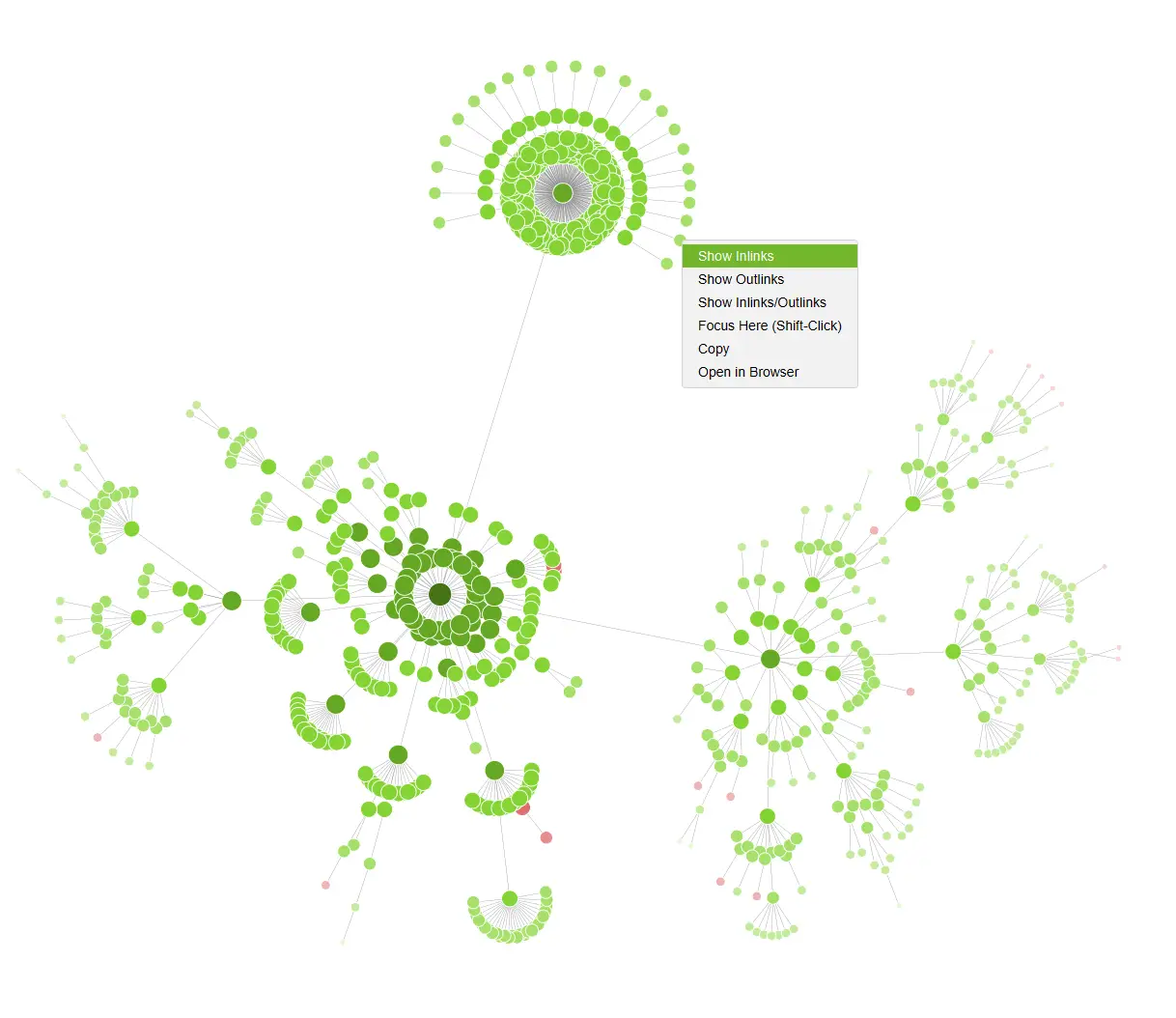
That’s where Screaming Frog becomes genuinely useful.
The crawl shows:
- Pages sitting too deep in the site structure
- Pages with very few internal links
- Sections that receive far more internal emphasis than others
- Older content that has become isolated
- URLs competing against each other unnecessarily
This is usually the point where businesses realise their site structure evolved accidentally rather than intentionally.
A proper internal linking review fixes a surprising amount of that.
Once pages connect more logically, both users and search engines move through the site more easily.
Technical Problems Usually Build Quietly
Very few websites collapse because of one massive technical problem.
What normally happens is slower.
Small issues build up over time.
Redirects stack on top of redirects. Old pages stay indexed. Internal links break quietly. Duplicate URLs appear. Canonicals become inconsistent.
Individually, none of it looks catastrophic.
Together, though, the crawl becomes messy.
Screaming Frog helps you catch those problems before they become much harder to untangle.
A single crawl can reveal:
- Pages returning errors
- Redirect issues
- Weak URL structures
- Duplicate content patterns
- Inconsistent metadata
- Indexability problems
That visibility is what makes technical SEO manageable.
Without it, most businesses are just guessing.
Better Content Usually Starts With Better Structure
People sometimes separate technical SEO and content work too aggressively.
In reality, the two overlap constantly.
Good content becomes harder to understand if the page structure is messy.
Screaming Frog helps uncover issues that affect content clarity as much as technical performance:
- Missing image alt text
- Duplicate headings
- Weak H1 structures
- Thin pages
- Inconsistent metadata
- Poor internal linking
Once you can see those patterns, improving the site becomes much more straightforward.
And honestly, this is where many websites quietly improve without publishing a single new page.
Cleaning up weak structure often helps existing content perform better on its own.
Looking at Competitor Websites Properly
One of the more overlooked uses for Screaming Frog is competitor analysis.
Most competitor research focuses heavily on keywords and rankings.
That’s useful, obviously, but structure matters too.
When you crawl a competitor website, you start noticing:
- How they organise topics
- Which pages receive the most internal links
- How deep important pages sit in the structure
- Where they expand supporting content
- How category and service pages connect together
That tends to reveal far more practical information than copying keywords blindly.
Sometimes you realise competitors are simply covering topics more thoroughly.
Other times you notice they’ve built stronger supporting structures around their main pages.
Either way, the crawl gives you ideas you can adapt sensibly instead of just imitating surface-level SEO tactics.
Link Building Makes More Sense When You Understand Structure
Screaming Frog is not a dedicated outreach platform, but it still helps with link-focused work.
Once you crawl competitor content, you can start identifying the types of pages that naturally attract links.
Usually it is:
- Detailed guides
- Original resources
- Useful tools
- Well-structured informational content
- Pages that explain something clearly without fluff
That insight is much more useful than chasing random backlink numbers.
You start building content people actually want to reference.
That’s normally where sustainable links come from.
A Personal Note on Why I Still Use It
If somebody asked me to keep only one technical SEO tool, this would probably be the one.
Screaming Frog has helped me through site launches, migrations, redesigns, technical audits, and recovery projects where the underlying problems were not obvious at first.
It saves an enormous amount of manual checking.
More importantly, it gives clarity.
That matters because technical SEO becomes overwhelming very quickly when you cannot see the structure properly.
You also do not need to master every feature immediately.
A basic crawl is already enough to improve most websites.
The more advanced parts of the tool tend to make sense naturally once you’ve used it consistently for a while.
Top Tip
“Pair Screaming Frog with Google Search Console. One shows structure, the other shows performance. Together, they give you a much clearer picture.”
Your First 20-Minute Screaming Frog Audit
If you only have twenty minutes, focus on the basics first.
That alone is enough to improve many small business websites.
Work through these areas in order:
- Response codes: fix broken links and 404 pages
- Indexability: check for accidental noindex rules and blocked pages
- Page titles: remove duplicates and tighten vague titles
- Meta descriptions: fill important gaps and avoid repetition
- H1 headings: check for missing or duplicated headings
- Internal links: identify pages receiving very little support
- Orphan pages: make sure important pages are not isolated
You do not need to fix everything immediately.
Most of the value comes from identifying the problems clearly and working through them steadily.
That approach is far more sustainable than trying to clean up an entire website in one afternoon.
Frequently Asked Questions About Screaming Frog
Before wrapping up, there are a few questions that come up regularly whenever people start using the tool for the first time.
How long does a Screaming Frog crawl take?
It depends on the size of the website and the speed of the server.
Small websites often finish within a few minutes. Larger websites naturally take longer, especially if JavaScript rendering is enabled.
Why is Screaming Frog useful for technical SEO audits?
Because it shows the technical structure of the site clearly.
You can identify crawling issues, duplicate content, indexing problems, broken links, redirect issues, and metadata gaps in one place instead of checking them manually.
Does Screaming Frog replace manual review?
Not really.
The tool highlights structural and technical issues, but human judgement still matters.
You still need to evaluate content quality, design decisions, usability, and the overall user experience yourself.
How often should you run a crawl?
For most businesses, monthly crawls are enough.
If the site changes constantly, weekly checks can help catch problems earlier.
Is Screaming Frog difficult for beginners?
No, not particularly.
The interface looks technical at first, but the basics are straightforward once you run a few crawls.
Most people learn naturally by exploring the reports gradually.
How This All Ties Together
Screaming Frog remains one of the most practical SEO tools available because it focuses on the part that actually matters: understanding how your website works underneath the surface.
It shows you what search engines can crawl, where structure becomes messy, and which technical problems quietly weaken performance over time.
Used consistently, it helps improve crawlability, internal structure, indexing, and content clarity without turning SEO into a guessing exercise.
And honestly, most websites do not need dramatic technical overhauls.
They usually just need someone to identify the important issues properly and fix them in a sensible order.
If you have never run a crawl before, start small.
Run the site through Screaming Frog, identify your top five issues, and fix those first. That alone is often enough to noticeably improve the overall health of the site.
If you’re ready to improve your visibility and attract more local customers, get in touch and we can build an SEO strategy that fits the way your business actually works.