
Many people turn to SEO because they want more customers from Google. More visibility, more clicks, more enquiries. That’s a fair goal, but traffic alone rarely tells you whether your SEO is actually working.
A visit only shows that someone reached your page. It does not tell you what they came for, whether the page met their expectations, or whether they took the next step. Tracking turns SEO from guesswork into a simple feedback loop you can improve month by month.
A visit only shows that someone reached your page. It does not reveal what they saw, how they reacted, or which parts of your site encouraged them to stay. It also cannot tell you which pages support your goals and which ones may need attention.
To understand your SEO performance clearly, you need to look beyond clicks and rankings. The most useful insights often come from the way people behave once they arrive. Their movements highlight what works, what feels confusing, and where small improvements can bring steady progress.
Summary
SEO feels a lot less mysterious when you can see what happens after the click. In this post, you’ll learn how to set up simple tracking in GA4 and Google Search Console, what to pay attention to, and how to separate real change from normal day-to-day noise. It focuses on a small set of metrics that tell a clear story, impressions and clicks for visibility, then engagement and conversions for what the traffic actually does.
The goal is a straightforward monthly routine. You’ll learn how to spot early progress, find quick wins like pages with high impressions but low clicks, and check which landing pages are driving enquiries, calls, bookings, or sales. Instead of chasing daily swings, you get a steady view of what is improving, what is stuck, and what to work on next.
Why Tracking Helps You Achieve Stronger SEO Results
SEO takes time to grow. Many beginners expect quick results, only to feel confused when progress moves more slowly. Tracking gives you clarity during this stage. Instead of guessing, you see how your visibility and engagement shift over weeks and months.
Tracking helps you understand:
- What people search for when they find your site
- How they interact with your content
- Which pages attract the most attention
- How often visits turn into actions
- Where improvements will bring the biggest impact
Without tracking, you rely on assumptions. This creates frustration and confusion. With tracking, the process becomes manageable. Your decisions become calmer because they rely on facts rather than hope.
Tracking Shows Early Signs Of Progress
SEO rarely changes overnight. When you understand your data, you notice early signals that your site is moving in the right direction. You may see impressions rising, meaning Google is showing your pages more often. You may find a gradual increase in engagement. You may notice that certain search terms begin to bring small but steady clicks.
These signs help you stay motivated. They show that your work is gaining momentum even before conversions increase.
Tracking Helps You Avoid Guesswork
For those doing SEO by themselves, they feel the key is to try and optimise every part of their site at once. This often creates stress because it becomes impossible to tell which changes actually help. When you track your data, you know which updates make a difference. You can leave effective pages alone and focus your attention where it will have real value.
Before You Track Anything, Make Sure The Basics Are Set Up
You only get useful data if the tools are connected properly.
Start with:
- Google Search Console: verify your site and submit your sitemap if you have one
- GA4: make sure the tracking tag is installed on every page
- Conversion events: decide what counts as a win (form submissions, phone clicks, bookings, purchases)
If you skip this, you end up with a dashboard full of numbers that don’t match reality. Ten minutes of setup saves months of confusion.
Google Analytics And What It Tells You
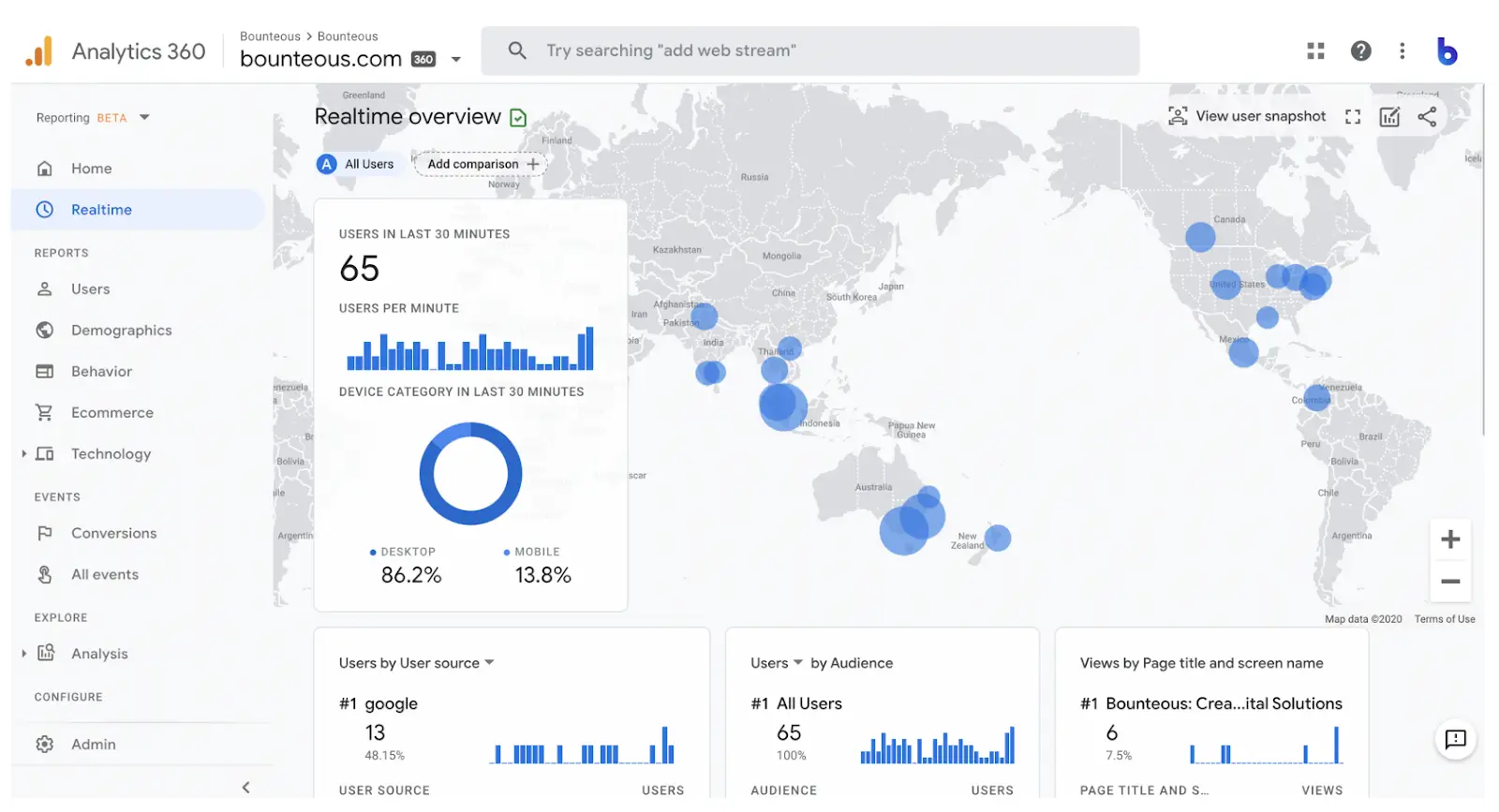
Google Analytics shows how visitors behave on your site. It tracks what they do, how long they stay, and how often they take an action. This is one of the simplest ways to understand how your content performs.
Key Metrics To Look At In Google Analytics
You do not need to understand every feature. Begin with a small set of metrics that offer a clear view of visitor behaviour.
Organic Sessions
This tells you how many people found your site through Google search. A gradual rise in organic sessions usually shows that your visibility is increasing. It is helpful to track which pages attract the most sessions and how those sessions change over time.
Engagement Rate
Engagement rate shows how actively people interact with your content. Pages with high engagement often feel clear, useful, and easy to read. If you are creating blogs or guides, engagement rate helps you understand whether the content delivers what visitors want.
Average Engagement Time
This highlights how long people spend with your content. Longer times suggest that your pages hold attention. Shorter times may mean that your content needs more detail or clearer structure.
Conversions
A conversion is any action that has value to you. It could be a form submission, a booking, a sale, a download, or a click on a contact link. Tracking conversions helps you understand whether your traffic leads to meaningful outcomes.
What Google Search Console Reveals About Your Site
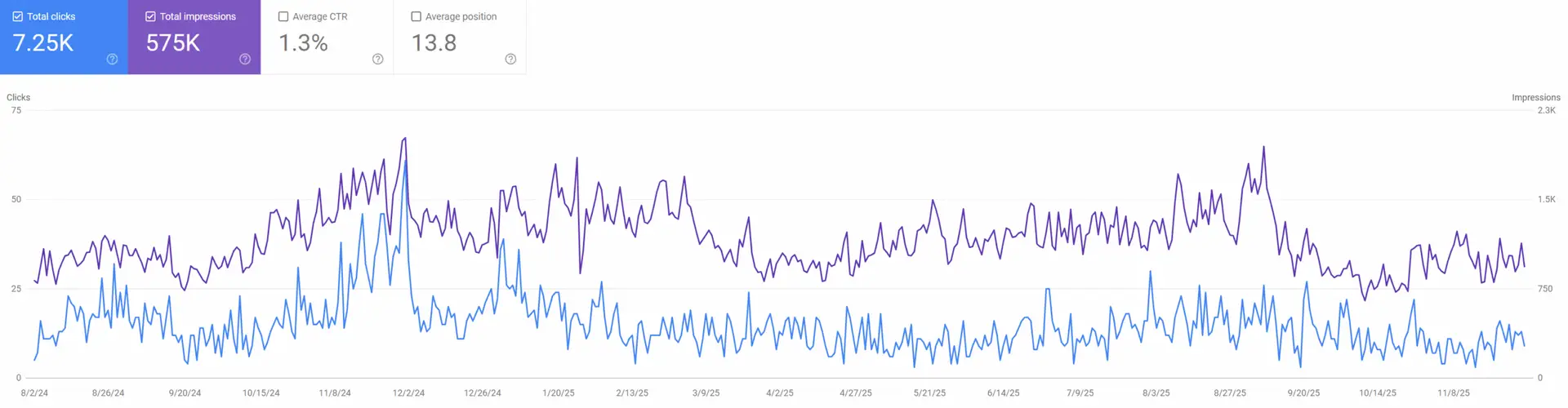
Google Search Console focuses on how your site appears in search results. It shows which keywords trigger your pages, how many impressions you receive, and how many visitors click through.
Key Metrics To Track In Search Console
A simple routine that works:
- Filter to the last 28 days
- Find queries with high impressions but low clicks
- Check the page that ranks for them
- Improve the title and opening paragraph so the page matches the intent more clearly
- Re-check in 2–4 weeks
This is one of the fastest ways to turn existing visibility into more traffic without waiting for rankings to move.
Impressions
Impressions show how often your pages appear in Google search results. Even if people do not click, impressions tell you that Google recognises your content as relevant. Growing impressions often signal early SEO progress.
Clicks
Clicks show how many people choose your page after seeing it in search results. A gradual rise in clicks usually reflects stronger visibility and better connection to search intent.
Average Position
Average position shows roughly where your page appears for a group of related search terms. It is not exact because search results vary by device, location, and history. Still, it helps you understand general movement over time.
Search Queries
Search queries show the exact words people type before reaching your site. As a new starter to SEO, this information is incredibly helpful. It teaches you:
- What people care about
- How they describe their problem or need
- What topics you should write about
- Which pages match their expectations
Search queries are one of the richest sources of ideas for content creation. If you want a clear introduction to how Google records impressions, clicks and search queries, this guide from Google offers a simple overview of how Search Console works.
Key SEO Tracking Metrics That Actually Matter
Try not to feel overwhelmed by the number of metrics available. The secret is to focus on a few that provide a clear picture. These metrics build a foundation for understanding your progress without feeling overloaded.
Organic Traffic (GA4 and GSC)
Organic traffic is the number of visitors who find you naturally through Google. It is one of the simplest ways to see whether your visibility is growing.
If organic traffic increases, it often indicates that your content is being recognised as helpful. If it falls, you may need to review your pages, update information, or consider whether competitors have improved their content.
Top Pages (GA4 and GSC)
Your top pages show what people find most valuable. These pages reveal which topics connect with your audience. They also highlight the structure, style and clarity that work best.
SEO’s can learn a great deal from their top pages. Study them and ask:
- What makes these pages clear
- How the headings are structured
- How the content flows
- Which questions the page answers
This builds confidence as you create more content.
Search Queries And Search Intent (GSC)
Search queries show why someone is searching. This is known as search intent. Understanding search intent can help to create content that answers real questions rather than guessing what people want.
Some queries show research intent. Others show buying intent. Others show confusion that needs simple guidance.
Tracking search queries helps you match your content to your audience.
Bounce Rate And Engagement Rate (GA4)
Bounce rate shows how many people leave after viewing one page. Engagement rate shows how many interact. Don’t worry when you see a high bounce rate, yet the number only makes sense when you understand the purpose of the page.
If someone comes to your site to find a phone number and leaves immediately after calling you, the bounce rate will look high but the page is doing its job.
Engagement rate is often a clearer signal of quality. High engagement usually means the content feels simple, helpful, and easy to move through.
Conversion Rate (GA4)
Conversion rate measures how many visitors complete an important action. It is the clearest sign of whether your SEO is helping your goals.
Those new to SEO often overlook conversions because they feel complicated to set up. Once you track them, you gain a real sense of how your site supports your business.
Small improvements to layout, headings, buttons, or calls to action often increase conversion rate without needing more traffic.
Average Engagement Time (GA4)
GA4 focuses on engagement rather than old-style “time on page”. Average engagement time shows how long people actively keep your page in view.
Longer engagement usually means the page is doing its job. Short engagement often means the page is unclear, too thin, or doesn’t match what the searcher expected. Use this alongside conversions, because a short visit can still be a good visit if the user takes action quickly.
Why Patterns In Your SEO Data Matter
When starting out don’t get discouraged when a metric drops for a day or rises suddenly. SEO data is naturally uneven. It changes based on season, industry activity, search behaviour, and Google updates.
Instead of focusing on single numbers, look at patterns:
- Is organic traffic growing over several weeks
- Do impressions rise during the same period
- Does your engagement stay steady
- Do certain topics consistently attract clicks
Patterns guide you towards improvements. Single numbers cause stress for no reason.
When you track patterns, you gain a calmer understanding of your progress. You see how updates influence your site and you avoid reacting too quickly to minor fluctuations.
Top Tip
“Choose three pages to track closely each month. Make them pages you care about, such as your main service page, your homepage, and one blog. Review their traffic, engagement, and conversions. You will learn more from these three pages than from trying to track everything at once.”
The Metrics That Move First (And The Ones That Take Longer)
Some SEO metrics change early. Others lag behind.
Early signs (leading indicators):
- impressions rising in Search Console
- more queries showing up for your pages
- average position improving slightly
- engagement improving on key pages
Later signs (lagging indicators):
- enquiries, bookings, and sales from organic
- consistent growth in conversions month-on-month
- more branded searches because your visibility is compounding
If conversions are slow but impressions and engagement are climbing, you’re usually building the right foundation. Then you refine the pages that convert.
Choosing Which Goals To Track
Sometimes goal tracking can feel complicated. In reality, you only need to choose a small number of actions that matter most.
Common goals include:
- Contact forms
- Newsletter signups
- Phone clicks
- Purchases
- Downloads
- Button clicks
These actions show intent. They give you a fair picture of how well your traffic supports your goals.
Why Goal Tracking Makes Your SEO More Honest
Traffic without action does not help your growth. Goals help you see whether your content encourages visitors to take the next step. A visitor who reads for two minutes and submits a form is worth far more than twenty visitors who leave after ten seconds.
Top Tip
“Do not try to track every possible action. Choose one or two that truly matter. Add more when you feel confident.“
The Limits Of SEO Data
SEO data is never perfect, and every tool has limits. Some users block tracking. Some data is sampled. Some sessions are counted twice. This is normal and happens on all websites.
When traffic rises, you know your visibility is improving. When conversions increase, you know your messages are clear. When engagement grows, you know people value your content.
Top Tip
“Do not rely on keyword rankings alone. They change for every person due to location, device type, and search history. Focus on clicks, impressions, engagement, and conversions instead.“
How To Build A Simple Monthly SEO Report
Keep it short. One page is enough. The goal is clarity, not a spreadsheet marathon.
1) Visibility (Search Console)
- Impressions: ___ (up/down vs last month)
- Clicks: ___ (up/down)
- Top 5 queries by impressions: ___
2) Behaviour (GA4)
- Organic sessions: ___
- Top 5 landing pages from organic: ___
- Average engagement time: ___
3) Outcomes (GA4)
- Conversions from organic: ___
- Conversion rate from organic: ___
- Best converting page: ___
4) What to do next
- Fix: one page with high impressions and low clicks
- Improve: one page with traffic but weak conversions
- Create: one supporting piece that links into your main service page
This keeps you focused on actions that compound.
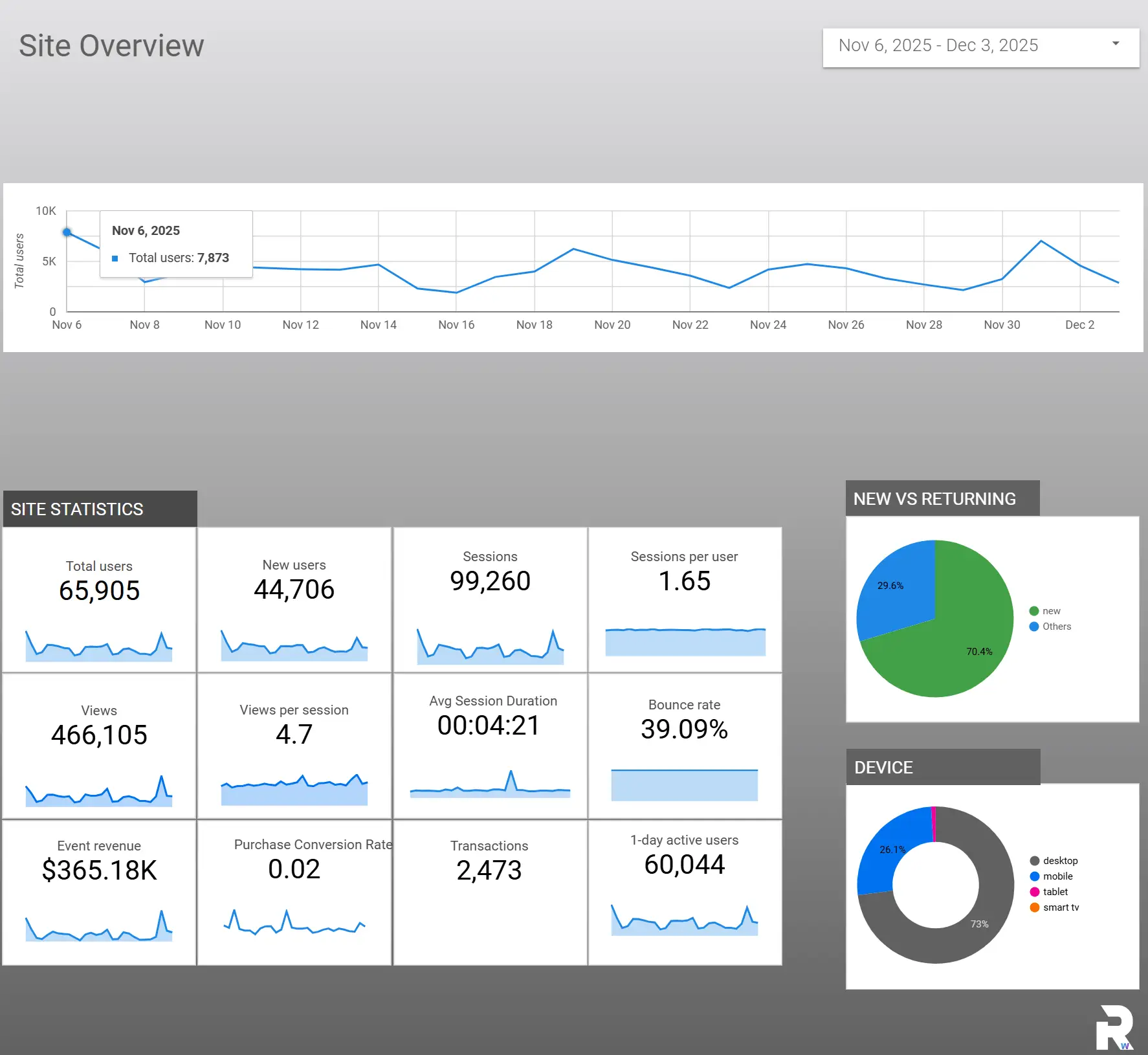
To make this easier, I have created a Looker template that lays everything out in a clear, friendly format.
Frequently Asked Questions About SEO Tracking
What should SEO beginners track first?
To begin with start with organic traffic, top pages, engagement, and conversions. These metrics provide a clear view of both visibility and behaviour. Once you understand these areas, you can expand into more detailed analysis.
How long does it take to see results from SEO tracking?
You often notice early signs of improvement within a few weeks. These may include rising impressions or steady increases in engagement. More visible changes, such as higher rankings or more conversions, may take a few months.
What is the easiest way to understand my SEO data as a beginner?
Start small. Choose a few metrics and track them consistently. Focus on patterns, not exact numbers. Over time, the data becomes easier to read and your decisions become clearer.
Why does my ranking change so often?
Rankings vary because search results adapt to context. Your location, device type, history, and even the time of day can influence your position. This is why beginners should focus on clicks and engagement rather than ranking alone.
How do I know if my content needs improvement?
Short visit times, low engagement, and declining clicks are common signs that content needs refinement. Updating headings, improving clarity, adding examples, or answering questions more directly often helps.
The Bottom Line
Tracking your SEO results brings clarity to the entire process. It turns assumptions into insights and gives you a calm, structured way to grow. You do not need advanced tools or deep technical knowledge. A simple setup in Google Analytics and Google Search Console offers everything required to understand your progress.
When you track your key pages, monitor visitor behaviour, and measure meaningful actions, you gain a clear view of how your content supports your goals. You also build confidence as you see steady improvements over time.
If you want a tracking setup that ties SEO work to enquiries and sales, get in touch and I’ll help you build a simple reporting routine that actually reflects business results.