
DIY SEO for small businesses is not about chasing tricks or trying to copy big brands. It is about making your website clear, useful, and easy for Google to understand. When someone searches for the service you offer, your job is to show Google that your page is a good match and to make the visitor feel confident enough to take the next step.
Most small business websites struggle for the same reasons. The service pages are too thin, the wording does not match what customers actually type into Google, and the site does not guide people towards a call, a quote, or a booking. DIY SEO for small businesses fixes those gaps with a few simple habits, done consistently.
Start by thinking about the real searches that lead to enquiries. A person rarely searches for a broad term like “plumber” or “accountant.” They search for a need, a location, and often a time frame. That is why “emergency plumber in Leeds” and “small business accountant in Bristol” tend to bring better leads than vague phrases. Once you know those searches, you can build pages around them and structure each page so it is easy to scan on a phone.
Summary
This guide walks small business owners through DIY SEO in a practical, step-by-step way. It covers the foundations first, then moves into keyword research that matches real customer searches, on-page improvements that make pages clearer, local SEO that supports map and location-based results, and simple tracking so you can see what is working.
The focus is on actions that reliably increase visibility and enquiries, without shortcuts. You’ll learn how to build stronger service pages that match intent, improve trust signals like reviews, location details, and proof of work, and keep progress steady over time. It also explains how to stay effective as search shifts towards more AI-led results, by answering clearly, making pages easy to scan, and building the kind of content people and search systems can rely on.
What SEO Actually Means
SEO is the work of making your website easy for search engines to understand, and genuinely useful for the people who land on it. Search engines try to show pages that match the search, load quickly, and answer the question well. Your job is to give them clear signals. That means:
You use the words real customers use, in places Google expects to see them. You structure pages so they are easy to scan. You keep things tidy, so the site is fast and simple to navigate. A good way to think about SEO is this. It is not about tricks. It is about reducing friction. Less friction for Google, less friction for customers.
Top Tip
“Start with your customers’ language. Write down the exact phrases you hear on calls, in DMs, and in quotes. Those phrases are often better than anything you will find in a keyword tool.”
If you remember one thing, remember this: SEO works best when your pages match how real people search, load cleanly on mobile, and make the next step obvious. Everything else builds on that.
Why SEO Matters For Small Businesses
If you rely on local trade, referrals, or repeat work, SEO still matters. It supports all of those channels.
People often check a business online after they get a recommendation. They look for proof that you are real, active, and trusted. A clear website, with helpful service pages and recent content, gives that reassurance quickly.
SEO also helps you compete with bigger brands. Large companies can outspend you on ads, but they often struggle to look local, personal, and specific. A well-built page that targets a clear local need can outrank a generic national page, especially for “near me” searches and service queries.
There is also the user side. A site that loads fast, reads well on mobile, and answers common questions tends to convert better. That means more calls and form fills from the same traffic. It is not just rankings. It is results.
Step 1: Sort Out Your Foundations First
When you start doing DIY SEO for your website, it’s easy to get lost in keywords and blog ideas, but you need to check the SEO basics first. These are the bits that quietly hold everything together.
Make Sure Google Can Find Your Site
You want your key pages to be crawlable and indexable. In plain terms, that means Google can access them and decide to show them in results.
If you have set up your site yourself, you can accidentally block pages with a “noindex” setting, a password gate, or a plugin toggle. It is worth checking early, because it saves weeks of confusion later.
Set Up Google Search Console
Google Search Console is free, and it tells you what Google sees. It also flags issues like pages not indexed, mobile usability problems, and manual penalties.
Even if you do nothing else this week, getting Search Console running is a strong start. You can see which searches already bring impressions, which pages get clicks, and where small tweaks might help.
Google’s own guidance explains the Performance report and the main metrics, including clicks and impressions.
Make Sure Your Site Works Properly On Mobile
Most local searches happen on phones. People scroll quickly, tap quickly, and leave quickly if something feels clunky.
Check your service pages on your own phone. Can you read the text without zooming. Can you tap the phone number. Can you find prices, areas covered, and next steps within a few seconds. This is basic stuff, but it is where a lot of small business sites fall down.
Mobile usability is not just a ranking factor. It directly affects whether someone calls you or leaves. If a page feels awkward on a phone, it quietly leaks enquiries even when rankings look fine.
Step 2: Keyword Research That Fits Real Life
Keywords are just the phrases people type into Google. The goal is not to collect hundreds of them. The goal is to pick the right ones and match them to the right pages.
Start With Services, Then Add Context
Begin with what you sell. Write your main services as a list, then add the bits people usually add when they search:
Location: “in Manchester”, “Leeds”, “near me”
Urgency: “same day”, “emergency”, “24 hour”
Intent: “cost”, “price”, “quote”, “book”
Specific need: “boiler repair”, “wedding bouquet”, “end of tenancy clean”
This is how you get from a vague phrase like “plumber” to something useful like “emergency plumber in Salford” or “boiler pressure dropping fix”.
Use Free Tools To Fill The Gaps
Google’s autocomplete suggestions and “People also ask” are often enough to guide early work. You can also use free tools like Google Keyword Planner or Ubersuggest for variations.
Do not get stuck chasing the biggest volume terms. For small businesses, the best terms are usually specific and local. They bring fewer visits, but more of the right visits.
Match Keywords To Pages
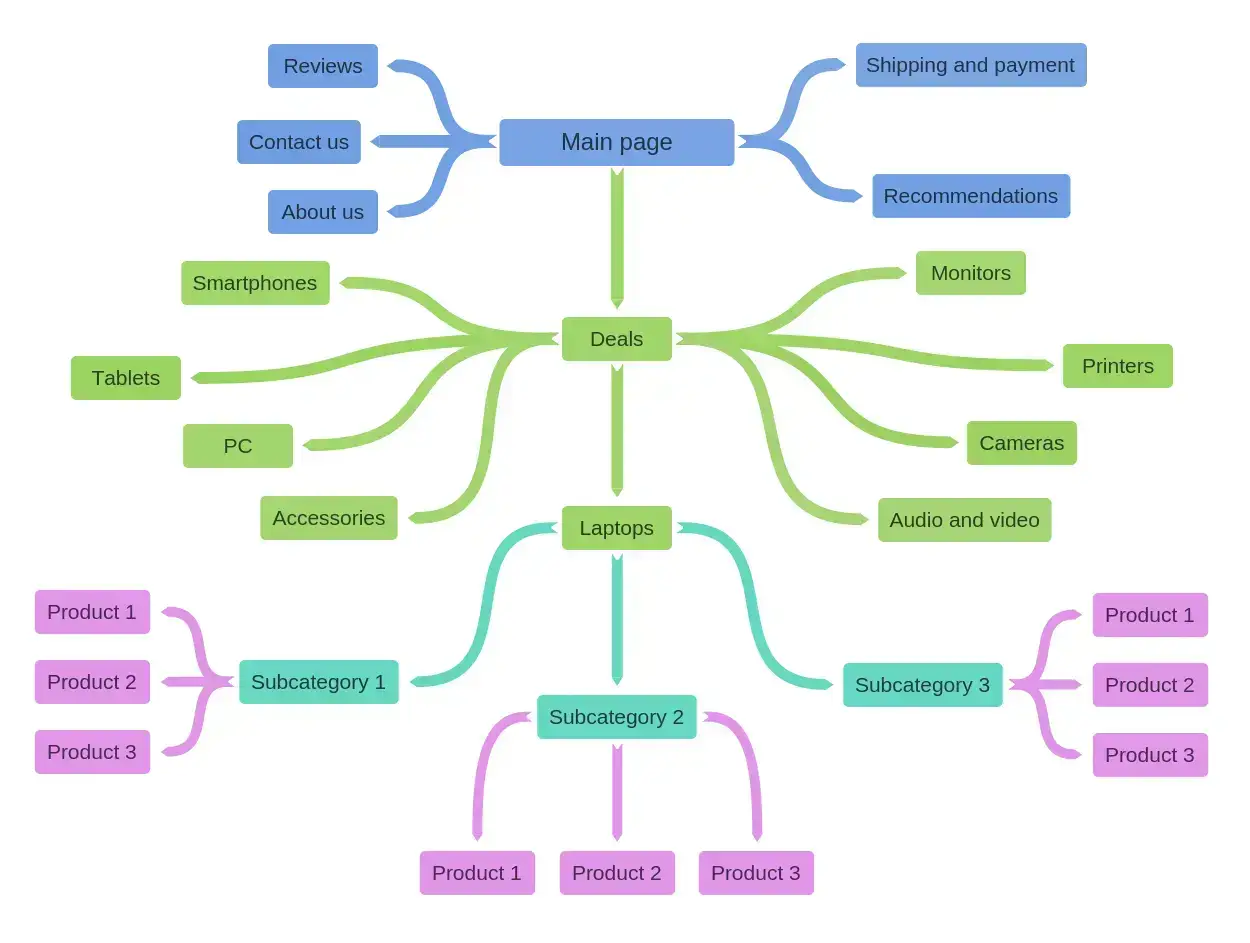
One of the most common DIY SEO mistakes is trying to rank one page for everything. It rarely works.
A simple pattern helps:
Your homepage targets your brand plus your core offer and main location.
Each core service gets its own page, written for that service.
Each location/product you serve/offer gets a page only if you can write it properly and make it genuinely useful.
Blog posts target questions, comparisons, and “how do I” topics.
If you keep that structure, your site becomes easier to grow without turning into a mess.
Top Tip
“Longer phrases often convert better. A person searching “kitchen fitter Liverpool price” is usually closer to booking than someone searching “kitchens”.“
Resist the urge to create a new page for every variation. Fewer, stronger pages that fully answer a search usually outperform lots of thin ones. If two pages would say almost the same thing, they probably belong together.
Step 3: On-Page SEO That Google Can Read Easily
On-page SEO is the work you do on the page itself. Think of it like labelling shelves in a shop. If everything is clearly labelled, customers and staff find things faster.
Page Titles That Match The Search
Your page title is the clickable headline in Google results. Keep it clear and direct.
A simple format works well for local services:
Service + Location | Brand
“Boiler Repair in Sheffield | ABC Heating”
“Wedding Flowers in Leeds | Rose & Pine Florist”
Do not try to cram in five locations. It looks spammy and it tends to perform badly.
Meta Descriptions That Help People Choose You
Meta descriptions are the short snippets under the title. Google might use them, or it might pull a different snippet from the page. Google explains that it can use the description tag if it feels it is a good fit, and snippets can be cut to suit the device width.
Write descriptions for humans. Keep them specific. Give a reason to click.
For example:
“Local boiler repairs in Sheffield with clear pricing and fast callouts. Book a visit or get advice over the phone.”
Headings That Create A Clean Structure
Use one H1 heading per page, then H2 and H3 headings to break the page into sections.
A service page might use:
H1: Boiler Repair in Sheffield
H2: Common Boiler Faults We Fix
H2: What A Repair Visit Includes
H2: Prices And Callout Info
H2: Areas We Cover
H2: Book A Repair
This structure helps readers scan and helps Google understand the page.
Internal Links That Guide People
Internal links help turn traffic into journeys. They show Google which pages matter and help visitors move from information to action without friction. They help visitors move through your site, and they show Google how pages relate.
If you write a blog post about “boiler pressure dropping”, link to your boiler repair page. If you mention a specialist service, link to that service page. Keep it natural and useful, not forced.
Internal linking is still under used in modern SEO because people focus on new content and backlinks, but a simple internal link can pass relevance, guide Google to key pages, and turn existing traffic into enquiries with almost no extra effort.
Image File Names And Alt Text
Rename images before uploading. “kitchen-fit-liverpool.jpg” is better than “IMG_3829.jpg”. Add alt text that describes the image simply.
Alt text helps accessibility, and it gives search engines more context. It is not a place for keyword stuffing. One short line is enough.
Top Tip
“Write like you speak. If a sentence sounds odd when read out loud, it will usually read badly on the page too.”
Step 4: Make Your Service Pages Do More Of The Work
Many small business sites have thin service pages. A short paragraph and a contact form is not enough in most cases. A strong service page answers the customer’s questions before they ask them. It removes doubt and gives clear next steps.
What To Include On A Proper Service Page
Start with a short, clear summary of the service and the area you cover. Then expand with detail that shows real understanding.
You can include how the process works, what the customer needs to prepare, what affects pricing, and what timelines look like. You can also add a short section on common problems and when to call a professional.
This is where you can stand out against generic competitors. A national company can write a generic paragraph. You can write the page that feels like it was written for your town and your customers.
Detailed service pages do more than convert visitors. They help search engines and AI systems understand exactly what you offer, who it is for, and when to show your business as a relevant option.
Add Proof Without Overdoing It
Proof can be a few short reviews, a couple of photos, a short case study, or a simple “recent jobs” section. You do not need a full portfolio for every trade, but people do want reassurance. If you can show real work, in real homes, in the local area, it builds trust quickly.
Step 5: Local SEO And Google Business Profile
If you serve a specific area, local SEO is usually your fastest win.
Get Your Google Business Profile Right
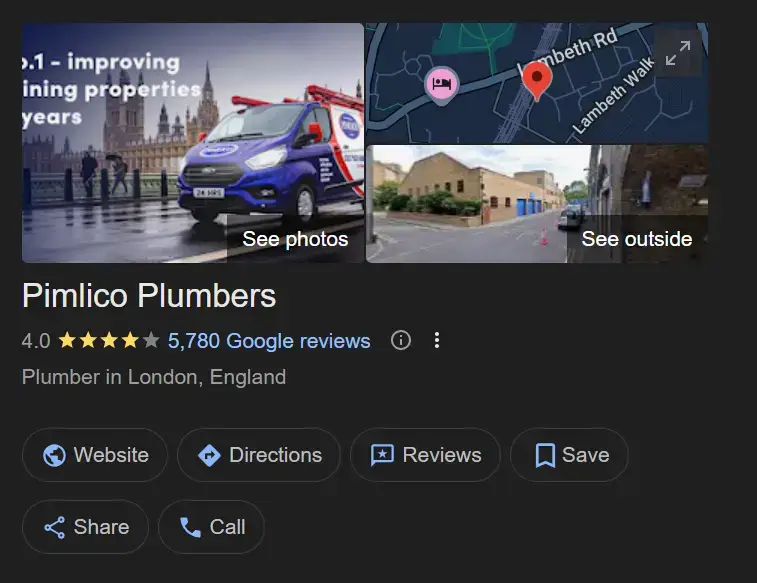
Your Google Business Profile helps you appear in map results and local packs. Fill it in fully and keep it updated.
Focus on:
Accurate name, address, phone number
Correct primary category and useful secondary categories (Research has shown that Google does add tiny weight when using their own predetermined service list).
Opening hours that match reality
GBP Photos that show the business, team, or completed work
Regular updates if relevant, like seasonal hours
Reviews Matter More Than Most People Think
Reviews do two jobs. They help conversion, and they support local visibility.
BrightLocal’s 2025 Local Consumer Review Survey notes that many consumers use reviews in the decision process, and it highlights patterns like how many sites people check when reading reviews.
Do not chase reviews in a panic. Build a calm system. Ask after you finish a job, when the customer is happy. Make it easy by sending a direct link. Reply to reviews in a human way, not a copy and paste script.
Keep Your Business Details Consistent
Your business name, address, and phone number should match across your website, your Google profile, and key directories. Inconsistency creates confusion. It can also cause missed calls if an old number still exists on a directory listing.
Step 6: Content That Wins Clicks And Builds Trust
Blogging is not magic. But useful content can bring steady traffic, and it can support conversions even when it does not rank first.
Pick Topics That Reflect Real Questions
A good topic usually starts with a customer question.
If you are a roofer, people ask about costs, signs of damage, and timing.
If you run a gym, people ask about beginner plans, injury concerns, and class types.
If you are an accountant, people ask about deadlines, allowable expenses, and software.
Write posts that answer those questions clearly. Aim for a calm, practical tone. Make it feel like advice you would give on the phone.
Frequency matters far less than usefulness. One genuinely helpful page that answers a real question often outperforms a stream of rushed posts.
Build Simple Content Hubs
As you publish more, group related content.
For example, a cleaning business might build a small hub around “end of tenancy cleaning”:
A main service page
A post on what landlords look for
A checklist for tenants
A post on oven cleaning tips
A post on carpet cleaning timings
This makes internal linking easier and helps Google see topical relevance.
Top Tip
“Fix one page before you build five new ones. Pick your main money page, usually your top service page, and improve it properly. Add detail, tidy headings, add internal links, and make the next step obvious. One strong page often beats five thin ones.”
Update Older Content
Outdated posts slip over time. Set a reminder to review key pages every few months. You can refresh examples, update pricing notes, add new photos, and tighten the intro. These small updates often bring pages back to life without writing something new from scratch.
Step 7: Link Building For Small Businesses
Links from other sites act like signals of trust. You do not need hundreds. A few relevant ones can move the needle.
Think Local First
Local links often come from real relationships:
Local charities and sponsors pages
Business associations and chambers of commerce
Local newspapers and community sites
Suppliers and partners
Events you support
A simple approach is best. If you sponsor a youth team, ask for a link on the sponsor page. If you work with a builder, ask to be listed as a recommended partner.
Avoid Low-Quality Shortcuts
Skip spammy directories and paid link packs. They rarely help long term, and they can cause problems later. If you are going to spend time on links, spend it on links that make sense for your business and your area.
Step 8: Monitoring Your SEO Efforts
SEO takes time, so tracking progress is part of the job. The aim is to spot steady improvement, not to panic over daily ups and downs. Check the key numbers regularly, like clicks, impressions, and enquiries, then make small changes based on what you see. That way you stay in control without getting pulled into overthinking every movement.
Use Search Console For Search Data
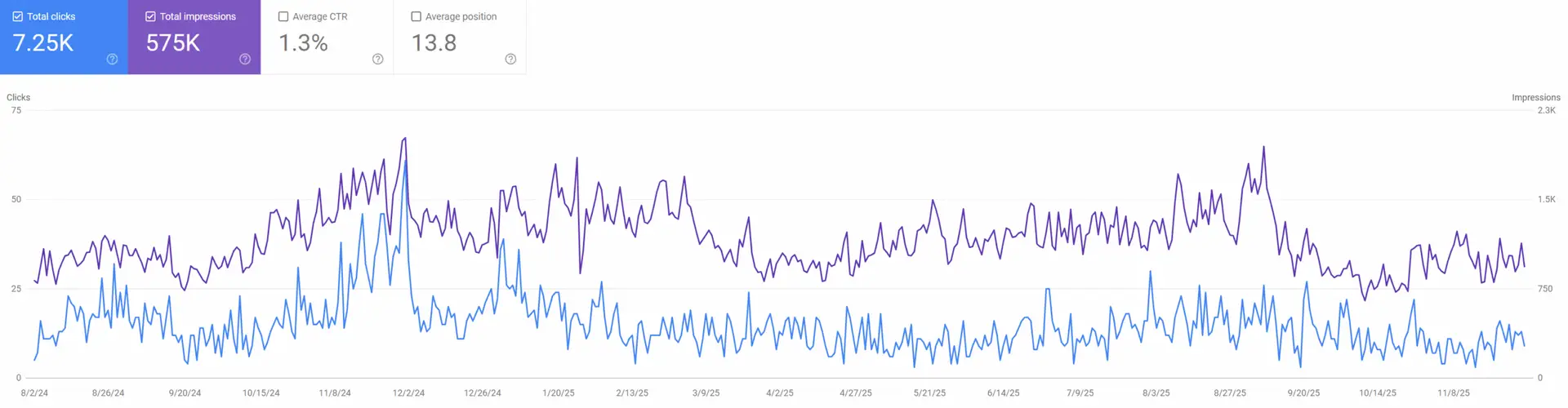
Search Console shows the searches you appear for, your click-through rate, and which pages get impressions.
A useful habit is checking once a week. Look for pages with impressions but low clicks. Those pages often improve quickly with a better title, a clearer meta description, or a stronger intro.
Use Analytics For Behaviour
Google Analytics helps you see what people do after they land. Do they stick around. Do they visit another page. Do they tap the phone number. Do they submit the form. If a page ranks but does not convert, the page needs work. That is a better problem than not ranking at all.
Other free software like Clarity, allows you to view on-page interactions by your site visitors, how far they scroll, where they come from, click areas and is great for helping to spot user friction.
Use A Simple Ranking Tracker
DIY SEO for Small Businesses: How to Optimise Your WebsitePaid tools are fine, but you can start with a spreadsheet. Pick 10 to 20 key phrases that matter (SEMRUSH as of 2026, allows you to track upto 10 Keywords for free, with a host of other free perks also). Track your position once a month. Note any changes you made that month. Over a few months, patterns start to show.
It’s easy to get in a panic when one day, your keyword drops, this is normal and it happens. If the drop is consistent over a month, then review the SERPs, has the intent changed, has your competitor updated their page, is there a new competitor?
Your Brand Matters More With AI-Driven Search
Search results are changing. Google has introduced AI Overviews, which use generative AI to summarise information and help people search faster. Google has described rolling AI Overviews out in Search and expanding access over time.
For small businesses, the practical takeaway is simple. Your reputation and clarity matter. If your business name appears across the web with consistent details, strong reviews, and clear service information, you are easier for systems to understand and recommend. If your site is thin, unclear, or inconsistent, it is harder to be included in these newer answer-style results.
This does not mean you ignore keywords. It means you pair keywords with trust signals. Clear “about” pages, real photos, genuine reviews, and consistent listings all support that wider picture.
The good news is that the basics still win. Clear service pages, consistent business details, real reviews, and helpful content remain the foundation for visibility, even as search presentation changes.
SEO FAQs for Small Businesses
1) How long does DIY SEO take to show results?
Most sites see early signs in weeks, like more impressions in Search Console, but meaningful gains usually take longer. It depends on competition, how good your site is today, and how often you make improvements. The key is to track small wins, like better click-through rate and more enquiries from the same pages. Those usually arrive before big ranking jumps.
2) What pages should I optimise first on a small business website?
Start with pages that drive revenue, like your core service pages and your contact page. Your homepage also matters, but it often has too many jobs at once. A focused service page can rank for specific searches and convert well when it is clear and detailed. Once those are solid, move onto supporting content like FAQs and blog posts.
3) Do I need a blog for local SEO?
A blog helps, but it is not required. Many local businesses do well with strong service pages, a solid Google Business Profile, and consistent reviews. Blog content becomes useful when customers search lots of questions in your niche, or when you want extra ways to appear in results. If you blog, focus on real questions, not generic marketing topics.
4) What if I serve more than one town or city?
You can still rank locally, but you need a sensible structure. Create strong service pages first, then add location pages only where you can write something genuinely useful and specific. Thin pages that repeat the same text with swapped place names rarely perform well. A better option can be an “areas we cover” section plus a handful of well-written location pages for your main areas.
5) Is it worth paying for SEO tools as a beginner?
Free tools can take you far, especially Search Console and Analytics. Paid tools become helpful when you want easier rank tracking, competitor insights, and auditing features. If budget is tight, start free and spend time learning what moves the needle for your site. Once you have a routine, you will know exactly what you would use a paid tool for.
The Bottom Line
DIY SEO is not about doing everything. It is about doing the right few things, in the right order, and sticking with them. Start with the foundations, build strong service pages, and make sure your local presence is accurate and active. Then add content that answers real questions and supports the services you sell.
As search shifts towards AI-driven answers, trust signals become even more important. Clear information, consistent listings, and genuine reviews all support visibility, alongside solid on-page work. If you keep things simple and steady, you can make real progress without spending a fortune.
You do not need to master SEO. You need a repeatable routine that improves clarity, trust, and conversion over time.. If you’re ready to improve visibility and attract more local customers, get in touch to build a tailored SEO strategy for your business.