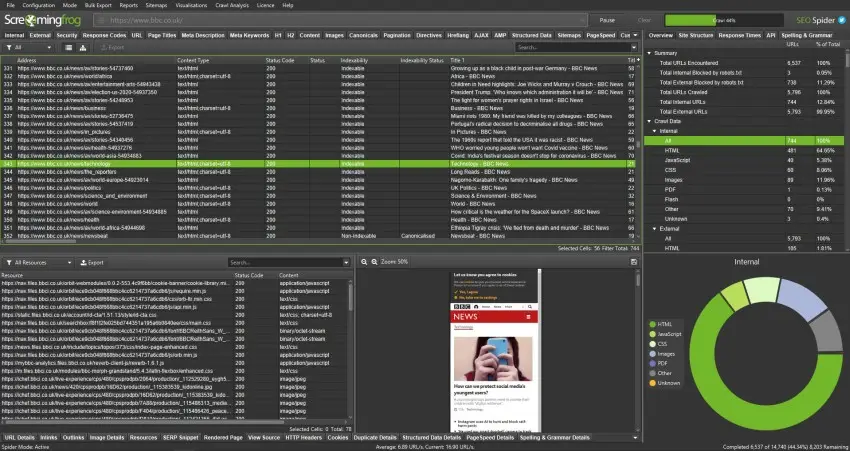
If you have ever hit “Start” in Screaming Frog on a big site and watched your laptop slowly start to wheeze, you are not alone.
Large websites behave differently. A crawl that takes five minutes on a small brochure site can take hours, sometimes days, on an e-commerce store, publisher, marketplace, or enterprise platform.
Usually, the problem is not Screaming Frog itself. It is the setup.
The default configuration works perfectly well for smaller websites, but larger crawls need more control. You need to think about what you are actually trying to learn from the crawl, how much load the server can realistically handle, and how you are going to keep the crawl stable long enough to finish cleanly.
That part gets overlooked constantly.
This guide is written for people running their own SEO audits and technical reviews. It leans practical rather than theoretical, because large crawls tend to become messy very quickly if you approach them casually.
You will learn how to:
– plan large Screaming Frog crawls properly
– keep the crawl stable on larger websites
– avoid common crawl traps and wasted URLs
– segment large websites into manageable audits
– organise outputs so the findings are actually useful
Screaming Frog offers a free download, which is useful for learning the basics of the tool, but large website crawls normally require the paid licence because the free version is limited to 500 URLs.
Summary
– Use Database Storage Mode so crawl data saves to disk instead of RAM
– Keep memory allocation sensible and prioritise stability over raw speed
– Start with a lower thread count and increase slowly if the server responds well
– Tighten crawl scope with include and exclude rules to avoid parameter traps and wasted URLs
– Break very large websites into sections by folder, sitemap, or priority URL list
– Use smaller segmented crawls to speed up analysis and make fixes easier to manage
– Focus on indexable URLs first so important issues do not get buried in noise
– Group findings by template or section rather than analysing thousands of URLs individually
– Run short pilot crawls before full audits to test settings and identify crawl problems early
– Treat large crawls as controlled technical investigations, not just automated exports
Why crawling still matters on large sites
Large websites hide problems surprisingly well.
Templates drift over time. Plugins change. Teams publish content quickly. Old sections get abandoned quietly in the background. You can end up with thousands of pages that look technically “fine” on their own while the overall site still struggles because of how everything connects together.
A crawl gives you a working map of the site.
Not a perfect map. No crawler sees everything exactly the way Google does. But it gives you a realistic model of how search engines and users move through the website, which is usually enough to uncover the patterns causing problems.
On larger sites especially, patterns matter far more than isolated page issues.
Broken links and dead ends
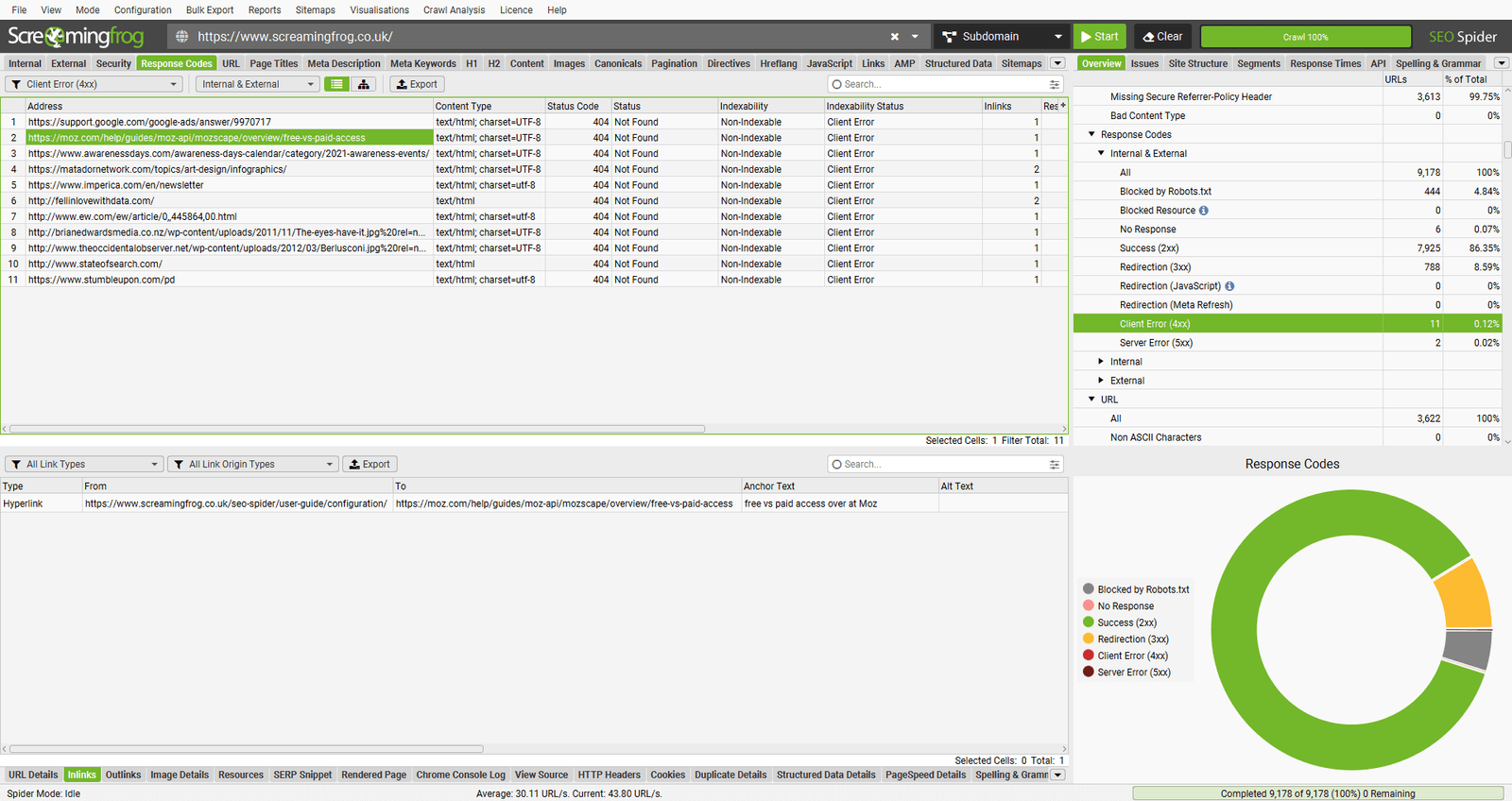
Internal 404s waste crawl budget and create poor user journeys.
External broken links matter too, especially when they sit on important commercial or informational pages.
On large websites, broken links often appear because of:
– deleted products
– expired campaign pages
– navigation updates
– category restructures
– old CMS migrations
When internal links break, internal link equity gets disrupted too. Important pages gradually lose support because authority keeps flowing into dead ends.
That is usually where things start slipping quietly.
Redirect chains and loops
Redirects are completely normal on established websites.
The issue starts when they stack.
Long redirect chains slow page loading, waste crawl resources, and sometimes make it harder for search engines to settle consistently on the final URL. Redirect loops are worse because they stop crawlers entirely.
A crawl helps you identify:
– redirect chains
– redirect loops
– the pages triggering them
– recurring redirect patterns by template or section
Fixing redirects at source level is normally far cleaner than endlessly patching the final hop.
Duplicate and near-duplicate pages
Large sites create duplicate pages constantly, often without anyone noticing.
Common causes include:
– faceted navigation
– filter combinations
– tracking parameters
– internal search pages
– sorting URLs
– printer-friendly pages
– repeated location content
The pages themselves are not always “bad”. The issue is scale.
Once a site starts generating thousands of near-identical URLs, it becomes harder for search engines to understand which pages actually deserve visibility.
A crawl helps quantify the problem properly instead of relying on assumptions.
Metadata gaps across templates
Metadata quality tends to become inconsistent on large websites.
You often find:
– missing titles on one template
– duplicated titles across pagination
– descriptions truncating across entire sections
– inconsistent canonical rules
– conflicting indexation signals
This is one of the reasons crawling still matters so much.
You can group issues by template or directory very quickly, which turns huge messy exports into practical development fixes.
Indexation and directive problems
Large websites can accidentally noindex huge sections overnight.
One CMS rule change or template update is sometimes enough.
A crawl helps surface:
– noindex usage
– canonical behaviour
– robots directives
– blocked URLs
– inconsistent indexation signals
On enterprise sites, even a small technical mistake can affect tens of thousands of pages very quickly.
Speed signals and heavy pages
Screaming Frog is not a full performance testing platform, but it still reveals useful technical clues.
You can usually spot:
– very large HTML pages
– slow server responses
– repeated redirects
– bloated templates
– unstable sections during crawling
On larger websites, these problems usually live inside templates rather than isolated pages.
Crawling also becomes essential during migrations, redesigns, or platform changes.
You need a record of what exists today so you can compare it against what survives tomorrow.
Before you crawl, decide what “done” actually means
Large crawls usually fail because the scope is vague.
People start crawling millions of URLs without deciding what they are trying to learn. Then the crawl finishes and nobody has time to analyse the export properly.
That happens more than most people admit.
Before starting, make three decisions.
1) Define the primary audit goal
Pick the main objective first.
Secondary findings will naturally appear during the crawl anyway, but the primary goal controls how you configure the crawl.
Typical goals include:
– technical indexation issues
– internal linking analysis
– crawl depth analysis
– duplicate content reviews
– redirect clean-up
– migration benchmarking
– metadata quality checks
Your objective matters because every additional data point increases crawl size, resource usage, and processing time.
2) Define the crawl boundary
Most large sites contain areas you probably do not want to crawl.
Examples include:
– internal search results
– faceted navigation
– customer account areas
– staging environments
– filter combinations
– media directories
– tracking parameters
Write down what should be included and excluded before you touch the crawl settings.
Honestly, this step saves more time than almost anything else.
3) Decide how you will segment the crawl
If the website is very large, assume you will split the crawl.
Trying to crawl everything at once is often slower overall because analysis becomes unmanageable.
Common segmentation methods include:
– by subfolder
– by subdomain
– by XML sitemap
– by priority URL lists
– by content type
Breaking crawls into smaller sections usually makes the outputs easier to understand and easier to action.
Top Tip
“Some crawls take days to complete. Breaking them into smaller sections makes the process far easier to manage and much easier to analyse afterwards.”.
A quick reality check on website scale
Before pressing Start, estimate the size of the website first.
You do not need an exact URL count. You just need enough information to decide how aggressive the crawl can realistically be.
Ways to estimate scale include:
– reviewing XML sitemaps
– checking indexed folder counts
– using Search Console sitemap reports
– testing a single directory first
The main thing to watch for is uncontrolled URL generation.
If filters, parameters, or search pages can create near-infinite URLs, the crawl needs very strict controls.
Otherwise the dataset becomes noisy very quickly.
Core Screaming Frog setup for large crawls
Switch to Database Storage Mode
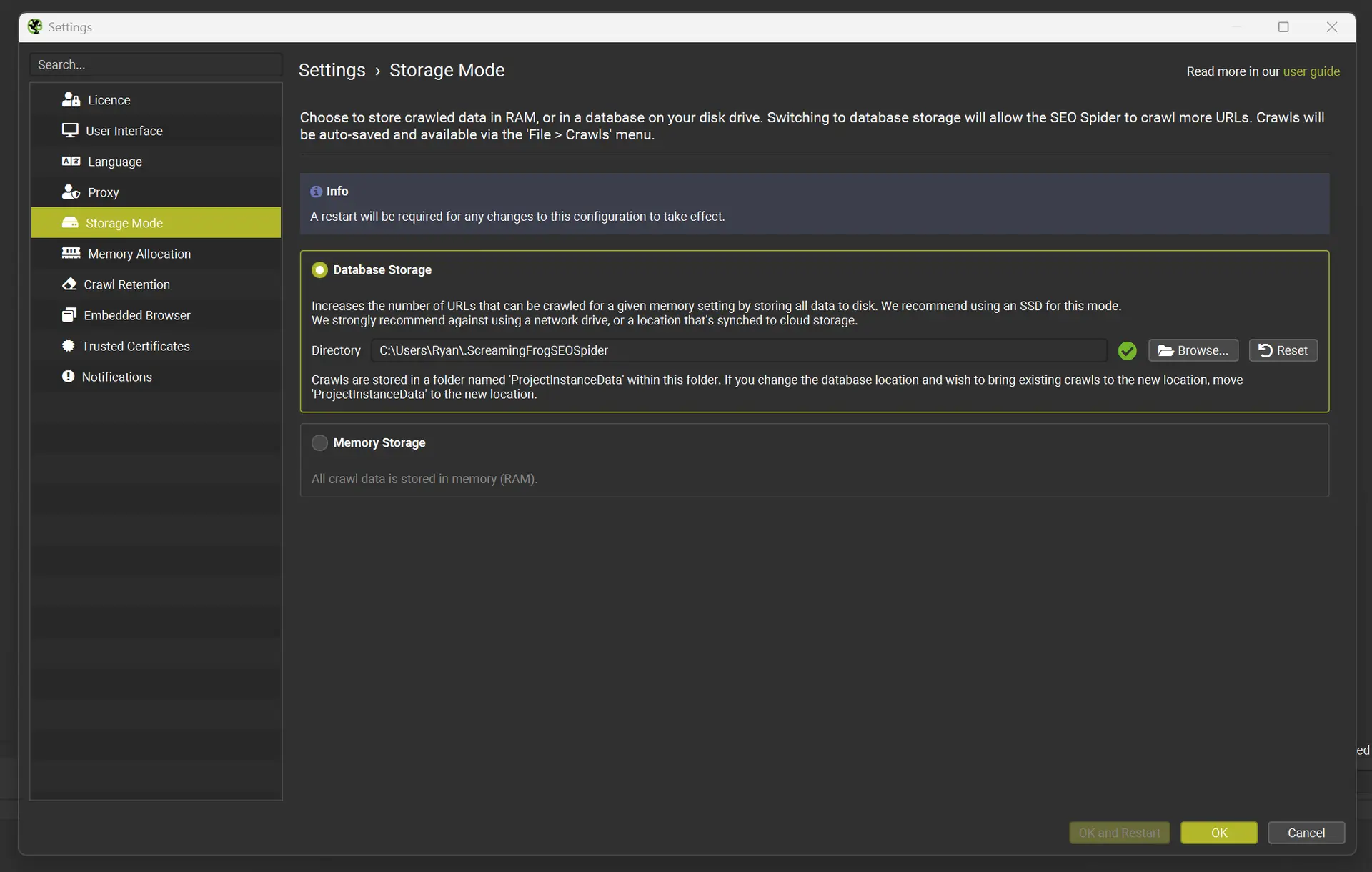
For larger websites, this is usually the single biggest stability improvement.
Database Storage Mode saves crawl data to disk instead of keeping everything in RAM.
That matters once crawl sizes become substantial.
If possible, run the crawl on an SSD. Disk speed genuinely makes a difference during very large crawls.
A few practical points:
– keep plenty of disk space free
– close unnecessary applications
– organise crawl files properly
– expect large exports on enterprise websites
Set memory allocation sensibly
Even in database mode, memory still matters.
Screaming Frog provides guidance around memory allocation and crawl capacity, but in practical terms, stability matters far more than squeezing every last bit of performance from your machine.
A crawl finishing successfully at a moderate speed is far more useful than a faster crawl crashing halfway through.
That sounds obvious, but people still chase speed constantly.
Choose a crawl speed the server can tolerate
Thread count controls how many URLs Screaming Frog processes simultaneously.
Higher thread counts increase crawl speed, but they also increase load on the server.
The right number depends heavily on:
– hosting quality
– caching setup
– application stability
– CDN behaviour
– bot protection rules
If you control the site yourself, you can test more aggressively.
If you are crawling a client website, stay conservative unless the development team has confirmed what the server can comfortably handle.
A practical approach:
– start low
– increase gradually
– monitor response times
– watch for 429s, 503s, and timeouts
The goal is a stable crawl that runs consistently for hours.
Not a crawl that flies for ten minutes and then gets blocked.
Top Tip
“Add the site’s required cookie if needed.”
Some websites return errors to crawlers unless a session or region cookie exists. This can happen because of WAF rules, bot protection, load balancing, localisation logic, or logged-in state handling.
How to avoid crawling millions of useless URLs
Large websites often look much bigger than they really are.
Most of the inflation comes from URL variation.
You can easily end up crawling:
– tracking parameters
– session IDs
– filter combinations
– sorting URLs
– pagination traps
– infinite calendar URLs
If you crawl all of those blindly, the audit becomes slow, bloated, and noisy.
More importantly, genuinely important issues become harder to spot.
Use exclude rules early
Build a shortlist of patterns you almost always exclude.
Typical examples include:
– utm_ parameters
– internal search URLs
– filter and sort parameters
– duplicate tag pages
– session IDs
Use Screaming Frog’s exclude rules before the crawl starts.
Not halfway through after the crawl has already ballooned.
Use include rules for tighter audits
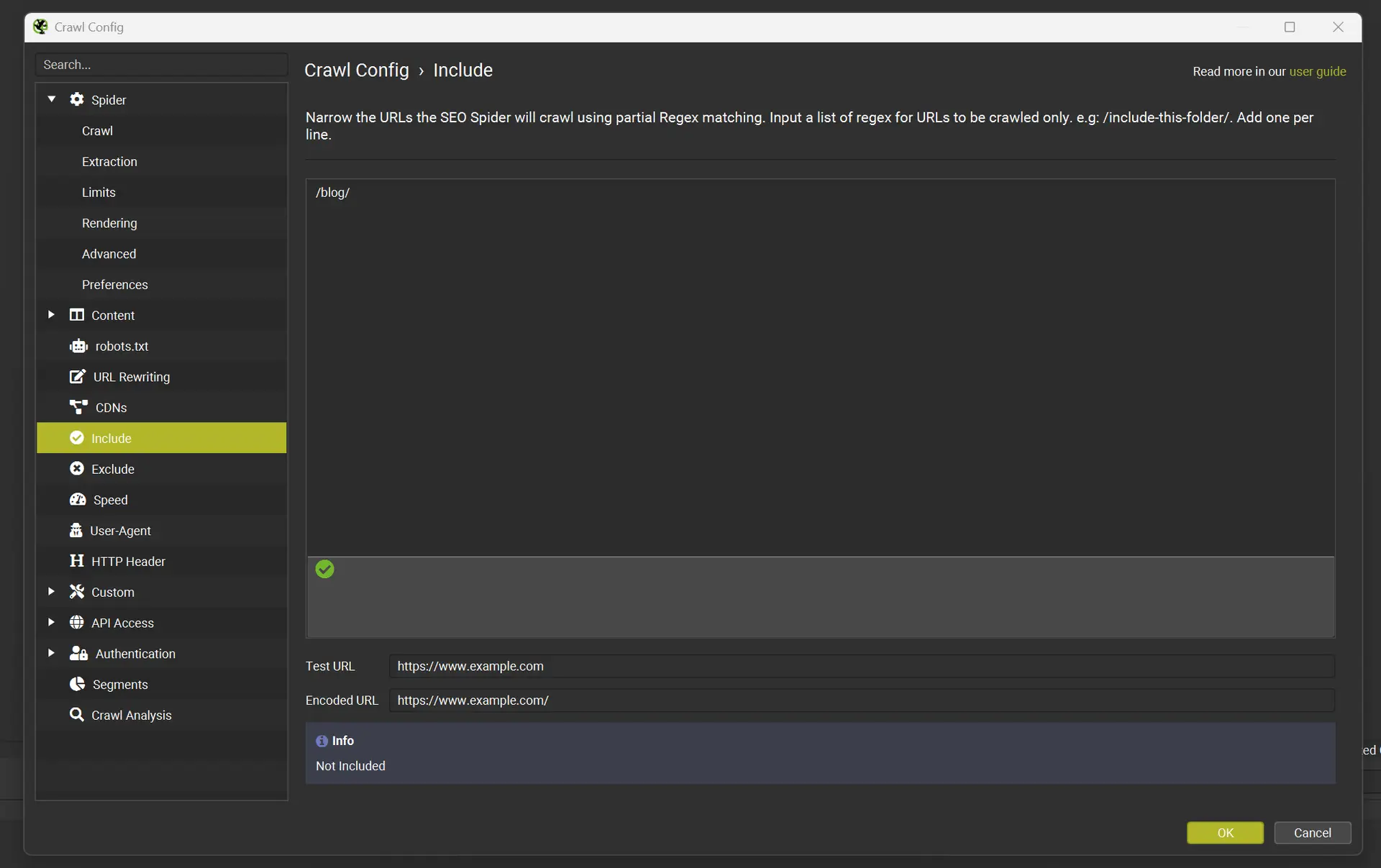
On very large websites, include rules are often safer than exclude rules.
Instead of trying to block endless variations, you only allow the patterns you actually want.
Examples:
– crawling only /blog/
– crawling only /product/
– crawling only a specific category structure
– targeting URLs that follow a defined pattern
This works especially well for phased audits.
Full-site crawls can become extremely large data sets surprisingly quickly.
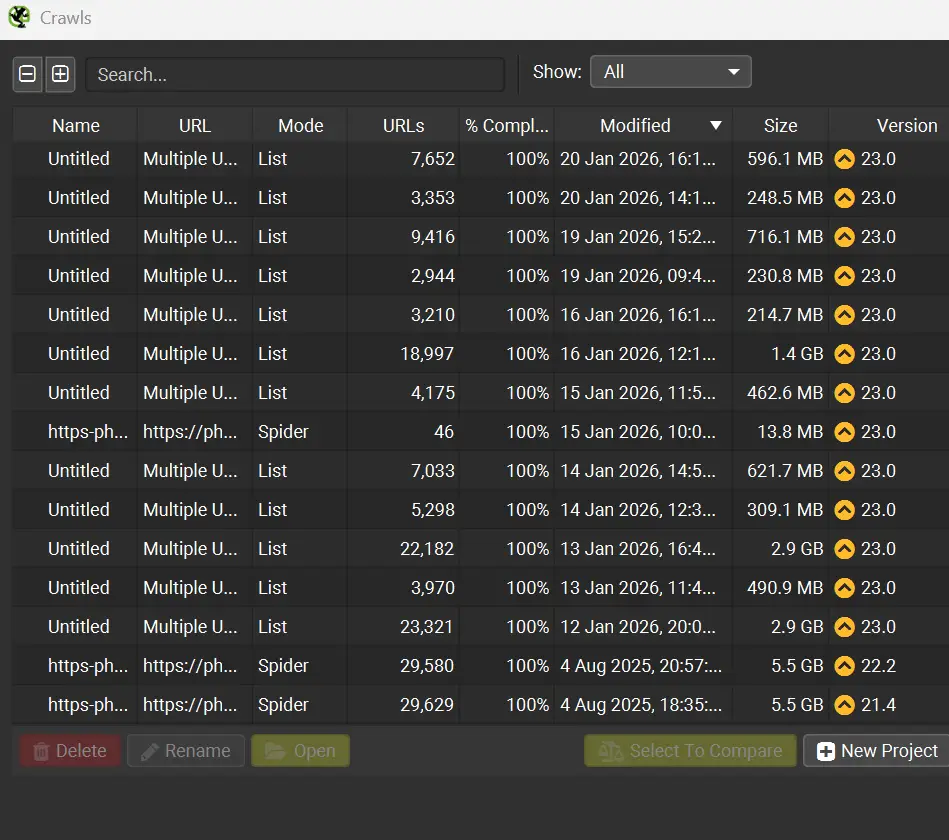
Breaking audits into smaller focused sections is kinder on storage, easier on your machine, and much easier to analyse afterwards.
Decide how parameters should be treated
Parameters are not automatically bad.
Some parameters only handle tracking. Others generate genuinely useful content.
The important thing is deciding which parameter types matter for search visibility.
If parameter combinations create crawl traps, the cleaner approach is normally:
– block them during the main crawl
– audit parameter behaviour separately using controlled samples
Trying to analyse everything simultaneously usually becomes chaotic.
Break large websites into manageable sections
Even with strong crawl settings, crawling everything at once is not always the best use of time.
Segmented crawls usually produce cleaner analysis and faster fixes.
Crawl by directory
This is normally the simplest approach.
For example:
– /blog/
– /category/
– /product/
– /guides/
The main benefit is organisational.
Outputs naturally align with how the website is structured, which makes briefing developers or content teams much easier.
Crawl by sitemap
If the website uses clean XML sitemaps, they can become extremely useful crawl sources.
This works well when:
– navigation does not expose every page
– you want to prioritise indexable URLs
– you want to compare sitemap URLs against discovered URLs
It also reveals situations where the business believes pages exist but the internal linking structure barely supports them.
That happens surprisingly often.
Crawl by priority URL list
Sometimes you do not need a complete crawl.
A focused list might be enough.
Examples include:
– top landing pages
– highest-converting products
– important category pages
– core informational content
You can then crawl those pages plus surrounding internal links to a defined depth.
This approach works particularly well when:
– time is limited
– the website is extremely large
– you only need commercial insights
– you are validating changes after development work
If you only need to crawl specific URLs, switch Screaming Frog from Spider Mode to List Mode and upload a defined URL list instead.
Top Tip
“Run a pilot crawl first.”
Pick a section representative of the wider site and test your planned configuration.
Check:
– server response stability
– parameter handling
– exclude rules
– crawl traps
– blocking behaviour
– export usefulness
A short pilot crawl can save hours later.
Handling JavaScript rendering on large websites
JavaScript changes crawl complexity massively.
Some websites render most important content directly in HTML.
Others rely heavily on client-side rendering.
If you enable rendering across a very large website unnecessarily, crawl time and resource usage can increase dramatically.
A more practical approach is usually:
– start with a standard crawl first
– map the basic structure
– identify templates likely relying on JavaScript
– run smaller rendered crawls afterwards
Templates commonly affected include:
– product filters
– SPA navigation
– client-side metadata
– accordions and tabs
– lazy-loaded content
The main thing you are looking for is mismatch.
Does the crawler see the same thing the browser sees?
If not, that section probably needs deeper investigation.
Make crawl outputs easier to work with
A huge crawl export is not automatically useful.
The real value comes from turning findings into actions.
Group findings by template and section
Instead of reporting 40,000 missing titles individually, identify:
– which template generates them
– which directories are affected
– what a correct version should look like
That turns a giant spreadsheet into a realistic development task.
Developers and content teams work far faster with root causes than URL lists.
Focus on indexable URLs first
Large crawls become far easier to manage when you separate:
– indexable URLs
– non-indexable URLs
The highest-impact technical problems usually sit inside:
– canonical signals
– internal linking
– crawl depth
– indexation handling
Trying to fix everything simultaneously rarely works well.
Save crawl files properly
Large crawls are difficult to recreate exactly.
Save projects clearly and consistently.
Examples:
– site-main-2026-02-17-dbmode
– blog-folder-2026-02-17
– products-sitemap-2026-02-17
Future-you will appreciate this later.
Especially during migrations or comparison audits.
Top Tip
“Patterns matter! When large crawls start generating errors, the important question is what those errors actually mean”
For example:
– 429 errors usually indicate rate limiting
– 503s can point to server strain or unstable infrastructure
– repeated timeouts may indicate bloated templates
– spikes in 5xx responses can reveal fragile sections like search or filtering systems
– If errors cluster around specific templates or directories, that is often a genuine technical finding rather than just crawler noise.
Cleaning up internal linking and crawl depth at scale
Internal linking audits become difficult once websites grow large.
Still, crawls reveal useful patterns surprisingly quickly.
Look for important pages with weak internal support
Warning signs include:
– low internal inlinks
– excessive crawl depth
– orphaned pages
– key pages hidden behind scripts or parameters
Some pages technically exist but are barely connected to the wider website.
Google can still find them eventually, but they rarely perform as well as properly supported pages.
Spot pagination and navigation issues
Large e-commerce and publisher websites often generate messy pagination structures.
Common issues include:
– duplicate pagination pages
– thin archive pages
– crawl traps through sorting
– endlessly generated URL variations
A crawl helps you understand:
– which pages receive the strongest internal support
– how navigation pushes crawlers through the site
– where crawl paths become inefficient
Identify pages collecting link equity accidentally
Some URLs become internal hubs unintentionally.
Examples include:
– old category pages
– abandoned campaign pages
– tag archives
– outdated seasonal hubs
If those pages remain linked heavily across templates, they can quietly pull internal authority away from more important commercial URLs.
That problem tends to build slowly over time.
Common large-site crawl problems and how to handle them
The crawl never finishes
Usually caused by:
– parameter traps
– internal search pages
– calendar URLs
– unstable crawl speed
– uncontrolled filtering systems
Fixes normally involve:
– stricter include/exclude rules
– slower crawl rates
– crawl segmentation
– limiting parameter behaviour
Your machine becomes unusable
Most often this happens because:
– memory mode is enabled
– memory allocation is too aggressive
– disk space is low
– too many applications are running simultaneously
Database Storage Mode normally solves a large part of this.
You get blocked by the site
Aggressive crawling often triggers WAF or rate-limiting rules.
If you start seeing large volumes of:
– 403s
– 429s
– connection failures
then reduce crawl speed.
You can also:
– crawl outside peak hours
– lower thread counts
– coordinate with hosting teams
– whitelist your IP if appropriate
The crawl produces too much data to use
This usually happens because the crawl collected everything without a clear analysis plan.
The cleaner approach is:
– focus on indexable URLs first
– group issues by template
– segment crawls logically
– create action lists tied to teams or owners
Otherwise the export just becomes another spreadsheet nobody revisits.
Read my article on how you can enhance your SEO Efforts with Screaming Frog
Frequently Asked Questions About Crawling Large Websites With Screaming Frog
How many URLs can Screaming Frog crawl?
It depends on:
– your machine
– storage mode
– memory allocation
– crawl configuration
– the website itself
In practice, server behaviour and URL structure often become the limiting factors before Screaming Frog does.
What thread count should I use?
Start conservatively.
Increase gradually while monitoring:
– response times
– timeout frequency
– 429s
– 5xx errors
Stable crawls almost always produce better audits than aggressive unstable crawls.
Should I crawl parameters on e-commerce websites?
Usually only selectively.
Parameter combinations can create enormous crawl bloat very quickly.
A cleaner approach is normally:
– exclude most parameters
– test specific parameter sets separately
– sample behaviour intentionally
How should I handle JavaScript-heavy sites?
Run a standard crawl first.
Then run smaller rendered crawls on templates likely relying on JavaScript.
Rendering entire enterprise sites unnecessarily can become extremely resource-heavy.
What is the fastest way to turn a huge crawl into practical fixes?
Segment the crawl.
Then group findings by:
– template
– section
– root cause
That gives development and content teams something actionable instead of an overwhelming export.
How All This Fits Together
Crawling large websites with Screaming Frog is less about pressing Start and more about controlling the crawl properly.
Storage mode, crawl speed, memory allocation, and URL rules are what keep large crawls stable. Once those foundations are set correctly, the tool becomes surprisingly reliable, even on very large websites.
The other half is analysis.
A huge crawl only becomes valuable when you turn the findings into clear actions.
Segment the website. Focus on indexable URLs first. Group patterns by template. Prioritise root causes over giant URL lists.
That is how large crawls become useful technical audits rather than oversized spreadsheets.
If you want a second pair of eyes on your crawl setup, or help turning a large crawl into a practical SEO audit plan, get in touch and I will help you build an approach that fits your website and your resources.