Most websites already have a running list of “things we should test”. The problem is that the list rarely turns into a useful plan.
Teams get pulled towards the loudest opinion in the room. Or the quickest tweak. Or whatever a competitor changed last week.
That usually creates activity rather than learning.
If you are planning your 2026 roadmap, the better question is simpler. Which experiments are actually worth the effort?
Not tiny cosmetic changes that create noise. Not endless rounds of button-colour debates. Real experiments that help you understand how people find your site, how they make decisions, and what helps them move forward confidently.
So here are five website experiments worth running in 2026.
These are written for general website pages rather than e-commerce-specific setups. More importantly, each one is designed to give you reusable insight across the site, not just a short-term lift on one URL.
Before getting into the list though, there is an important reality worth mentioning.
Testing results are shaped by a lot of moving parts. Your audience matters. Your offer matters. Traffic sources matter. Device mix matters. Timing matters too. A change that works brilliantly on one website can do absolutely nothing on another.
Sometimes it can even make things worse.
Still, these five areas tend to be sensible starting points because they sit close to the moments that influence decisions most. How people discover you. How quickly they understand the page. And what helps them feel comfortable taking the next step.
Summary
– Test titles that better match real search intent, so the right visitors click through with the right expectations.
– Test CTA wording that explains the next step clearly instead of pushing vague actions.
– Test hero sections that immediately explain who the page is for, what it offers, and why somebody should trust it.
– Test controlled template rebuilds that fix repeated structural issues across groups of pages.
– Test recommendation blocks that help people continue their journey instead of hitting a dead end.
The point is not finding one “winning trick”.
It is building reusable learning you can apply across the site with less guesswork.
And it is worth remembering that success rarely comes down to clicks alone. Good experiments improve the quality of the journey as well. Enquiries, bookings, calls, lead quality, progression through the site. That is usually where the meaningful signals sit.
Why these experiments keep appearing on serious roadmaps
Website testing conversations often split into two completely separate camps.
One side focuses heavily on search visibility, impressions, rankings, and click-through rate.
The other focuses on behaviour after the click. Conversions, enquiries, signups, sales.
Real websites do not work like that though.
Those things overlap constantly.
A title change that increases clicks but attracts the wrong audience can reduce lead quality. A redesign that improves conversions but weakens relevance can slowly reduce traffic over time.
That is why these experiments matter.
They sit in the overlap between discovery and decision-making.
They influence how people choose your result in search, how quickly they understand your page, and how confidently they move to the next step.
They are also practical.
You do not need a complete rebuild. Most teams can run versions of these experiments using tools and reporting they already have.
Experiment 1: Test titles around real search behaviour, not clever wording
Title testing is still one of the fastest experiments most websites can ship.
It is also one of the easiest places to fool yourself.
Search Engine Land shared research showing Google changed titles in a large share of cases in Q1 2025. While Zyppy’s study also found frequent rewrites and highlighted patterns around length and formatting.
That does not mean titles stopped mattering.
It just means the goal is clarity and alignment rather than obsessing over a “perfect” headline nobody may actually see.
What to test on general website pages
The best title tests usually start with intent.
Not creativity.
Look at the language people already use when searching for the page topic, then make sure the title sounds like a natural answer to that query.
A few areas tend to work well.
Query alignment.
Mirror the wording real users already search with.
This is not about stuffing awkward keyword variations into every title. It is about sounding relevant immediately.
If somebody searches “accountant for small business london”, a title that leads with “Small Business Accountants in London” will usually make more sense than something vague or overly branded.
Simple beats clever surprisingly often.
Front-loading.
People skim quickly.
Search engines also truncate and rewrite aggressively.
Putting the clearest phrase near the start of the title tends to work better than burying the main point halfway through.
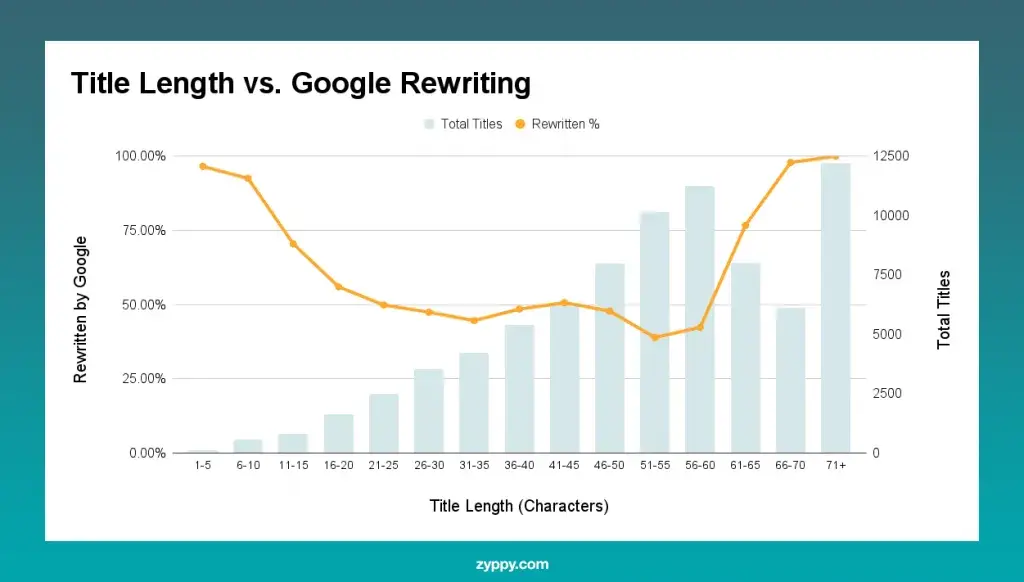
Zyppy’s findings suggested rewrites were less common within certain length ranges, though it is safer to treat that as directional rather than absolute.
Add one genuinely useful detail
Useful detail can help somebody choose you before they even click.
That might be:
– Prices
– Examples
– UK
– For startups
– Step-by-step
– Templates
– Case studies
Only include details the page genuinely covers though.
People notice quickly when the title promises something the page barely mentions.
Use dates carefully
Dates can help on pages tied closely to timing.
Pricing pages. Regulations. Deadlines. Trend reports.
But old dates create the opposite effect.
If the page is unlikely to stay updated consistently, it is usually safer not to force a year into the title.
How to run title tests without misleading yourselff
A very common approach is:
“Change the title and watch Search Console.”
Sometimes that works.
Often it becomes messy quite quickly.
Traffic changes constantly for reasons unrelated to the title itself. Rankings move. Competitors adjust snippets. Demand fluctuates. Google rewrites the title anyway.
If possible, treat title testing more like a controlled experiment.
SEO split testing tools can help, but even a simpler approach works better than random changes. Test similar pages in groups. Change half. Leave half untouched. Compare the trend over several weeks rather than reacting to a few days of movement.
It also helps to stay grounded by looking at real case studies.
SearchPilot has published examples where relatively small title adjustments created measurable changes in organic traffic. They also have examples where changes produced no impact at all.
That second part matters.
Not every experiment creates a win.
Sometimes “no change” is still useful
One of the biggest mistakes teams make is treating every experiment like a competition.
The value is often in the learning.
If impressions increase but clicks stay flat, you may have improved relevance without improving appeal.
If clicks increase but enquiries drop, the title may be attracting visitors with the wrong expectation.
Both outcomes tell you something valuable about intent.
That is usually more useful long term than celebrating a temporary click increase with no commercial impact.
Experiment 2: Test CTA wording before obsessing over design
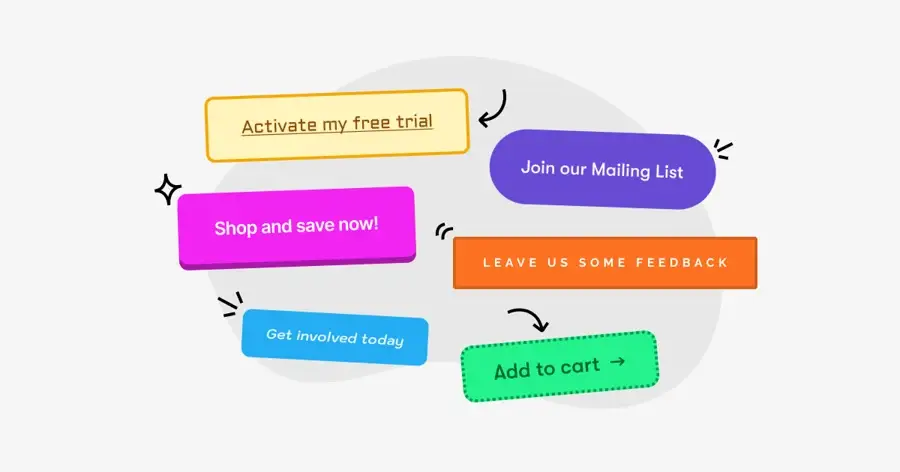
CTA buttons have been tested endlessly for years.
Sometimes usefully.
Sometimes not.
A lot of teams still spend far too long debating colours while ignoring the thing that actually shapes decisions most.
Meaning.
People click when the next step feels clear, sensible, and low-risk.
That is usually more important than the shade of green on the button.
Nielsen Norman Group’s research
around microcopy touches on this well. Good microcopy supports interaction by helping users understand what happens next.
That is exactly what strong CTA copy should do.
What to test on most sites
The strongest CTA experiments tend to focus on expectation-setting.
Specific actions instead of vague actions
“Submit” does not tell anybody much.
Neither does “Learn more” in a lot of contexts.
Compare that with:
– Get a quote
– See pricing
– Book a call
– Download the guide
– View examples
The action feels clearer immediately.
You may even get fewer clicks.
That is not automatically bad.
Clearer CTAs often reduce low-intent clicks and improve the quality of the people moving forward.
Benefit-led wording vs task-led wording
Small wording shifts can subtly change how heavy an action feels.
“Get my estimate” can feel more personal than “Start estimate”.
“See examples” can feel easier than “Contact sales”.
These are small differences, but small differences near decision points matter.
Add reassurance near the CTA
A short line underneath a button can remove friction surprisingly well.
Simple reassurance works because it answers worries at the exact moment they appear.
Things like:
– No spam
– Takes 2 minutes
– No commitment
– Free consultation
Only use reassurance that reflects reality though.
If your process immediately contradicts the promise, trust disappears quickly.
Offer two paths for different intent levels
Not every visitor is ready to enquire immediately.
That part gets overlooked constantly.
A primary CTA beside a lower-pressure option often works better than forcing everybody towards the same action.
For example:
– Get a quote
– See recent projects
Or:
– Book a demo
– Watch a walkthrough
Giving people a safer next step can improve the overall journey significantly.
Design still matters, but accessibility matters more
Once the wording is clear, design helps people notice and use the CTA.
Bad accessibility can quietly damage performance.
Weak contrast, poor focus states, tiny tap areas. Those things affect real users every day.
WCAG 2.2 includes guidance around contrast and focus visibility for keyboard users. If buttons become harder to use, especially on mobile, conversion problems often follow.
Sometimes teams misread this as:
“Mobile traffic converts badly.”
Really, the page simply became harder to use.
Measure outcomes beyond button clicks
Button click rate is only part of the picture.
Track what happens after the click.
If the CTA leads to a form, measure:
– Form starts
– Form completions
– Qualified enquiries
If it leads to bookings, measure completed bookings.
If it leads to downloadable content, track what happens later as well.
Did those users eventually enquire?
Did they engage meaningfully?
That is where the useful signal sits.
Top Tip:
“Define success before launching the test”
This sounds obvious, but honestly, this is where things often become messy.
A lot of tests begin without a proper definition of success.
Then everybody grabs whichever number supports their opinion afterwards.
If the real goal is qualified enquiries, judge the experiment against qualified enquiries.
Not button clicks.
Not pageviews.
Not surface-level engagement metrics.
That one habit alone makes testing conversations far calmer internally.
Experiment 3: Hero sections that answer the right question quickly
Hero sections are not there to look impressive.
They are there to help visitors decide if they are in the right place.
That is the real job.

Nielsen Norman Group’s research around scrolling behaviour consistently shows that users spend a large share of attention near the top of the page and within the first few screenfuls.
People absolutely do scroll.
But they scroll when the opening section gives them a reason to continue.
So most hero tests are really clarity tests.
What to test in hero sections
Sharper value statements
A lot of hero copy tries to speak to everybody.
That usually means it lands with nobody.
Broad claims like:
“Helping businesses grow through innovative solutions”
rarely explain anything meaningful.
Clearer statements work better because they reduce effort.
Something like:
“Accountancy support for UK startups and freelancers”
immediately tells visitors who the page is for.
That simplicity matters.
Add proof close to the claim
Interest is not always the barrier.
Trust usually is.
A small proof point near the headline can reduce hesitation early.
That could be:
– A review score
– Client numbers
– Accreditation
– Short testimonial snippets
– Years operating
Nothing exaggerated.
Just enough evidence to support the claim naturally.
Use visuals that actually help understanding
Stock imagery often fills space without helping decisions.
A better hero visual usually explains something.
That might be:
– A product screenshot
– Before-and-after example
– Team photo
– Process diagram
– Real project image
People do not need cinematic visuals.
They need confidence that they understand what they are looking at.
Test CTA pairings carefully
Hero sections are also useful places to test how the primary and secondary CTA work together.
A softer secondary action often improves confidence without weakening the main CTA.
That balance matters more than people think.
Measure behaviour across the whole page
One problem with hero testing is that teams often measure one tiny action in isolation.
Hero changes influence the entire session.
Useful measurements can include:
– Scroll depth
– Time to first action
– CTA clicks
– Navigation clicks
– Pricing page visits
– Example/project views
– Contact progression
Device splits matter too.
A hero that works nicely on desktop can become chaotic on mobile very quickly.
A nuance many teams miss
Hero sections often fail because they are written by insiders.
Internal terminology creeps in.
Abstract phrasing creeps in.
Acronyms creep in.
Then everybody internally understands the message perfectly while new visitors quietly struggle.
Replacing vague platform language with plain explanations is often one of the highest-value hero experiments you can run.
You are not simplifying the business.
You are reducing friction.
There is a difference.
Experiment 4: Controlled template rebuilds instead of endless patching
Template redesigns sound intimidating.
Sometimes they should.
They are bigger experiments than changing a title or CTA.
But they also produce some of the most useful learning because templates repeat patterns across entire groups of pages.
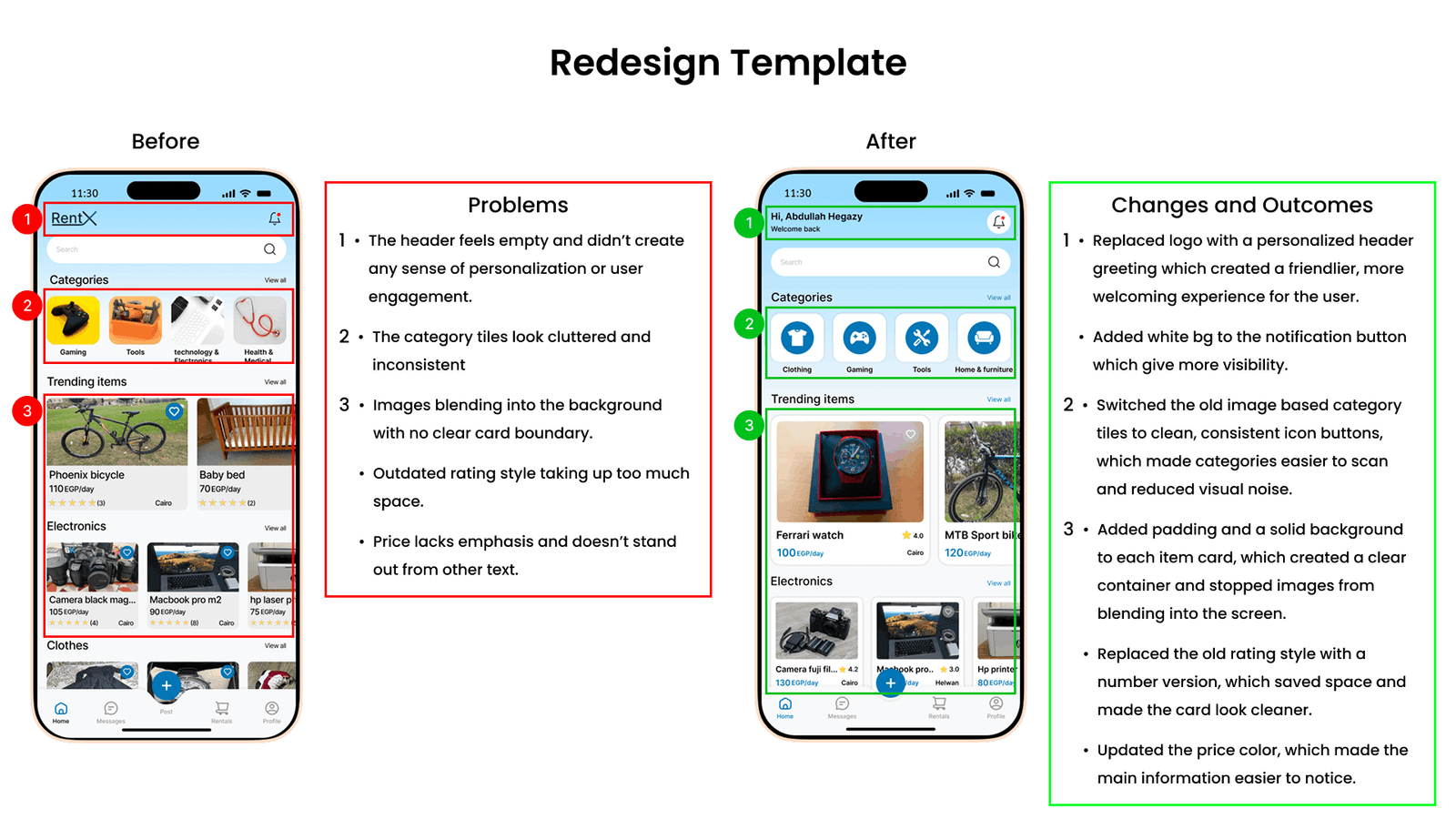
If a page structure is weak, that weakness usually exists everywhere.
Poor hierarchy.
Weak mobile layouts.
Too many competing actions.
Confusing structure.
Fixing the template can improve dozens of pages at once.
The mistake most teams make is trying to redesign everything simultaneously.
Then they cannot isolate what actually changed performance.
What a controlled rebuild actually means
The idea is fairly simple.
Keep the offer and the core content relatively stable.
Focus the experiment on usability, structure, hierarchy, and readability.
That can include:
– Reordering sections
– Improving scanability
– Reducing clutter
– Simplifying navigation
– Improving spacing
– Making mobile layouts easier to use
Accessibility checks should sit inside the rebuild process as well, not as an afterthought.
WCAG 2.2 guidance around contrast and focus visibility matters here too.
A cleaner-looking template that becomes harder to use is not an improvement.
Start with one structural idea
Most successful rebuild experiments begin with one clear hypothesis.
Not twenty.
One common improvement is changing the page order itself.
A lot of websites still begin with company-focused introductions before addressing the visitor’s actual problem.
Testing a structure that starts with:
– The user problem
– Expected outcomes
– Process
– Proof
– CTA
can often improve clarity significantly.
Another common improvement is simplifying mobile layouts.
Single-column structures with cleaner headings and shorter sections usually create a calmer reading experience on smaller screens.
And honestly, reducing clutter alone fixes more issues than many teams expect.
Fewer popups.
Fewer interruptions.
Fewer competing CTAs.
That part gets overlooked constantly because everybody wants to keep adding things.
Bigger tests need calmer planning
Template tests often take longer to stabilise.
That is normal.
Optimizely’s guidance around sample sizes and minimum detectable effect is useful here because it forces teams to define what level of improvement actually matters.
Without that, tests tend to drift endlessly.
Or people celebrate tiny movements that have no commercial value.
If traffic is low, measuring earlier behavioural signals first can still be worthwhile.
Just avoid pretending weak data proves something confidently.
TOP TIP
“Stop chasing “any improvement”
A surprising number of testing programmes quietly fall apart because nobody defines what meaningful improvement looks like.
A 1% shift may technically count as movement.
That does not automatically make it commercially useful.
Sometimes the better experiment is improving lead quality.
Or reducing friction.
Or improving completion rate on mobile.
Not every valuable result needs to look dramatic on a dashboard.
That is an important mindset shift for 2026.
Testing is not gambling.
It is a structured way to reduce uncertainty over time.
Experiment 5: Recommendation blocks that genuinely guide people
Recommendation blocks exist on almost every website.
Even sites that do not sell products still recommend something.
Articles.
Guides.
Services.
Case studies.
Downloads.
Related resources.
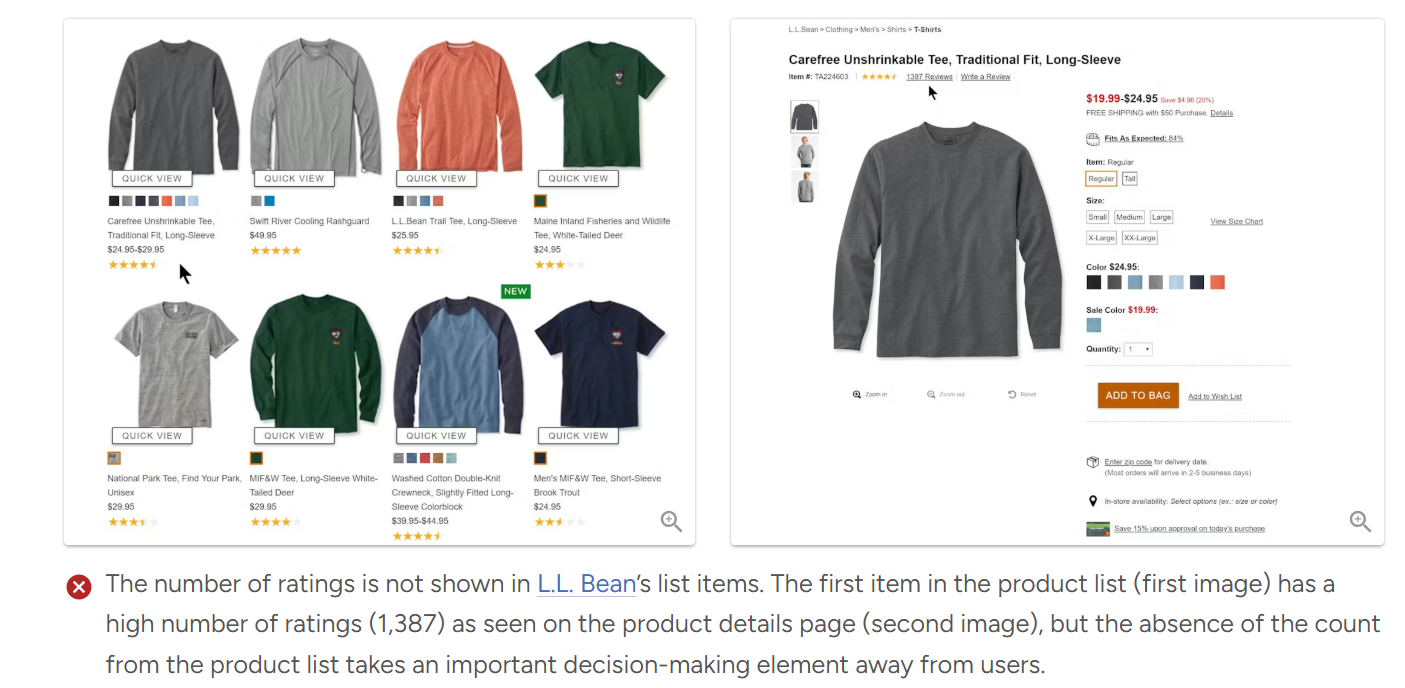
The issue is that many recommendation sections feel like placeholders rather than useful guidance.
Tiny thumbnails.
Generic headings.
No context.
No explanation.
And when people cannot judge value quickly, they usually ignore the recommendation entirely.
What to test on recommendation sections
Add context, not just links
“Related articles” is functional.
It is not very helpful.
Adding short guidance often improves engagement because it reduces decision effort.
Simple labels work surprisingly well:
– Start here
– Best next step
– Good for beginners
– Compare options
– Popular with startups
That extra context helps people self-select more confidently.
Include lightweight metadata
People use tiny details to make decisions.
Reading time.
Last updated dates.
“Best for” descriptions.
Difficulty level.
These details help visitors judge relevance quickly without feeling overwhelmed.
Test recommendation logic itself
A lot of recommendation systems simply group content by category.
That is easy.
It is not always useful.
Journey-based recommendations can work far better.
Instead of:
“More articles about SEO”
try:
“What most businesses read next after this guide”.
That feels more intentional.
Test layouts calmly
Carousels hide options.
Lists feel calmer.
Tiles work well when visuals matter.
There is no universal answer here because audience behaviour changes significantly across devices and industries.
That is exactly why testing matters.
Measure downstream behaviour, not just clicks
Recommendation blocks are often judged purely on click-through rate.
That misses the bigger picture.
The more useful question is:
What happens after somebody clicks?
Do they continue exploring?
Do they enquire later?
Do they engage more deeply?
Or do they bounce immediately because the recommendation created the wrong expectation?
Exit rates matter here too.
A recommendation block that reduces dead-end exits on key pages may be creating far more value than the click-through rate alone suggests.
Top Tip
“Recommendation blocks are part of the journey.”
This is where many websites accidentally undersell themselves.
Recommendation sections often get treated like filler at the bottom of the page.
But for lower-intent visitors, recommendations are sometimes the thing that keeps the journey alive.
Not everybody is ready to contact you immediately.
Some people still need reassurance.
Examples.
Proof.
Education.
Context.
Good recommendation blocks support that naturally.
Picking the right pages for these experiments
Technically, you can test almost anywhere.
Practically, some pages give cleaner learning than others.
The best starting points are usually pages with:
– Stable traffic
– Clear intent
– Consistent goals
That often means:
– Service pages
– Pricing pages
– Contact pages
– Key guides
– Hub pages
If multiple similar pages exist, test across the group rather than relying on one isolated URL.
The data becomes easier to interpret and the risk becomes lower.
And if you only have one major traffic-driving page, that is fine too.
Just avoid assuming every result automatically applies across the entire website.
A calmer way to build a 2026 testing roadmap
A good roadmap should feel realistic.
Not like a giant wishlist nobody has time to deliver.
For most websites, a sensible progression looks something like this:
Start with titles on pages already earning impressions.
Then move into CTA wording and hero clarity on major entry pages.
After that, choose one important page template and rebuild it carefully.
Then improve recommendation blocks so the journey between pages feels more intentional.
Nothing flashy.
But practical.
And importantly, document what you learn.
A short internal note for each experiment is enough:
– What changed
– What you expected
– What happened
– What you would reuse
After six months, those notes become one of the most useful assets your team has.
Because the real value of testing is not isolated wins.
It is accumulated understanding.
FAQs about running website experiments in 2026
How long should a website test run?
Long enough to smooth out normal variation.
For many websites, that means at least two full weeks. Sometimes much longer if conversion volume is low.
Sample size calculators can help estimate this before launching the experiment.
And if traffic is limited, it is often smarter to measure earlier behavioural signals first rather than pretending weak data proves something confidently.
What should smaller websites test first?
If traffic is limited, start with experiments closest to existing behaviour.
Title tests can work well because they improve click quality from traffic you already receive.
Hero clarity and CTA wording are also strong starting points because they affect understanding immediately.
Small improvements to clarity often produce larger gains than people expect.
How do you avoid “busy work” testing?
Most low-value tests share the same problems.
Weak hypotheses.
Shallow success metrics.
No clear follow-up action.
A useful habit is writing a simple hypothesis before building anything:
“If we change X for Y reason, we expect Z outcome.”
Then decide in advance what counts as success, failure, or inconclusive learning.
That structure keeps experiments grounded.
What is the safest way to test a full template redesign?
Keep the offer and tracking stable.
Change the structure and usability gradually.
Run the rebuild on one page type first rather than across the whole site.
And build accessibility checks into the process from day one.
That part should never become an afterthought.
How do recommendation blocks work on non-ecommerce websites?
The same basic principle applies.
People still need context before making decisions.
Simple additions like reading time, “best for” labels, or short explanations help visitors choose more confidently.
Then measure what happens afterwards.
Not just the click itself.
How This All Ties Together
If there is one thing worth taking from all of this, it is probably this.
A good experiment is not about making clever changes.
It is about asking clear questions and measuring the right outcomes.
The five experiments above work well because they sit close to real decisions.
They influence how people choose your result in search, how quickly they understand your page, and how comfortable they feel taking the next step.
And honestly, that is where most meaningful website improvements come from.
Not dramatic redesigns.
Not trend-driven tweaks.
Just clearer communication and better journeys.
If you want help turning these ideas into a realistic testing roadmap for your own website, start with three things:
– Your main page types
– Your primary business goal for 2026
– What your team can realistically ship each month
That is usually enough to build a sensible sequence of experiments without creating chaos internally.
And that tends to produce better results than trying to test everything at once.