Google Business Profile Images: Why They Matter More Than Most Businesses Realise
For a lot of small businesses, a Google Business Profile is the first proper impression a customer gets.
Before they visit your website. Before they read an about page. Before they speak to anyone.
They search for a service nearby, your profile appears, and within a few seconds they make a judgement about the business behind it.
That’s why local search feels slightly different from traditional SEO. In many cases, your Google Business Profile carries more weight than your homepage.
If the profile looks neglected, customers notice. Low-quality photos, outdated branding, missing information, or empty sections quietly create doubt. People rarely stop and analyse why something feels off. They just move on.
A well-maintained profile does the opposite. It gives people confidence before they’ve even clicked.
And honestly, one of the simplest ways to improve that first impression is through imagery.
Summary: Google Business Profile Images
- Your Google Business Profile is often the first thing customers see when searching locally, so the photos you use directly influence trust, clicks, calls, and visits.
- Strong visuals help your business look active, professional, and genuine before someone ever reaches your website.
- The most important image types to optimise are your logo/profile image, cover photo, and additional business photos.
- Additional images should include a mix of interior shots, exterior photos, products, team images, and seasonal or event updates.
- Google Business Profile posts also support imagery, including What’s New posts, Events, and Offers.
- Image dimensions matter more than many businesses realise because poor cropping can make otherwise good visuals look messy in thumbnails.
- Authentic photos almost always work better than overly polished stock imagery.
- The goal is simple: keep your imagery current, consistent, and real so your business feels trustworthy at first glance.
About Google Business Profile
A Google Business Profile gives customers the essentials quickly.
Opening hours. Address. Phone number. Reviews. Directions. Website links.
It also gives businesses a way to publish updates, promote offers, share events, and stay visible in local search.
That’s partly why local SEO specialist Greg Gifford often says businesses should treat their Google Business Profile like their new homepage and “optimise the hell out of it.”
And realistically, he’s right.
A huge number of local buying decisions happen directly from the search results now. People compare businesses quickly. They skim photos. They read reviews. They decide who feels trustworthy.
Around 90% of consumers read online reviews before visiting a business. At the same time, businesses with complete and accurate profiles are significantly more likely to appear in local search results.
Still, plenty of businesses barely touch their profile after setting it up.
The information becomes outdated. Photos stay unchanged for years. Reviews go unanswered.
That neglect creates friction.
The good news is that customers are not expecting perfection. They just want reassurance that the business is active, legitimate, and looked after.
Photos help massively with that.
There are obviously far more moving parts involved in managing a Google Business Profile properly than can fit into one article. Local SEO on its own can become a very deep rabbit hole.
But for this piece, I want to focus specifically on imagery. More importantly, how businesses can improve the different image types across their profile without overcomplicating the process.
Why Imagery Matters On Your Google Business Profile
Most business owners underestimate how quickly customers judge visuals.
People don’t land on a profile and carefully read every section from top to bottom. They scan.
The images usually shape the first impression before anything else does.
A clean, well-lit image instantly makes a business feel more credible. Poor-quality imagery tends to do the opposite. It can make even a genuinely good business feel neglected online.
That sounds harsh, but it’s true.
Good imagery also helps customers picture themselves using your service, visiting your location, or buying your product. It reduces uncertainty. And in local search, reducing uncertainty matters a lot.
Google encourages businesses to upload a broad range of authentic photos for exactly this reason.
Those images help users understand what the business actually looks like in real life. They also help Google better understand the business itself, which can contribute to local visibility.
So no, photos alone won’t magically fix rankings.
But they absolutely influence engagement, trust, and conversion.
And that’s usually where the real value sits.
Types Of Google Business Profile Photos
1. Profile Photos / Logo Photos
Your profile image is usually your logo, and it acts as the visual anchor for the business.
People should recognise it immediately.
Ideally, the same logo should appear consistently across your website, social channels, and local listings. Small inconsistencies are surprisingly common, and they quietly weaken brand recognition.
Try to avoid logos that feel cluttered, too dark, or difficult to read on mobile.
Simple generally works better.
A centred logo on a clean or transparent background tends to display best across devices.
Recommended Size: 720 x 720 pixels
Minimum Size: 250 x 250 pixels
Top Tip
“Keep the logo centred and leave enough spacing around it. Tiny details often disappear on smaller screens, especially in map results.”
2. Cover Photos
Your cover photo does a lot of heavy lifting.
It’s usually the largest image on the profile and often becomes the main visual people associate with the business.
The best cover photos feel honest.
For some businesses, that might be the exterior of the shop or office. For others, it could be the workspace, a signature product, or the team in action.
Natural lighting helps enormously here.
Overedited filters generally don’t.
Customers want to see what the business genuinely looks like, not an overly polished version that feels disconnected from reality.
Recommended Size: 1024 x 576 pixels
Top Tip
“If your cover image displays awkwardly, it’s usually caused by sizing or resolution issues rather than a Google bug. Re-uploading a cleaner version often fixes the problem.”
3. Additional Business Photos
This is where businesses can start building a fuller picture of who they are.
Additional photos can include:
- Interior shots
- Exterior images
- Products
- Team photos
- Services in action
- Customer experiences
- Seasonal updates
Google recommends uploading multiple examples across these categories where possible.
And honestly, this section matters more than many businesses realise.
These images help potential customers understand the atmosphere of the business before visiting. They answer questions people subconsciously have.
Does the place look welcoming?
Does it feel professional?
Does it look active?
Can I trust it?
That’s what people are really evaluating.
Recommended Size: 720 x 720 pixels or larger
Top Tip
“Avoid stock imagery if possible.”
Most customers spot staged visuals instantly. Slightly imperfect but authentic photos usually feel far more trustworthy.
Customer-uploaded images are especially valuable here too. User-generated content often gives people more confidence because it shows the business as real customers experience it.
Ideas For Additional Business Photos
Interior And Exterior Photos
Take these during daylight hours when possible.
Tidy spaces matter more than expensive photography.
The goal isn’t perfection. It’s reassurance.
People simply want to know the business feels approachable, easy to find, and professionally maintained.
Product Photos
Focus on your most recognisable products or services first.
Keep backgrounds relatively clean and avoid clutter competing for attention.
Consistency helps as well. Similar lighting and framing create a much stronger visual impression across the profile.
Top Tip
“If you’re photographing multiple products, keep the style reasonably consistent. Random lighting and completely different editing styles can make the profile feel disjointed.”
Team Photos
People connect with people.
Even simple team photos can make a business feel far more approachable.
That doesn’t mean everyone needs stiff corporate headshots either.
Natural photos of staff working, interacting with customers, or simply being part of the business often feel much stronger.
Event Or Seasonal Photos
This part gets overlooked constantly.
Seasonal updates help profiles feel active.
Running a Christmas promotion? Hosting an event? Launching something new?
Upload fresh imagery around it.
Regular updates quietly signal that the business is alive and paying attention.
Google Business Posts And Image Use
Google Business Profile posts give businesses a simple way to share updates directly inside their listing.
These can include:
- Offers
- Events
- News
- Promotions
- Product updates
- Service announcements
While GBP posts don’t directly improve rankings, they can absolutely improve engagement.
And that matters.
A strong post with a clear image can encourage calls, bookings, or website visits directly from the search results.
Google also includes call-to-action buttons like:
- Call Now
- Learn More
- Sign Up
- Get Offer
So although posts are not a ranking factor in the traditional sense, they still contribute to visibility and customer interaction.
Especially inside the local map pack.
Different Types Of GBP Posts And Image Sizes
Google currently offers three main post types.
Each one serves a slightly different purpose and works best with properly sized visuals.
‘What’s New’ Posts
These work well for general updates.
New services, announcements, product launches, business news, recent work, or quick updates.
Businesses can include up to 1,500 characters alongside images, GIFs, or videos.
Image Sizes:
- Default: 720 x 540 pixels (4:3 ratio)
- Minimum: 480 x 270 pixels
- Maximum: 2120 x 1192 pixels
- Recommended: 1200 x 900 pixels
Video Guidelines:
- Resolution: 720p (1280 x 720 pixels)
- Maximum file size: 100 MB
- Duration: Up to 30 seconds
Event Posts
Unlike standard posts, Event Posts stay visible until the event finishes.
That makes them useful for workshops, launches, seasonal events, open days, or promotions with fixed dates.
Recommended Image Size: 480 x 270 pixels
Aspect Ratio: 16:9
Offer Posts
Offer posts are designed for discounts, limited-time promotions, or voucher campaigns.
Businesses can include:
- Expiry dates
- Offer details
- Coupon codes
- Redemption links
Image Sizes:
- Default: 1200 x 900 pixels
- Minimum: 400 x 300 pixels
- Maximum: 5000 x 3750 pixels
One Small Problem Businesses Run Into Constantly
Thumbnail cropping.
This frustrates a lot of people.
An image might look perfectly fine when uploaded, then suddenly appear awkwardly cropped inside previews or mobile thumbnails.
Usually, the important part of the image gets cut off.
Text disappears.
Products become partially hidden.
Faces get cropped badly.
That’s why designing specifically for thumbnail previews matters more than many businesses expect.
The GBP Image Template
Creating properly sized visuals can feel fiddly at first, especially for businesses without design experience.
To make the process easier, I created a free Canva template based loosely on a framework I originally saw Greg Gifford present at BrightonSEO.
I’ve adapted the layout and workflow into a more practical day-to-day version that small businesses can use quickly.
The goal is simple.
Help businesses create images that still look clean after Google crops them into thumbnails.
Because honestly, that’s usually where things go wrong.
Free CANVA GBP Image Template
The template includes four slides designed to help businesses position images correctly before uploading them to Google.
No specialist software needed either. Canva works perfectly well for this.
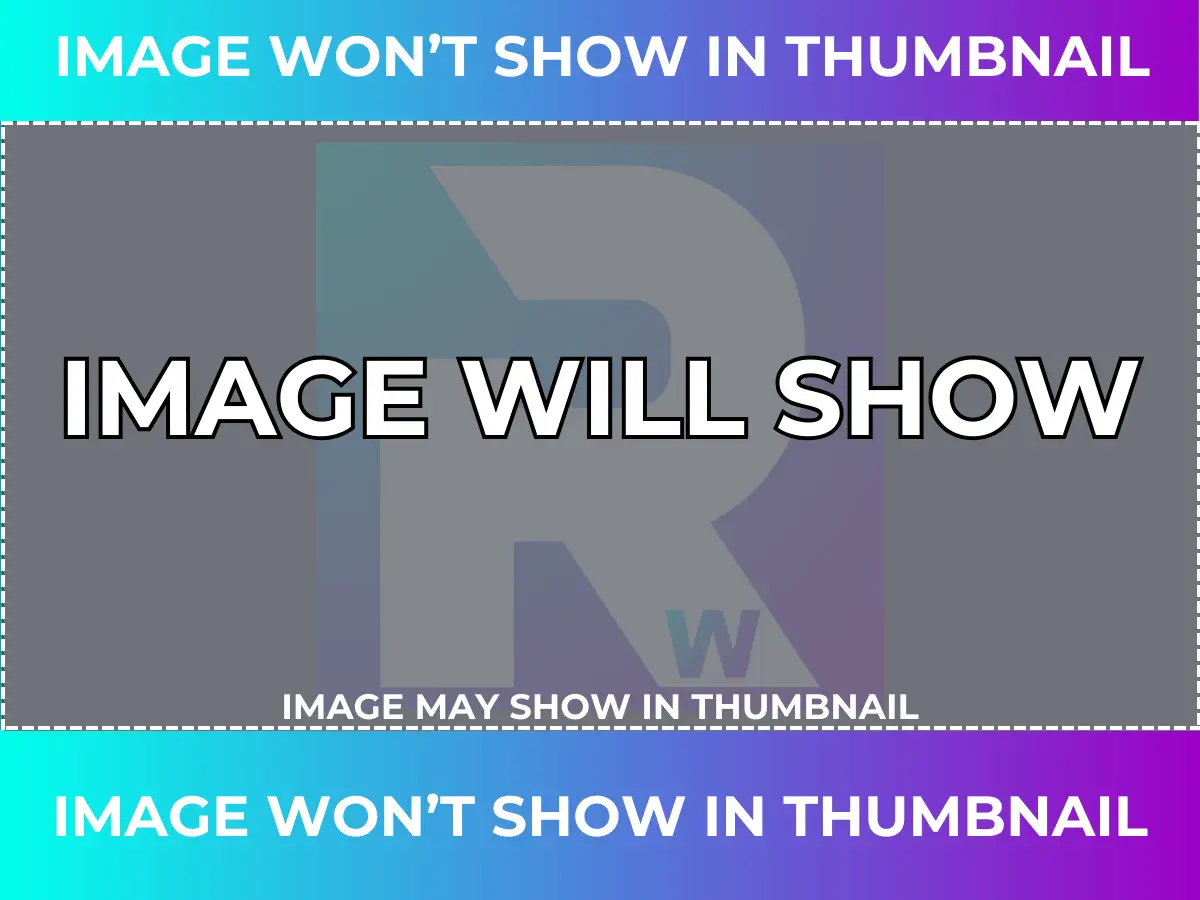
How To Use The GBP Image Template
Slide 1: Visualisation
The first slide demonstrates how thumbnail cropping affects images.
A photo can look perfectly fine in full size but become awkward once Google trims it down for previews.
This slide helps visualise that problem immediately.
Slide 2: Example
The second slide shows a completed example so businesses can see exactly what gets cropped inside the thumbnail version.
It’s a simple comparison, but it makes the issue much easier to understand.
Slide 3: Overlay
Slide three contains the overlay tool.
The proportions are already set.
Simply click anywhere on the slide, select everything, and copy it.
Then move over to slide four.
Slide 4: Add Your Own Image
This is the working frame.
Upload your own image first, then paste the overlay tool over the top.
That immediately shows which parts of the image will remain visible in the thumbnail and which areas risk being cropped.
Once you’re happy with the positioning, delete the overlay and export the final image.
Simple, but genuinely useful.
How This All Ties Together
Your Google Business Profile is one of the strongest free visibility tools available to local businesses.
And for many customers, it’s the only impression they’ll get before deciding who to contact.
That’s why imagery matters.
Good photos help businesses feel trustworthy, current, and professionally maintained before a customer reads a single sentence.
The goal isn’t perfection.
It’s authenticity.
Keep the profile updated. Use real photos. Show the business honestly.
A profile that feels active and genuine will almost always outperform one that feels neglected, even if the neglected business technically offers a better service.
That first impression carries more weight than most people think.