Google Trends for SEO is one of the quickest ways to understand how search demand is actually moving without relying too heavily on estimated keyword numbers.
It shows if interest is rising, falling, or repeating in predictable seasonal patterns. That alone makes content planning much easier. You stop guessing which topics are worth building pages around and start working from real search behaviour instead.
For people newer to SEO, Google Trends is also a useful starting point because it helps explain how people search before you get pulled into spreadsheets, keyword metrics, and endless SEO tools.
Most keyword tools tell you what gets searched.
Google Trends helps you understand when people search, how interest changes over time, and if users are slowly shifting towards different wording or newer topics.
That context matters more than most people realise.
Summary
- Google Trends shows how search demand changes over time rather than only showing estimated search volume
- It helps you spot seasonality, rising topics, fading keywords, and changes in phrasing
- You can compare search terms to see which wording people prefer
- Related queries often reveal useful blog ideas, FAQs, and content opportunities
- Trends helps explain traffic drops that are actually caused by falling demand rather than SEO problems
- Seasonal patterns make it easier to plan content calendars and update pages earlier
- Local businesses can use Trends to compare regional phrasing and seasonal demand changes
- It works best alongside traditional keyword tools rather than replacing them entirely
In this article, the focus is on using Google Trends to make better SEO decisions rather than obsessing over graphs and data points.
You can use it to sanity-check traffic drops, compare keyword variations, spot changes in search behaviour, and avoid spending months improving pages tied to topics people simply care about less.
Honestly, that happens more often than people think.
Sometimes rankings are fine.
The demand has just moved on.
Understanding Google Trends
Google Trends is built from real search activity across Google platforms including web search, YouTube, Google Shopping, images, and news.
That wider view gives you a better sense of how people behave online rather than limiting everything to standard search results.
You can filter results by:
- Location
- Timeframe
- Category
- Search type
Those filters matter because trends can look completely different depending on what you select.
For SEO planning, Web Search is usually the best starting point. If video content matters for your audience, it is worth checking YouTube Search afterwards as well.
Local filtering is especially useful.
Interest in one region might climb sharply while another area stays flat. That can help shape local landing pages, regional campaigns, or seasonal service content.
You can also look back as far as 2004, which is surprisingly useful for spotting long-term behaviour patterns that repeat every year.
One thing worth understanding early: Google Trends does not show exact search volume.
Instead, it uses a relative scale from 0 to 100.
A score of 100 represents the highest point of interest within the selected timeframe.
That confuses a lot of people at first.
The graph is showing movement and relative popularity, not total search numbers. In practice, that is usually more helpful for content planning anyway.
Another useful area sits lower down the page.
Related topics and related queries often reveal the next thing people search for after the original term. Those smaller signals can uncover useful blog ideas long before they become heavily targeted keywords.
That part gets overlooked constantly.
Why Google Trends Matters for SEO
SEO depends on understanding what people actually want.
Most keyword tools can tell you how often a phrase gets searched.
Very few help explain the shape of that demand.
Google Trends adds that missing context.
It helps you see:
- If a keyword is growing or fading
- If interest peaks seasonally
- If users are changing the wording they use
- If a topic is stable or volatile
- If demand has shifted towards newer topics
Without that context, it becomes easy to make the wrong decisions.
A keyword might still show decent search volume while quietly declining year after year.
Or you publish seasonal content after interest has already peaked and wonder why traffic never really lands.
That is usually where things go wrong.
Google Trends works best alongside traditional keyword tools rather than replacing them.
Think of it like this.
Keyword tools show the size of the opportunity.
Google Trends shows the direction things are moving.
That combination gives you a much clearer picture.
It is also useful when traffic drops unexpectedly.
Businesses often assume ranking problems, technical SEO issues, or algorithm updates are responsible.
Sometimes the reality is much simpler.
Search demand naturally declined.
Checking Trends can save a lot of wasted time chasing problems that are not really there.
A Simple Google Trends Workflow
You do not need a complicated process.
A basic 10-minute review is usually enough to spot useful patterns.
- Set your location to the UK or your target region
- Start with the Past 12 Months view for seasonal behaviour
- Then switch to Past 5 Years for long-term direction
- Check if the trend is stable, seasonal, rising, or declining
- Compare similar keyword variations
- Review Related Queries under Rising
- Decide what type of page best fits the intent
- Add findings into your content calendar
That last step matters.
A lot of people check Trends, nod at the graphs, then never actually use the information.
The practical side is the important bit.
If demand spikes every October, publish and refresh pages before October.
Not during it.
Seeing Search Behaviour More Clearly
One of the most useful things about Google Trends is how quickly it helps separate short-term spikes from steady long-term interest.
Some topics explode for a few weeks and disappear just as fast.
Others grow quietly over several years.
Those are very different opportunities.
A pet shop owner, for example, might notice increasing searches around grain free dog food or positive reinforcement training. Those trends often begin building well before they become mainstream talking points.
Catching that early can shape:
- Blog content
- Product descriptions
- Service pages
- FAQs
- Social content
The businesses that spot those changes earlier usually have an easier time building visibility around them.
Google Trends also helps you avoid wasting effort on fading topics.
A keyword may still receive traffic today but show a clear downward trend across several years.
That changes the decision completely.
Turning Trend Data Into Actual SEO Work
Once you identify a stable or growing topic, the next step is applying that insight properly.
That is where the SEO work begins.
You can:
- Update titles and headings to match the phrasing people increasingly prefer
- Refresh older content before seasonal demand returns
- Add FAQs based on rising related queries
- Build supporting blog content around a core service page
- Improve internal linking between related topics
A lot of SEO improvements are not especially complicated.
They just require better timing and clearer decisions.
Google Trends helps with both.
How This Supports On-Site SEO
When a topic shows healthy demand or steady growth, it becomes easier to strengthen the page already targeting it.
That might include:
Meta Titles
Lead with the phrasing users clearly prefer, then add a straightforward benefit.
H1s and Introductions
Match the wording naturally and confirm who the page is written for.
Headings
Add sections around rising searches like:
- Costs
- Timelines
- Comparisons
- “Best” searches
- “Near me” intent
Internal Links
Link related blog posts into the main service or category page.
That helps authority flow towards the page that actually converts.
If the trend is seasonal, refresh the page early.
Search engines need time to crawl, understand, and trust updated content before demand peaks.
Who wants to publish seasonal pages after everyone starts searching?
Using Google Trends to Plan Better Blog Content
Blog content works best when it stays useful beyond a short traffic spike.
Google Trends helps you identify topics with long-term value rather than chasing temporary attention.
That creates a healthier content library over time.
Instead of publishing random disconnected posts, you gradually build clusters of related content that support each other.
That improves:
- Internal linking
- Topical relevance
- Reader experience
- Long-term search visibility
It also makes content planning calmer.
You stop scrambling for ideas every month.
Identifying Popular Search Terms
Seeing search interest displayed over time gives you a clearer sense of how stable a term may be. Some topics spike suddenly then disappear just as fast. Others grow steadily across several years. Google Trends helps you see these differences and plan content in a way that fits your goals.
For example, a pet shop owner might notice rising interest in grain free dog food or positive training tips. These searches often gain strength long before they reach mainstream attention. Early awareness can shape product descriptions, blog content, and social posts, which gives the business a better opportunity to attract new readers.
Interest patterns help guide decisions such as:
Choosing keywords that show consistent growth
Avoiding terms with sharp drops that suggest fading relevance
Preparing content ahead of seasonal rises
Spotting new questions or problems customers face
Turn that insight into SEO work by:
- Updating page titles and headings to match the preferred phrasing you see in comparisons.
- Refreshing older posts before the seasonal lift (not during it).
- Adding a short FAQ section built from related queries.
- Creating one “hub” page (main guide/service page) and linking supporting posts into it.
These signals help you stay closer to what readers want. You avoid guessing and instead work with evidence that reflects real searches.
How This Supports On Site SEO
Once Trends shows a topic is stable or growing, use it to sharpen the page you already rely on:
- Meta title: lead with the main phrasing people prefer, then add a clear benefit.
- H1 and intro: match the same phrasing and confirm who the page is for.
- Headings: add sections that reflect rising queries (cost, timing, comparisons, “best”, “near me”).
- Internal links: link from related blog posts into the main page so authority flows to the page that converts.
If the trend is seasonal, update and republish (or at least refresh) the page early so it’s indexed and trusted before demand peaks.
Using Interest Patterns To Plan Blog Content
Blogs support a wide range of searches, from simple questions to in depth guides. Google Trends helps you find the topics that bring long term value rather than short term traffic. By focusing on steady patterns, you build a library of content that stays useful throughout the year. This improves your visibility and offers readers a clearer path through your site.
Top Tip
“Check Google Trends before writing any new blog or guide. It takes a few minutes and often stops you building content around topics that already peaked months ago.“
Comparing Search Terms Properly
The comparison feature inside Google Trends is simple but genuinely useful.
You can compare multiple phrases side by side and quickly see which wording people naturally prefer.
That sounds small.
It really is not.
A fitness website might compare:
- Home workout routines
- Gym workout plans
- At home workouts
- Strength training at home
On paper, those terms look similar.
In practice, search behaviour may lean heavily towards one variation.
That insight helps shape:
- Page titles
- H1s
- Service wording
- Blog topics
- Internal anchor text
It also reveals broader behaviour shifts.
Are people moving away from gyms?
Is interest in home equipment climbing again?
Has a certain training style become more popular?
You start seeing the wider movement rather than isolated keywords.
Using Comparison Data More Effectively
Comparison data becomes especially useful when planning:
- Blog clusters
- Service pages
- Product categories
- Seasonal campaigns
- New landing pages
Small wording choices influence visibility more than many businesses expect.
Google Trends gives you a quick way to test assumptions before committing to new content.
That saves time later.
Using Google Trends for Local SEO
Google Trends will not replace dedicated local SEO tools.
It still helps.
Regional search behaviour often differs more than expected.
You can compare areas and identify:
- Different phrasing preferences
- Seasonal demand changes
- Regional spikes in interest
- Earlier demand shifts in certain locations
For example, one region may search more often for “boiler service” while another leans towards “boiler servicing”.
That difference matters when writing page titles and headings.
Seasonal timing matters locally too.
Some areas experience demand changes earlier than others depending on weather, tourism, or regional events.
That context helps shape publishing schedules more realistically.
Spotting Seasonal Trends Earlier
Seasonality is one of the strongest reasons to use Google Trends.
Many industries follow predictable yearly cycles.
Once you recognise those patterns, planning content becomes much easier.
Gift retailers often see demand rise before:
- Mother’s Day
- Christmas
- Valentine’s Day
- Father’s Day
Travel searches usually climb in spring and summer.
Fitness searches often jump in January.
Garden-related topics rise as weather improves.
None of this is especially surprising.
The useful part is seeing exactly when interest starts building rather than relying on assumptions.
That timing matters.
Publishing content after demand peaks usually means competing too late.
Some Seasonal Patterns Are Less Obvious
Not every seasonal trend is dramatic.
Some are subtle and easy to miss.
Searches around:
- Outdoor heating
- Home office equipment
- Garden furniture
- Air conditioning
- Winter tyres
often follow weather shifts and lifestyle changes gradually.
Looking across several years helps reveal those recurring behaviours more clearly.
Once you see the pattern, content planning becomes far more predictable.
Planning Ahead Properly
When you understand seasonal timing, you can:
- Publish earlier
- Refresh existing pages sooner
- Improve internal links before peaks
- Update FAQs in advance
- Build supporting content gradually
That gives pages time to settle into search results before competition intensifies.
Honestly, this is one of the simplest SEO wins available.
Most businesses just leave it too late.
Tracking Interest Over Longer Periods
Google Trends is also useful for understanding long-term market movement.
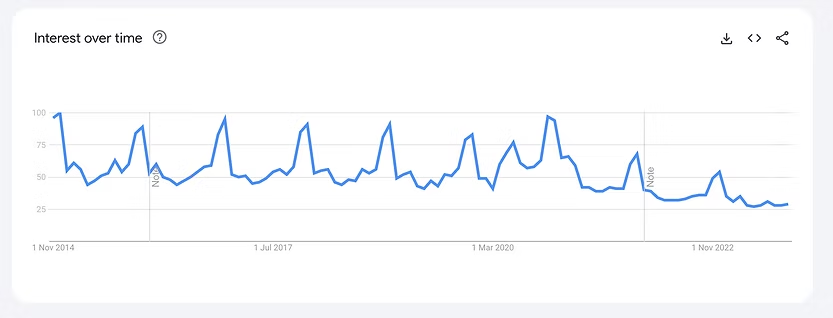
The graph helps reveal if a topic is:
- Growing steadily
- Slowly declining
- Flat over time
- Becoming more volatile
That context becomes important when traffic or sales suddenly shift.
In one project I worked on, a product category showed declining search interest year after year.
Rankings looked stable.
Site quality looked fine.
Technical SEO checks showed nothing unusual.
The issue was demand itself.
Interest in that category had gradually fallen over several years while related sub-categories were climbing.
Once that became clear, the strategy changed.
We shifted effort into the growing areas, updated category content, improved internal linking, and stopped investing time into pages tied to declining demand.
Without Trends, it would have been easy to keep chasing the wrong fix.
Top Tip
“When traffic drops, compare the keyword trend over several years before assuming an SEO problem. Sometimes the market simply changed.”
Finding Growth Areas Earlier
The opposite situation happens too.
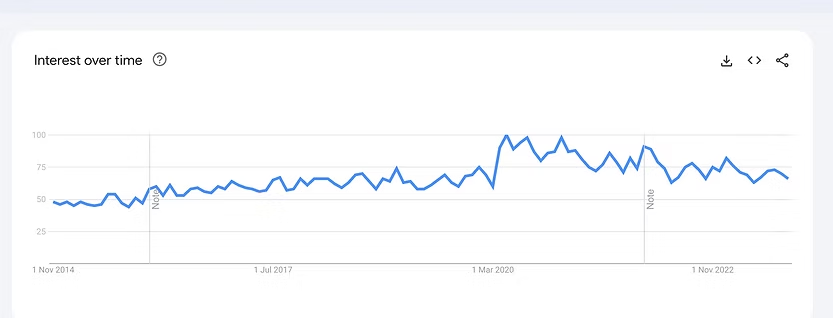
Sometimes smaller related searches begin climbing steadily while larger competitors ignore them.
That creates opportunities.
A steadily growing niche often becomes easier to build authority around compared to heavily saturated terms.
Google Trends helps you notice those shifts earlier.
Even a modest rise over several years can point towards useful long-term content opportunities.
Finding Related Queries and Content Ideas
Related queries are one of the most underrated parts of Google Trends.
They show:
- What people search next
- Which questions are growing
- Which concerns are becoming more common
- What language users naturally adopt
You can filter between:
- Top queries
- Rising queries
Rising queries are often more useful for content planning because they reveal newer behaviour patterns.
Breakout terms are especially interesting because they indicate rapid growth.
That does not always mean huge volume.
It often means growing interest before a topic becomes crowded.
Top Tip
“Use related queries to build content clusters naturally. They often reveal the exact supporting topics users expect to find next.”
A Practical Example
Imagine an outdoor equipment store notices “best hiking boots for winter” appearing as a breakout query.
That single insight could shape:
- A new buying guide
- Product comparison pages
- FAQ updates
- Internal linking
- Seasonal product descriptions
The timing matters as much as the topic itself.
Publishing that content early gives it time to settle before winter demand rises.
Why Related Queries Matter So Much
Related searches help explain customer behaviour more clearly.
You begin understanding:
- What users worry about
- Which details matter most
- Which comparisons they make
- What information feels missing
That improves content quality naturally because the page starts answering real questions rather than generic SEO assumptions.
Common Google Trends Mistakes
Google Trends is straightforward.
People still misuse it constantly.
Treating 0–100 as Search Volume
The numbers represent relative interest, not exact search volume.
Use Trends alongside keyword tools rather than replacing them entirely.
Using the Wrong Search Type
Web Search, YouTube Search, Shopping, and News can all behave differently.
For SEO, Web Search is usually the starting point.
Comparing Too Many Keywords
Keep comparisons focused.
Two to five phrases is normally enough.
Beyond that, the graphs become messy and harder to interpret.
Publishing Seasonal Content Too Late
This happens constantly.
If interest peaks every November, publishing in November is already late.
Ignoring Category Filters
Some keywords have multiple meanings.
Category filters help avoid misleading comparisons.
Frequently Asked Questions About Google Trends
How accurate is Google Trends for SEO planning?
Google Trends reflects real search activity, which makes it very useful for spotting patterns and direction.
It does not provide exact search volume numbers, but it helps explain how demand changes over time. That context is often more valuable than isolated monthly estimates.
Why does Google Trends show different numbers from keyword tools?
Most keyword tools rely on estimates and sample data.
Google Trends measures relative interest and movement instead.
The two tools work best together because they answer different questions.
How often should businesses check Google Trends?
Monthly checks are usually enough for most businesses.
Industries tied closely to trends or seasonality may benefit from weekly reviews.
Consistency matters more than constantly checking graphs.
What does a score of 100 mean in Google Trends?
A score of 100 represents the highest level of interest within the selected timeframe.
It does not mean total search volume.
It simply shows relative popularity compared to other points on the graph.
How can small businesses use Google Trends without overcomplicating things?
Keep it simple.
Check your main keywords over the last few years.
Compare a few wording variations.
Review related queries for content ideas.
That alone gives most businesses enough useful direction.
How early should seasonal content be published?
For many small business websites, refreshing or publishing content around four to eight weeks before demand rises works well.
Competitive industries often benefit from publishing even earlier.
How All This Ties Together
Google Trends gives you a clearer view of how search demand actually behaves.
That helps you:
- Plan content more realistically
- Choose stronger keyword phrasing
- Spot seasonal patterns earlier
- Understand traffic changes more accurately
- Build content around growing demand rather than fading topics
The biggest benefit is probably confidence.
You stop relying purely on assumptions and start working from real behaviour patterns instead.
That usually leads to calmer, more practical SEO decisions.
Google Trends works much better once you understand the wider foundations behind keyword research, search intent, and content planning.
If you want help turning search trends into a practical content strategy, page structure, or long-term SEO plan, get in touch.
Sometimes the hardest part is not finding the data.
It is knowing what to actually do with it.