
If you run a small business, you’ve probably heard meta tags mentioned during SEO conversations.
Usually in a slightly dramatic way.
People talk about them like they’re some technical mystery sitting behind your website. In reality, they’re much simpler than that.
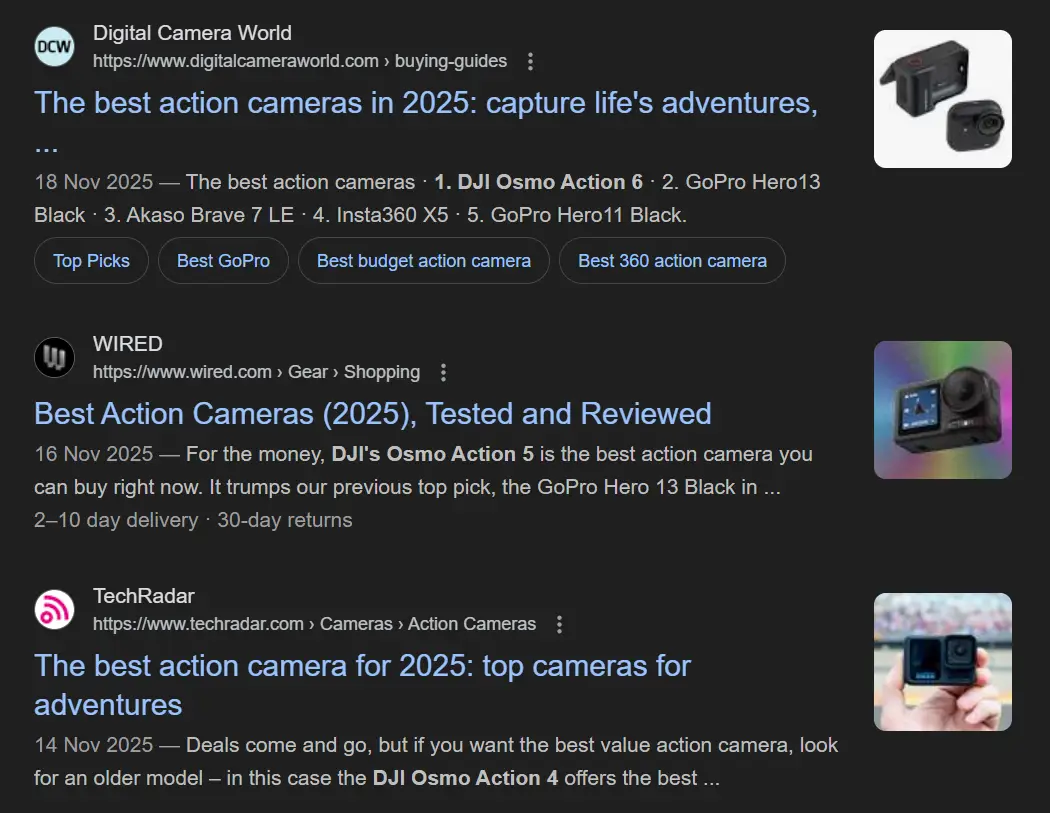
Meta titles and meta descriptions help shape how your pages appear in Google. They don’t sit visibly on the page itself, but they do influence what people see before they decide to click.
And honestly, that matters more than a lot of businesses realise.
You can rank well and still lose clicks if the wording feels vague, generic, or over-optimised.
Summary
- Meta titles and descriptions shape how your pages appear in Google search results.
- A clear, specific title often wins more clicks than a vague or overly optimised one.
- Good meta tags help users feel confident about clicking your result.
- Every page should have its own unique title and description.
- Clarity matters more than squeezing in extra keywords.
- Google sometimes rewrites descriptions, but writing your own still matters.
- High impressions with low clicks usually point to weak titles or descriptions.
- Search Console is one of the easiest ways to spot pages that need improvement.
- Avoid duplicate tags, vague wording, and keyword stuffing.
- Small improvements to your meta tags can improve visibility and click-through rates over time.
Meta Tags Are Basically Your Search Result Pitch
Meta tags sit in the background code of a page. Visitors don’t see them while reading your website, but search engines use them to understand what the page covers.

The two that matter most are the meta title and the meta description.
These are usually the first things somebody sees when your site appears in Google.
So before a visitor reads your homepage, checks your services, or contacts you, they’ve already formed an impression based on a couple of short lines in search results.
That’s why this matters.
A clear title tells people they’re in the right place. A messy one creates doubt straight away.
And the strange thing is, most businesses spend far more time tweaking page layouts than they do improving the actual search listing people click on first.
Once you start reviewing meta tags properly, they stop feeling technical. They become part of normal website housekeeping.
Top Tip
“Keep a running document with your current meta titles and descriptions. If performance changes later, you’ll have something to compare against instead of guessing what changed.”
Most Meta Titles Fail Because They Try Too Hard
Your meta title is the main clickable line in Google.
Its job is fairly simple. Explain the page clearly and give people a reason to click.
That’s it.
But this is usually where things become messy.
A lot of businesses either write titles that are too vague or they cram in every keyword they can think of.
Neither works particularly well.
The strongest titles are normally the clearest ones.
For example:
“Fresh Cakes and Pastries | London Bakery”
There’s nothing complicated about that title. It explains the service, the product, and the location naturally.
That’s often enough.
You don’t need to sound overly clever or aggressively optimised.
Google still needs context, of course. Including relevant keywords matters. But people are the ones making the final decision.
If the title feels awkward, repetitive, or robotic, they’ll skip it.
There’s also a lot of discussion around title length.
Many SEO guides still repeat the idea that titles must stay under a strict character count. In practice, it’s more flexible than that.
Even so, Joy from Sterling Sky mentioned cases where much longer titles, even close to 200 characters, improved click-through rate. So while shorter titles often display more neatly, longer ones can still work perfectly well if the wording stays clear.
The real issue is readability.
Key Takeaways
- Keep the important message near the beginning.
- Use keywords naturally.
- Make every title unique.
- Focus on clarity before optimisation tricks.
- Write titles for people first, not SEO tools.
Meta Descriptions Still Matter, Even If Google Rewrites Them
Meta descriptions sit underneath the title in search results.
They don’t directly affect rankings, but they absolutely affect clicks.
And that part gets underestimated constantly.
If somebody compares five similar search results, the description often becomes the deciding factor.
People want reassurance.
They want to know the page actually matches what they searched for.
A good description helps remove uncertainty.
For example, if your bakery offers same-day delivery in London, mention it naturally.
Something like:
“Fresh hand-baked cakes delivered across London. Birthday cakes, pastries, and same-day delivery available.”
Simple works.
There’s no need to sound like an advert.
You can include a light call to action too if it fits naturally. Phrases like “Learn more” or “Order today” still work because they help guide the next step without sounding overly sales-focused.
Google does rewrite descriptions fairly often.
That frustrates people, understandably.
Still, it’s worth writing them yourself because when Google keeps your wording, you keep more control over the message.
Key Takeaways
- Keep descriptions natural and easy to read.
- Focus on usefulness, not keyword density.
- Mention real benefits where relevant.
- Give people a clear idea of what the page contains.
- Don’t force calls to action where they don’t fit.
Top Tip
“If a page gets plenty of impressions but very few clicks in Search Console, improve the title first. That’s usually where the biggest gains happen.”
A Good Ranking Means Very Little If Nobody Clicks
This is the part people forget.
Ranking position matters, obviously.
But if your search listing doesn’t convince people to click, the ranking itself only gets you so far.
Search behaviour is quick.
People scan results rapidly looking for something that feels relevant, trustworthy, and straightforward.
A clear title usually wins that attention faster than an over-optimised one.
And over time, stronger click-through rates can help reinforce relevance signals to Google as well.
If users consistently choose your page over similar results, it tells search engines your listing is matching intent properly.
That’s one reason well-written meta tags still matter so much.
It’s also worth clearing up one old SEO myth while we’re here.
Some systems still include a field for meta keywords.
Google stopped using those years ago.
For most small businesses, they can safely be ignored.
Small Meta Tag Changes Can Have a Bigger Impact Than Expected
One of the better things about meta tags is that they’re relatively easy to improve.
You’re not rebuilding your whole website.
You’re improving the way your pages are presented before somebody visits.
That’s a much smaller task, but it can still improve visibility surprisingly quickly.
Particularly on pages already getting impressions.
This is also where SEO starts feeling more practical for business owners.
Sometimes the improvement isn’t technical at all.
Sometimes it’s simply replacing vague wording with something clearer.
And honestly, most businesses still write meta tags like they’re trying to impress Google rather than communicate with actual people.
That’s usually where the quality drops.
Top Tip
“Check older versions of important pages using the Wayback Machine. Sometimes previous meta titles were clearer before later SEO edits made them overly complicated.”
Reviewing Your Meta Tags Properly
Most websites make editing meta titles and descriptions fairly straightforward.
WordPress plugins handle it easily. Other website builders usually offer similar tools.
The bigger problem is consistency.
A lot of websites have duplicate titles, missing descriptions, or pages that haven’t been reviewed in years.
That’s why site-wide SEO tools help.
Once you can see all your titles and descriptions together, weak spots become obvious very quickly.
SERP preview tools help too. They give you a rough idea of how your listing may appear in Google before changes go live.
And your tags should evolve over time.
If services change, locations expand, or customer priorities shift, your search listings should reflect that.
The Same Meta Tag Mistakes Keep Appearing
There are a few issues that come up constantly.
Duplicate titles are one.
If several pages share the same wording, search engines struggle to work out which page is most relevant.
Keyword stuffing is another.
People can spot awkward SEO writing instantly now. Titles overloaded with repeated phrases rarely feel trustworthy.
Missing tags cause problems too because Google ends up generating its own version from page content.
Sometimes that works well.
Sometimes it really doesn’t.
Vague wording is another common issue.
A title like:
“Home | Company Name”
doesn’t tell people anything useful.
The strongest meta tags usually sound simple, direct, and human.
That balance matters more than perfect optimisation formulas.
Frequently Asked Questions About Meta Titles and Descriptions
Before wrapping up, it’s worth answering a few questions that come up regularly.
What are meta tags?
Meta tags help search engines and users understand what a page is about. The most important ones are the meta title and meta description shown in Google search results.
Do meta descriptions improve rankings?
Not directly. But they can improve click-through rate, which still influences visibility and traffic.
Should every page have unique meta tags?
Yes. Unique titles and descriptions help search engines understand each page properly.
Why does Google rewrite meta descriptions?
Google sometimes replaces descriptions if another part of the page matches the search query better.
How often should meta tags be reviewed?
Regularly. Especially after updating services, locations, or key pages.
How This All Ties Together
Meta titles and descriptions shape the first impression people get of your business in search.
That first impression matters.
A clear, specific search listing usually earns more clicks than something overloaded with SEO language.
And the good thing is, improving meta tags doesn’t normally require huge amounts of work.
A few thoughtful updates across your main pages can improve visibility, increase click-through rates, and make your website feel more trustworthy before somebody even visits.
Keep the wording simple.
Match the search intent properly.
Write like a real person.
That tends to work better than most SEO tricks anyway.